
Nikon PC-E Micro NIKKOR 85mm f-2.8D: Important! 4. Mounting lens
Important! 4. Mounting lens: Nikon PC-E Micro NIKKOR 85mm f-2.8D
Table of contents
- Notes on Safety Operations
- 1. Nomenclature
- 2. Major features
- 3. Usable cameras and available functions
- Aperture stop-down button (one-touch preset aperture operation)
- Important! 4. Mounting lens
- 5. Using bayonet hood HB-22 6. Determining exposure
- When using other Nikon cameras Determining exposure (with an external exposure meter)
- 7. The shift/tilt function Important The shift function The tilt function
- Revolving
- 8. Focusing
- 9. Depth of field 10. Focusing at a predetermined reproduction ratio 11. Notes on close-up photography and duplication work
- 12. Taking flash pictures using cameras with a built-in flash
- 13. Recommended focusing screens
- 14. Lens care 15. Standard accessories 16. Optional accessories
- 17. Specifications
- Weight: Approx. 635 g (22.4 oz)
Important!
• This lens is a manual focus lens, and autofocus is not possible
even when the camera's focus mode is set to AF mode.
• Rotating the focus ring enables the effective aperture to be
displayed in the LCD panel and viewfinder of the camera body.
En
•
Use of tilt/shift function can cause some vignetting or slight color
change. (Vignetting is the darkening of the corners around the image.)
• When mounted on Nikon digital SLR (Nikon DX format) cameras,
such as the D2-Series and D300, the lens’ picture angle becomes
18°50’ and its 35 mm equivalent focal length is approx.
127.5 mm.
• Be careful not to soil or damage the CPU contacts.
• If the lens mount rubber gasket is damaged, be sure to visit your
nearest Nikon authorized dealer or service center for repair.
• In low temperatures, new or fully charged batteries should be
used in the camera.
4. Mounting lens
a
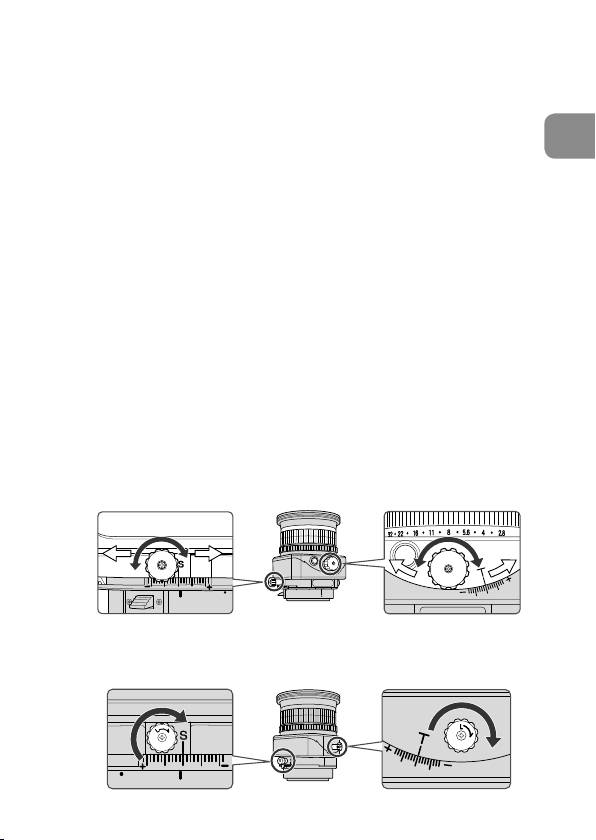
Set the shift amount and tilt amount to 0 by rotating the shift
and tilt knobs. (Fig. 2)
Note: Avoid attaching/detaching the lens to/from the camera
while using tilt, shift and/or revolving, and without locking
each knob. Failure to do so can lead to you pinching your
fingers between the lens and the camera body.
Fig. 2
b
Set the tilt and shift knobs. (Fig. 3)
Note: Turning either knob too tightly may damage the knob.
Fig. 3
23
