
Nikon MB-D12: Battery Level Battery Info
Battery Level Battery Info: Nikon MB-D12
Table of contents
- MB-D12 Multi-Power Battery Pack
- Safety Precautions Precautions for Use
- Notice for Customers in Canada
- The MB-D12 and Supplied Accessories Using the Optional BL-5 Battery-Chamber Cover Power Connector
- The MB-D12 Control Lock
- Removing the Battery Pack
- Inserting Batteries
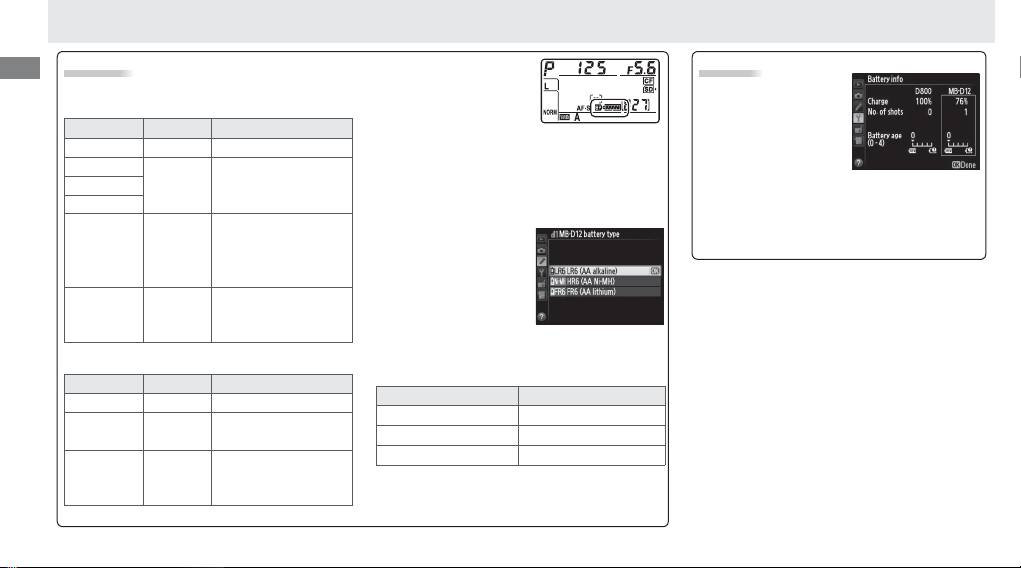
- Battery Level Battery Info
- Removing Batteries
- Specifi cations
En
Battery Level
An option in Group d of
Battery Info
the camera Custom Set-
The camera displays battery level as follows:
Battery information
tings menu can be used
EN-EL15/EN-EL18
(including calibration
to change the order in
information for EN-EL18
Control panel Viewfi nder Description
which the batteries are used.
When the camera
batteries) can be viewed
L
— Battery fully charged.
is drawing power from the MB-D12, a
s
icon
from the camera setup
K
is displayed in the control panel.
If the
s
icon
Battery partially
menu (the camera bat-
J
—
blinks, the battery-chamber cover is not locked.
discharged.
tery is listed on the left, the MB-D12 on the
Close and latch the battery-chamber cover.
I
right). Only the battery level icon is shown
Low battery.
Ready
To ensure that the
when AA batteries are used. See the camera
fully-charged spare
camera shows the cor-
H d
manual for details.
battery or charge
rect battery level when
battery.
AA batteries are used,
Battery exhausted.
choose the appropriate
H
d
Charge or exchange
option for
MB-D12 bat-
(blinks)
(blinks)
battery.
tery type
in the camera Custom Settings menu
(Group d).
If the correct option is not selected,
AA Batteries
the camera may fail to function as expected.
Control panel Viewfi nder Description
Option Battery type
L
—
Charge remaining.
1
LR6 (AA alkaline) AA alkaline (LR6)
Low batteries.
Ready
I d
2
HR6 (AA Ni-MH) AA Ni-MH (HR6)
spare batteries.
3
FR6 (AA lithium) AA Lithium (FR6)
Batteries exhausted.
H
d
Shutter release
Remove the batteries when the MB-D12 is not
(blinks)
(blinks)
disabled.
in use.
Note: The illustrations on this page are from the
D800.
8
