
Nikon AF-S VR II 200mm f-2G ED: ■ Focus operation selection switch and focus operation button (See page 20 for compatible cameras.)
■ Focus operation selection switch and focus operation button (See page 20 for compatible cameras.): Nikon AF-S VR II 200mm f-2G ED
Table of contents
- Notes on Safety Operations
- Observe the following precautions when handling the camera and lens
- ■ Nomenclature
- En
- ■ Major features ■ Usable cameras and available functions
- ■ Focusing
- ■ Focus operation selection switch and focus operation button (See page 20 for compatible cameras.)
- ■ Vibration reduction mode (VR
- Setting the vibration reduction ON/OFF ring switch Setting the vibration reduction mode switch Notes on using vibration reduction
- ■ Depth of field ■ Setting the aperture ■ Using a built-in rotating tripod collar
- ■ The built-in flash and vignetting ■ Using the lens hood
- ■ Recommended focusing screens
- ■ Lens care ■ Standard accessories ■ Optional accessories
- ■ Specifications
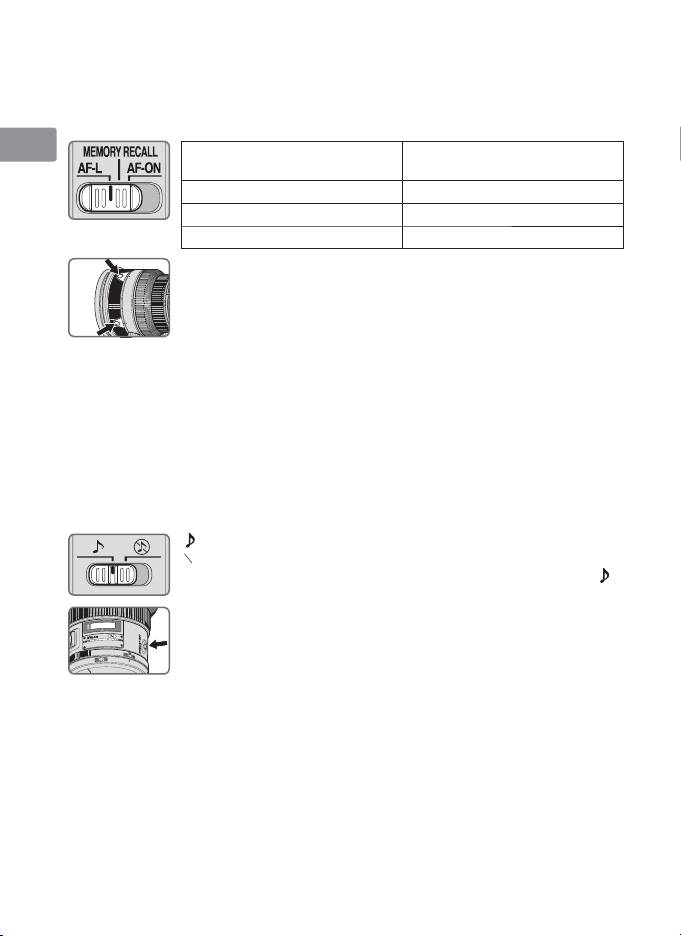
■ Focus operation selection switch and focus operation
button (See page 20 for compatible cameras.)
Jp
Use the focus operation selection switch to choose a function of the focus
operation buttons.
En
Position of focus operation
Focus operation button
selection switch
function
De
AF-L Focus lock
MEMORY RECALL Memory recall
Fr
AF-ON AF start (AF-ON) on the lens
• Press one of four focus operation buttons to activate each
Es
function.
Se
Ru
Focus lock (AF-L)
This function is only compatible with autofocus.
1
Set the focus mode switch to A/M or M/A.
Nl
2
Set the focus operation selection switch to AF-L.
3
During autofocus mode, focus can be locked by pressing one of the focus
It
operation buttons.
• Focus remains locked while a focus operation button is pressed and held down.
Ck
• The AF-L function can be engaged either from the camera or from the lens.
Memory recall (MEMORY RECALL)
Ch
: The lens beeps when memory recall is operated.
○
♪
: Memory recall operates without the beep sound.
Kr
The following operation is with the sound monitor switch set to .
1
Focus on a subject and press the memory set button to save
the focus distance.
•
The lens will beep when the focused distance is correctly
saved.
• When the focus distance is not correctly saved, the distance
scale ring will revolve back and forth some 10 times, while
the lens will emit one short and three long beeps. In this
case, repeat procedure to save focus distance.
• Memory set is possible regardless of the setting of the focus mode or focus
operation selection switch.
• The focus distance is saved even when the camera is turned off or the lens is
detached from the camera.
2
Set the focus operation selection switch to MEMORY RECALL.
22
