
Nikon 18-300mm-f-35-56G-ED-VR-AF-S-DX-Nikkor: Using the Vibration Reduction ON/OFF Switch Using the Vibration Reduction Mode Switch
Using the Vibration Reduction ON/OFF Switch Using the Vibration Reduction Mode Switch: Nikon 18-300mm-f-35-56G-ED-VR-AF-S-DX-Nikkor
Table of contents
- For Your Safety
- ■ Parts of the Lens
- ■ Zoom and Depth of Field ■ Aperture
- ■ Focus ■ Vibration Reduction (VRII)
- Using the Vibration Reduction ON/OFF Switch Using the Vibration Reduction Mode Switch
- Using Vibration Reduction: Notes
- ■ The Lens Hood ■ Built-in Flash Units
- ■ Lens Care ■ Supplied Accessories ■ Compatible Accessories
- ■ Specifications
- ■ A Note on Wide- and Super Wide-Angle Lenses
Jp
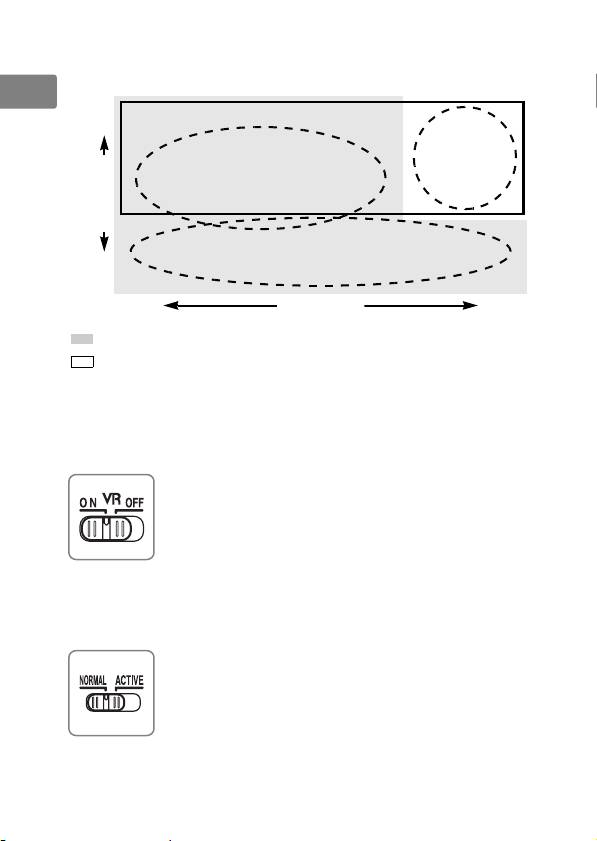
Choose from NORMAL and ACTIVE vibration reduction according to
the frequency and amplitude of the vibration.
En
High Frequency Low
Strong
De
camera shake
(e.g., moving
Fr
Camera shake
vehicle)
Es
Shooting while panning
Sv
Ru
Low Amplitude High
Nl
: Suited to NORMAL vibration reduction.
: Suited to ACTIVE vibration reduction.
Pt
• Camera shake: Choose NORMAL or ACTIVE.
• Shooting while panning: Choose NORMAL.
Pb
• Strong camera shake: Choose ACTIVE.
It
Using the Vibration Reduction ON/OFF Switch
Select ON to enable vibration reduction.
Vibration reduction
Cz
is activated when the shutter-release button is pressed
halfway, reducing the effects of camera shake for
Sk
improved framing and focus.
Select OFF to turn vibration reduction off.
Ro
Using the Vibration Reduction Mode Switch
Ua
The vibration reduction mode switch is used to select the vibration
reduction mode when vibration reduction is on.
Ck
Select NORMAL to reduce vibration caused by camera
shake or when panning the camera.
Ch
Select ACTIVE to reduce vibration caused by camera
shake or when shooting from a moving car, boat, or
Kr
other unstable platform.
Panning motions are not
detected.
Id
18
