
Canon i-SENSYS MF8380Cdw: English Checking SSID or Network Key for a Wireless LAN Router/Access Point Véri fi cation du SSID ou de la clé réseau d'un routeur/point d'accès de réseau sans fi l Controllo del SSID o della chiave di rete di un router LAN wireless o Access Point Überprüfen der SSID oder des Netzwerkschlüssels für einen Router/Access Point für Wireless LAN
English Checking SSID or Network Key for a Wireless LAN Router/Access Point Véri fi cation du SSID ou de la clé réseau d'un routeur/point d'accès de réseau sans fi l Controllo del SSID o della chiave di rete di un router LAN wireless o Access Point Überprüfen der SSID oder des Netzwerkschlüssels für einen Router/Access Point für Wireless LAN: Canon i-SENSYS MF8380Cdw
Table of contents
- Wireless LAN Setting Guide
- English Contents Table des matières Sommario Inhalt
- English Checking Before the Setup Véri fi cation avant la con fi guration Controllo prima della con fi gurazione Überprüfen vor der Einrichtung
- English Switching the Connection Method to Wireless LAN Changement de méthode de connexion pour choisir Réseau sans fi l Cambiare il metodo di connessione in LAN wireless Umschalten der Verbindungsmethode zu Wireless LAN
- ENG ENG ENG Selecting a Method for Setting the Wireless LAN Sélectionnez une méthode de con fi guration du réseau sans fi l Selezione di un metodo di impostazione della LAN wireless Auswählen einer Methode zur Einstellung des Wireless LANs
- English Setting the Machine Using the WPS (Push Button Mode) Con fi guration de la machine avec les fonctions WPS (système à bouton poussoir) Con fi gurazione della macchina utilizzando WPS (pressione del pulsante) Einrichten des Geräts mit WPS (Tastenwahlmodus)
- English
- English English Setting the Access Point Manually and Connecting Con fi guration manuelle et connexion du point d'accès Impostazione manuale dell'Access Point e connessione Manuelles Einstellen des Access Points und Herstellen einer Verbindung
- English
- English
- English
- English
- English
- English
- English Checking the Wireless LAN Setting is Completed La véri fi cation des réglages de réseau sans fi l est terminée Veri fi care la completezza della con fi gurazione della LAN wireless Überprüfen, ob die Einstellung des Wireless LANs abgeschlossen ist
- English
- English Checking SSID or Network Key for a Wireless LAN Router/Access Point Véri fi cation du SSID ou de la clé réseau d'un routeur/point d'accès de réseau sans fi l Controllo del SSID o della chiave di rete di un router LAN wireless o Access Point Überprüfen der SSID oder des Netzwerkschlüssels für einen Router/Access Point für Wireless LAN
- English
English Français
Italiano Deutsch
17
English
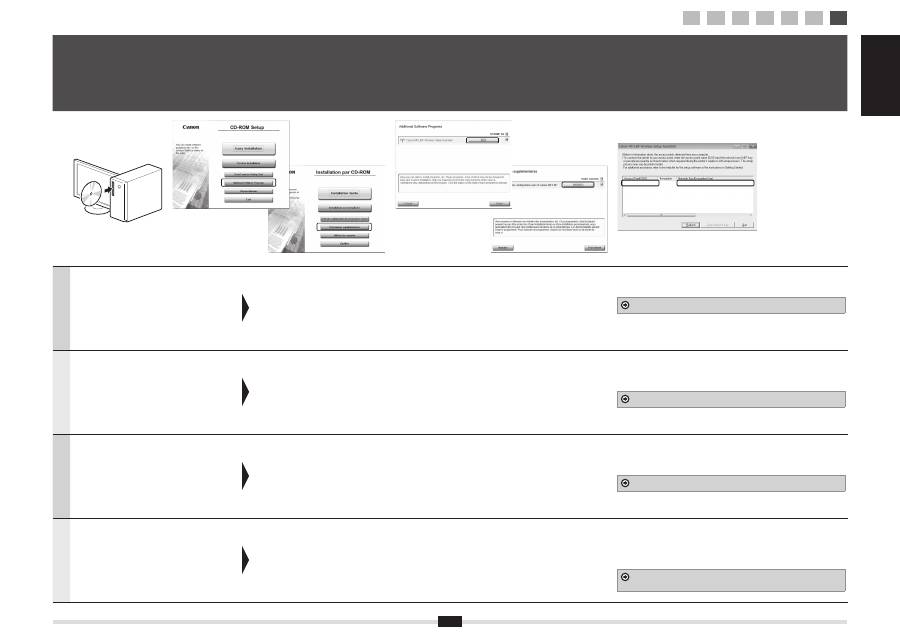
You can check the SSID or the network
key using "Canon MF/LBP Wireless Setup
Assistant."
* "Canon MF/LBP Wireless Setup Assistant" is included
in the supplied User Software CD-ROM in the machine.
Insert the User Software CD-
ROM into the slot on your
computer.
Click [Additional Software
Programs].
Click the [Start] button next to "Canon MF/
LBP Wireless Setup Assistant."
Read the License Agreement and click [Yes]
to agree.
The Wireless LAN or access point's information will be displayed.
Write down the information (indicated in frames) on P.12.
Afterwards, return to P.8 and continue the setup procedure.
Français
Vous pouvez véri
fi
er le SSID ou la clé réseau
avec l'outil "Assistant de con
fi
guration sans
fi
l
Canon MF/LBP".
* L'outil "Assistant de con
fi
guration sans
fi
l Canon MF/
LBP" est disponible sur le CD-ROM "User Software
CD-ROM" fourni avec la machine.
Insérez le CD-ROM "User
Software CD-ROM" dans le
lecteur de votre ordinateur.
Cliquez sur [Programmes
supplémentaires].
Cliquez sur le bouton [Démarrer] en regard
de l'option "Assistant de con
fi
guration sans
fi
l Canon MF/LBP".
Lisez attentivement le contrat de licence et
cliquez sur [Yes] pour l'accepter.
Les informations du routeur ou point d'accès de réseau sans
fi
l
s'af
fi
chent.
Prenez note des informations (indiquées par des encadrés) de la P.12.
Ensuite, revenez à la P.8 et continuez la procédure de con
fi
guration.
Italiano
È possibile controllare il SSID o la chiave
di rete utilizzando lo strumento "Assistente
con
fi
gurazione wireless Canon MF/LBP".
* "Assistente con
fi
gurazione wireless Canon MF/LBP" si
trova sullo User Software CD-ROM fornito a corredo
con la macchina.
Inserire lo User Software
CD-ROM nel lettore del
computer.
Fare clic su [Programmi
software aggiuntivi].
Fare clic sul pulsante [Avvia] accanto ad
"Assistente con
fi
gurazione wireless Canon
MF/LBP".
Leggere il Contratto di licenza e scegliere
[Yes] per accettare i termini.
Vengono visualizzare le informazioni relative alla LAN wireless o
all'Access Point.
Annotare le informazioni (indicate nei riquadri) in Pag.12.
Tornare quindi a Pag.8 e continuare la procedura di con
fi
gurazione.
Deutsch
Sie können die SSID oder den
Netzwerkschlüssel mit dem "Canon MF/
LBP-Assistenten für drahtlose Einstellungen"
überprüfen.
* Der "Canon MF/LBP-Assistent für drahtlose
Einstellungen" ist auf der mit dem Gerät gelieferten
User Software CD-ROM enthalten.
Legen Sie die User Software
CD-ROM in das Laufwerk
Ihres Computers ein.
Klicken Sie auf [Zusätzliche
Softwareprogramme].
Klicken Sie neben "Canon MF/LBP-
Assistent für drahtlose Einstellungen" auf
die Schalt
fl
äche [Starten].
Lesen Sie die Lizenzvereinbarung, und
klicken Sie auf [Yes], um zuzustimmen.
Die Informationen zum Wireless LAN oder zum Access Point für
Wireless LAN werden angezeigt.
Notieren Sie sich die (in Rahmen angegebenen) Informationen unter
S.12.
Kehren Sie anschließend zu S.8 zurück, und fahren Sie mit der
Einrichtung fort.
A-2
Checking SSID or Network Key for a Wireless LAN Router/Access Point Véri fi cation du SSID ou de la clé réseau d'un routeur/point d'accès de réseau sans fi l Controllo del SSID o della chiave di rete di un router LAN wireless o Access Point Überprüfen der SSID oder des Netzwerkschlüssels für einen Router/Access Point für Wireless LAN
SampleEFGHIJ
WPA-PSK
543210EDCBA
1
2
3
4-A 4-B A-1 A-2
