
Canon i-SENSYS MF4870dn: Clearing Paper Jams
Clearing Paper Jams: Canon i-SENSYS MF4870dn
Table of contents
- MF4890dw/MF4870dn MF4780w/MF4750/MF4730 MF4890dw/MF4780w
- Contents
- About the Supplied Manuals Navigating the Menu and Text Input Method
- Connecting the Power Cord and Turning ON the Power Specifying the Initial Settings
- Choosing the Method to Connect the Machine to the Computer Connecting via a Wired LAN Connecting via a USB Cable
- Setting a Paper Size and Type Specifying Initial Fax Settings and
- Perform Useful Tasks
- Clearing Paper Jams
- Replacing Toner Cartridge
- Symbols Used in This Manual Keys and Buttons Used in This Manual Illustrations and Displays Used in This Manual Important Safety Instructions
- Legal Notices
15
En
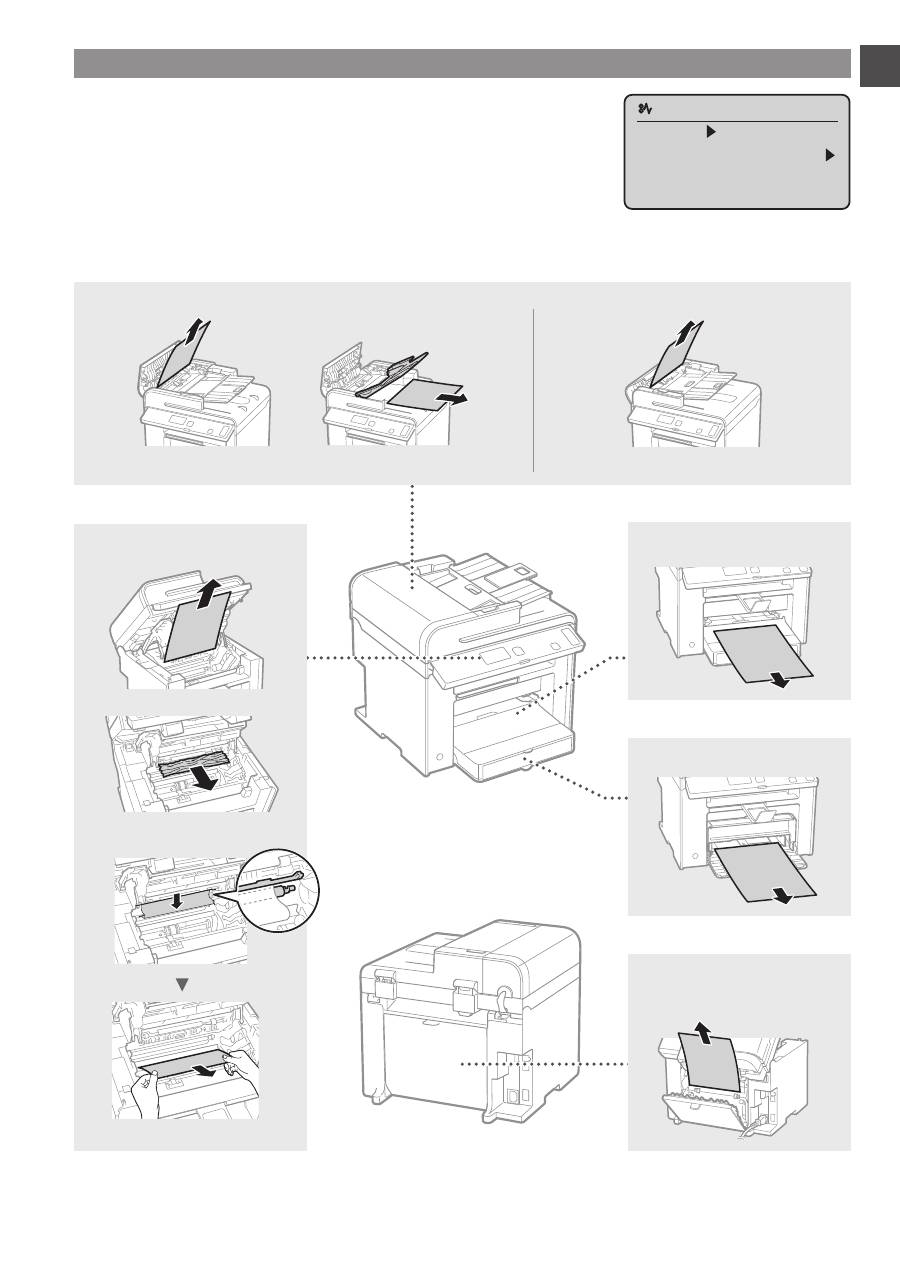
Clearing Paper Jams
If the following screen appears, a paper jam has occurred in the feeder or inside
the machine. Follow the procedure displayed on the screen to remove the jammed
document or paper. This manual indicates only areas where paper jams occur. For
details on each function, see the e-Manual.
Paper jam.
Press [ ] to
display steps.
Inside the machine
Multi-purpose tray
Paper Cassette
Back cover
(MF4890dw/MF4870dn only)
●
MF4890dw
●
MF4870dn/MF4780w/MF4750/MF4730
Feeder
Top 10 manuals
100.00
NZXT HALE90 1000W99.99
Samsung SM-R38099.97
AEG BSB 18C99.97
Dell 2700W99.97
Smeg KSEC70X99.96
Beurer HDE 4099.96
Pyramida KH 50 v.299.96
MSI CSM-H81M-P3299.96
AEG HR 562799.95
Melissa 640-048