
Cambridge Audio 80 Series: 85/86/89 DVD player
85/86/89 DVD player: Cambridge Audio 80 Series

85/86/89 DVD player
Connection to a 2 Channel Audio System/TV
VViiddeeoo
CCaabbllee
AAuuddiioo
CCaabbllee
VViiddeeoo
IInn
AAuuddiioo
IInn
Rear
Panel
FFrroonntt
LLeefftt
SSppeeaakkeerr
FFrroonntt
RRiigghhtt
SSppeeaakkeerr
80 Series DVD player 11
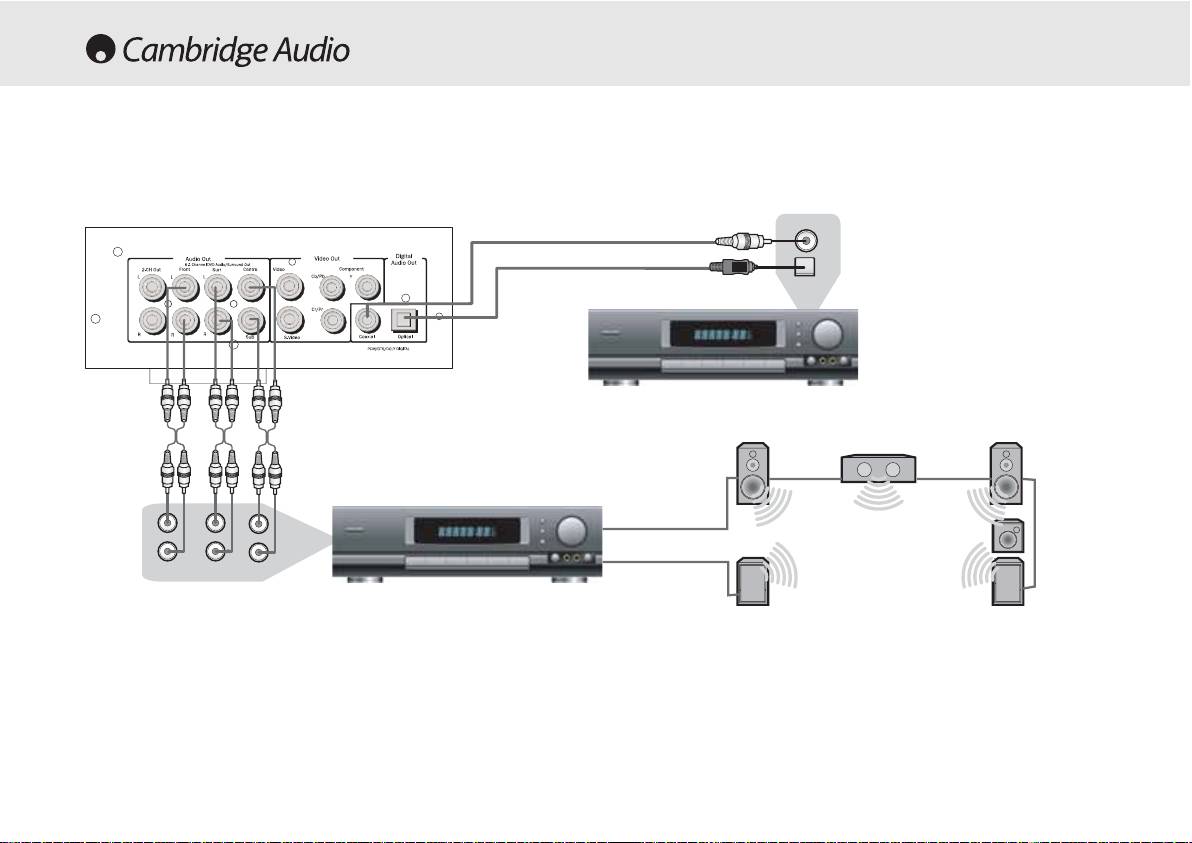
Connecting to a 5.1 Input Audio System
Connecting to an amplifier with Dolby Digital or DTS
Digital input connections
Coaxial in
Optical In
Rear
Panel
Front Left Speaker
Centre Speaker
Front Right Speaker
Amplifier with 5.1 Audio Input
L
Sub
Subwoofer
R
Front
Surr
Centre
Surround
Surround
Left Speaker
Right Speaker
The built-in Dolby Digital decoder inside your 80 Series DVD player
makes it possible to play discs recorded with Dolby Digital. This is
achieved simply by connecting your player to an amplifier and an
appropriate home theatre loudspeaker package
Manufactured under license from Dolby laboratories. “Dolby and the double-D
symbol are trademarks of Dolby Laboratories. Confidential unpublished works.
“5.1” means 5 main channels of output (front left, front right, centre,
1992-1997 Dolby Laboratories. All rights reserved.
surround left, surround right) plus subwoofer (the “.1”).
12 80 Series DVD Player

85/86/89 DVD player
FRONT PANEL CONTROLS
Power
On/Off
Stop
Switches the unit from Off to On.
Stops the Disc playing. If Play is pressed shortly afterwards, the DVD will
resume play in the place where it was stopped. Pressing stop twice will
take you to the start of the disc. A Compact disc will stop and a message
Open/Close
will appear on screen. Press PLAY to continue.
Allows you to open and close the disc tray to load a disc. The disc will
begin loading when the tray is closed. Pressing Play will also close the
Skip/Scan
tray and start the Disc.
Allows for skipping between the chapters on the DVD disc or tracks on a
CD.
Play/Pause
Note:
To perform the scan function from the player it requires the button
Plays the disc and pauses play.
to be held down for a few seconds and then released. Repeating this
process will increase the speed of the scanning function.
80 Series DVD player 13

OPERATING INSTRUCTIONS - DVD MENU DISPLAY
All of these menus are accessed from the blue Cambridge Logo screen
SACD:
Allows you to switch between 2 channel, multi channel and CD
that appears when the DVD player is on with no disc in the tray. Pressing
Mode output.
the SETUP button on the remote brings up the DVD menu display. It is
PSCAN:
Allows you to switch between interlace and progressive scan
accessed by the cursors and select button in the centre of the remote.
outputs via the component video connections.
DVD89
Only
When you press the setup button two options will be displayed, common
Spectrum:
Turns On/Off the on-screen 13 bar EQ display.
and professional.
Analogue
Output
Mode:
Switches between interlaced or progressive
Press the common setup, to setup basic functions, or the professional
video scanning.
setup for more advanced settings.
Speaker
Set
Up
Downmix:
Switches off the surround soundtrack (5.1 analogue output
section) and outputs a stereo signal from the 2 channel Left and Right
Outputs.
Front,
Centre
and
Rear
Speaker
Settings:
adjusts the DVD decoder to
compensate between large and small speakers and the size of the
General
Setup
signal it sends to the subwoofer.
Subwoofer
Off/On:
TV
Display:
Informs the player if a subwoofer is present. If it is
Allows you to alter between 16.9 widescreen and 4.3
present the low frequencies are split off and sent to the subwoofer, if not
conventional image.
the complete audio spectrum will be heard through the front channel.
SCART:
Switches the SCART output between RGB and Composite Video.
Channel
Delay:
Allows the distance between the listening position and
You will need a suitably equipped television to handle a component
the centre, subwoofer, rear left and rear right speakers to be individually
signal.
set (in cm). This is to enable the surround sound to be optimised for
Screensaver:
If the DVD is left on and inactive, it will switch to a
different listening room sizes and shapes.
screensaver to minimise energy consumption and screen burn. It can be
switched off here.
14 80 Series DVD player
Table of contents
- 85/86/89 DVD player
- 85/86/89 DVD player
- 85/86/89 DVD player
- 85/86/89 DVD player
- 85/86/89 DVD player
- 85/86/89 DVD player
- 85/86/89 DVD player 70 Series
- 85/86/89 DVD player
- 85/86/89 DVD player
- 85/86/89 DVD player
- 85/86/89 DVD player
- 85/86/89 DVD player
- 85/86/89 DVD-Spieler
- 85/86/89 DVD-Spieler
- 85/86/89 DVD-Spieler
- 85/86/89 DVD-Spieler
- 85/86/89 DVD-Spieler
- 85/86/89 DVD-Spieler
- 85/86/89 DVD-Spieler
- 85/86/89 DVD-Spieler
- 85/86/89 DVD-Spieler
- 85/86/89 DVD-Spieler
- 85/86/89 Lecteur de DVD
- 85/86/89 Lecteur de DVD
- 85/86/89 Lecteur de DVD
- 85/86/89 Lecteur de DVD
- 85/86/89 Lecteur de DVD
- 85/86/89 Lecteur de DVD
- 85/86/89 Lecteur de DVD
- 85/86/89 Lecteur de DVD
- 85/86/89 Lecteur de DVD
- 85/86/89 Lecteur de DVD
- 85/86/89 Reproductor DVD
- 85/86/89 Reproductor DVD
- 85/86/89 Reproductor DVD
- 85/86/89 Reproductor DVD
- 85/86/89 Reproductor DVD
- 85/86/89 Reproductor DVD
- 85/86/89 Reproductor DVD
- 85/86/89 Reproductor DVD
- 85/86/89 Reproductor DVD
- 85/86/89 Reproductor DVD
- 85/86/89 Lettore DVD
- 85/86/89 Lettore DVD
- 85/86/89 Lettore DVD
- 85/86/89 Lettore DVD
- 85/86/89 Lettore DVD
- 85/86/89 Lettore DVD
- 85/86/89 Lettore DVD
- 85/86/89 Lettore DVD
- 85/86/89 Lettore DVD
- 85/86/89 Lettore DVD
- 85/86/89 dvd-speler
- 85/86/89 dvd-speler
- 85/86/89 dvd-speler
- 85/86/89 dvd-speler
- 85/86/89 dvd-speler
- 85/86/89 dvd-speler
- 85/86/89 dvd-speler
- 85/86/89 dvd-speler
- 85/86/89 dvd-speler
- 85/86/89 dvd-speler
- 85/86/89 dvd-afspiller
- 85/86/89 dvd-afspiller
- 85/86/89 dvd-afspiller
- 85/86/89 dvd-afspiller
- 85/86/89 dvd-afspiller
- 85/86/89 dvd-afspiller
- 85/86/89 dvd-afspiller
- 85/86/89 dvd-afspiller
- 85/86/89 dvd-afspiller
- 85/86/89 dvd-afspiller
- DVD-проигрыватель 85/86/89
- DVD-проигрыватель 85/86/89
- 85/86/89 DVD player
