
Cambridge Audio 80 Series: 85/86/89 DVD player
85/86/89 DVD player: Cambridge Audio 80 Series
85/86/89 DVD player
70
Series
SAFETY PRECAUTIONS
Checking the Power Supply Rating
The crossed-out wheeled bin is the European Union symbol for
indicating separate collection for electrical and electronic
For your own safety please read the following instructions carefully before attempting
equipment. This product contains electrical and electronic
to connect this unit to the mains.
equipment which should be reused, recycled or recovered and
should not be disposed of with unsorted regular waste. Please
Check that the rear of your unit indicates the correct supply voltage. If your mains
return the unit or contact the authorised dealer from whom you
supply voltage is different, consult your dealer.
purchased this product for more information.
This unit is designed to operate only on the supply voltage and type that is
indicated on the rear panel of the unit. Connecting to other power sources may
Plug Fitting Instructions (UK Only)
damage the unit.
The cord supplied with this appliance is factory fitted with a 13 amp mains plug
fitted with a 3 amp fuse inside. If it is necessary to change the fuse, it is important
This equipment must be switched off when not in use and must not be used unless
that a 3 amp one is used. If the plug needs to be changed because it is not suitable
correctly earthed. To reduce the risk of electric shock, do not remove the unit's
for your socket, or becomes damaged, it should be cut off and an appropriate plug
cover (or back). There are no user serviceable parts inside. Refer servicing to
fitted following the wiring instructions below. The plug must then be disposed of
qualified service personnel. If the power cord is fitted with a moulded mains plug
safely, as insertion into a 13amp socket is likely to cause an electrical hazard.
the unit must not be used if the plastic fuse carrier is not in place. Should you lose
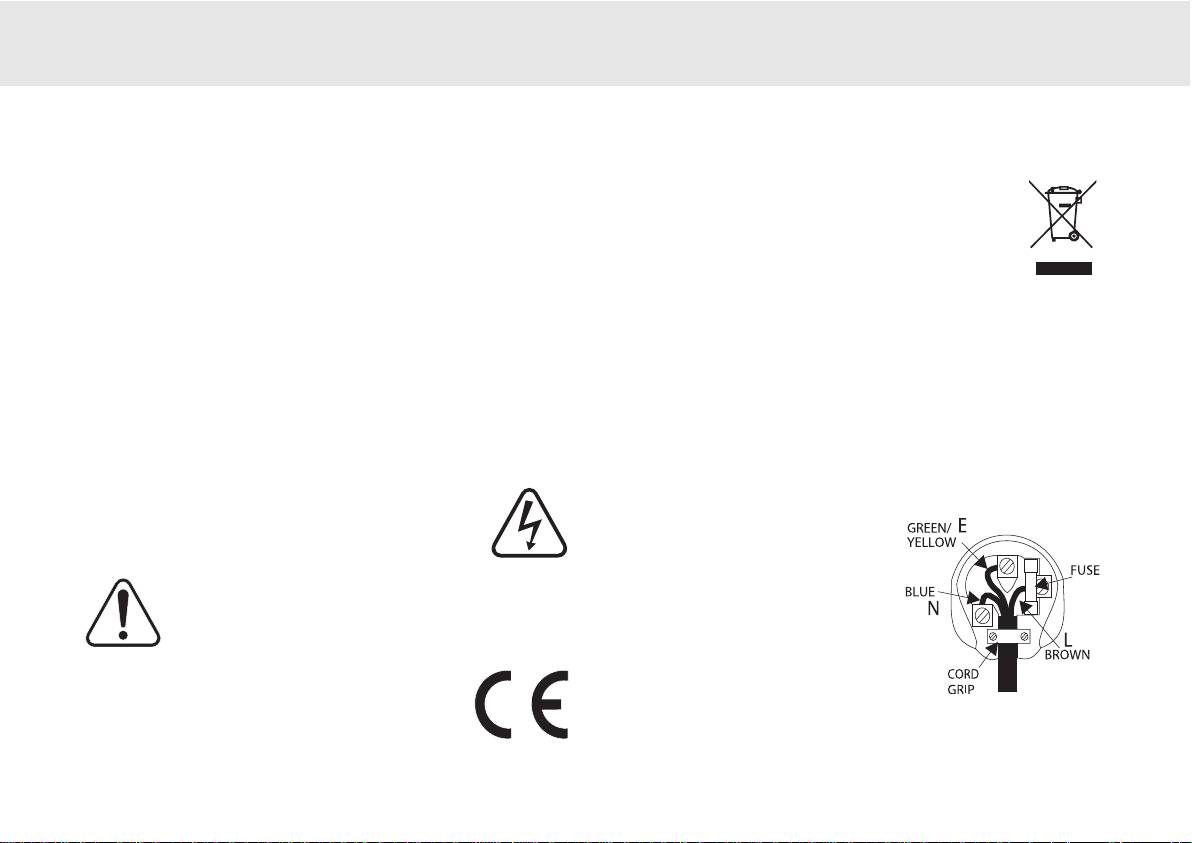
Should it be necessary to fit a 3-pin BS mains plug to the power cord the wires
the fuse carrier the correct part must be reordered from your Cambridge Audio
should be fitted as shown in this diagram. The colours of the wires in the mains
dealer.
lead of this appliance may not correspond with the coloured markings identifying
The lightning flash with the arrowhead symbol within an equilateral
the terminals in your plug. Connect them as follows:
triangle is intended to alert the user to the presence of un-insulated
The wire which is coloured BLUE must be
‘dangerous voltage’ within the product’s enclosure that may be of
connected to the terminal which is marked
sufficient magnitude to constitute a risk of electric shock to
with the letter ‘N’ or coloured BLACK.
persons.
The wire which is coloured BROWN must be
The exclamation point within an equilateral triangle is intended to
connected to the terminal which is marked
alert the user to the presence of important operating and
with the letter ‘L’ or coloured RED.
maintenance instructions in the service literature relevant to this
appliance.
The wire which is coloured GREEN/YELLOW
must be connected to the terminal which is
This product complies with European Low Voltage (73/23/EEC)
marked with the letter ‘E’ or coloured GREEN.
and Electromagnetic Compatibility (89/336/EEC) Directives
when used and installed according to this instruction manual. For
If your model does not have an earth wire, then disregard this instruction.
continued compliance only Cambridge Audio accessories should
be used with this product and servicing must be referred to
If a 13amp (BS 1363) plug is used, a 3amp fuse must be fitted, or if any other type
qualified service personnel.
of plug is used a 3amp or 5amp fuse must be fitted, either in the plug or adaptor,
or on the distribution board.
80 Series DVD player 5

IMPORTANT SAFETY INSTRUCTIONS
Please take a moment to read these notes before installing your DVD player, they
Do not route the power cable so that it can be walked upon or damaged by other
will enable you to get the best performance and prolong the life of the product. We
items near it.
advise you follow all instructions, heed all warnings and keep the instructions for
If you do not intend to use this unit for a long period, switch it to Standby and
future reference.
unplug it from the mains socket. Also unplug the unit during lightning storms.
The unit is of Class 1 construction and must be connected to a Mains socket outlet
Refer all servicing to qualified service personnel. Servicing is required when the
with a protective earthing connection. This unit must be installed on a sturdy, level
unit has been damaged in any way, such as a damaged power-supply cord or plug,
surface.
liquid has been spilled or objects have fallen into the unit, the unit has been
The unit requires ventilation. Do not situate it on a rug or other soft surface and do
exposed to rain or moisture, does not operate normally, or has been dropped.
not obstruct any air inlets or outlet grills. Do not place in a sealed area such as a
If you have checked the Troubleshooting guide in the manual with no improvement,
bookcase or in a cabinet. Any space open at the back (such as a dedicated
do not attempt to repair, disassemble or reconstruct the unit. A serious electric
equipment rack) is fine however.
shock could result if this precautionary measure is ignored.
WARNING - To reduce the risk of fire or electric shock, do not expose this unit to
rain or moisture. This unit must not be exposed to dripping or splashing water or
other liquids. No objects filled with liquid, such as vases, shall be placed on the
unit. In the event, switch off immediately, disconnect from the mains supply and
contact your dealer for advice.
To clean the unit, wipe its case with a dry, lint-free cloth. Do not use any cleaning
fluids containing alcohol, ammonia or abrasives. Do not spray an aerosol at or near
your DVD player.
Ensure that small objects do not fall through any ventilation grille. If this happens,
switch off immediately, disconnect from the mains supply and contact your dealer
for advice.
6 80 Series DVD player
Table of contents
- 85/86/89 DVD player
- 85/86/89 DVD player
- 85/86/89 DVD player
- 85/86/89 DVD player
- 85/86/89 DVD player
- 85/86/89 DVD player
- 85/86/89 DVD player 70 Series
- 85/86/89 DVD player
- 85/86/89 DVD player
- 85/86/89 DVD player
- 85/86/89 DVD player
- 85/86/89 DVD player
- 85/86/89 DVD-Spieler
- 85/86/89 DVD-Spieler
- 85/86/89 DVD-Spieler
- 85/86/89 DVD-Spieler
- 85/86/89 DVD-Spieler
- 85/86/89 DVD-Spieler
- 85/86/89 DVD-Spieler
- 85/86/89 DVD-Spieler
- 85/86/89 DVD-Spieler
- 85/86/89 DVD-Spieler
- 85/86/89 Lecteur de DVD
- 85/86/89 Lecteur de DVD
- 85/86/89 Lecteur de DVD
- 85/86/89 Lecteur de DVD
- 85/86/89 Lecteur de DVD
- 85/86/89 Lecteur de DVD
- 85/86/89 Lecteur de DVD
- 85/86/89 Lecteur de DVD
- 85/86/89 Lecteur de DVD
- 85/86/89 Lecteur de DVD
- 85/86/89 Reproductor DVD
- 85/86/89 Reproductor DVD
- 85/86/89 Reproductor DVD
- 85/86/89 Reproductor DVD
- 85/86/89 Reproductor DVD
- 85/86/89 Reproductor DVD
- 85/86/89 Reproductor DVD
- 85/86/89 Reproductor DVD
- 85/86/89 Reproductor DVD
- 85/86/89 Reproductor DVD
- 85/86/89 Lettore DVD
- 85/86/89 Lettore DVD
- 85/86/89 Lettore DVD
- 85/86/89 Lettore DVD
- 85/86/89 Lettore DVD
- 85/86/89 Lettore DVD
- 85/86/89 Lettore DVD
- 85/86/89 Lettore DVD
- 85/86/89 Lettore DVD
- 85/86/89 Lettore DVD
- 85/86/89 dvd-speler
- 85/86/89 dvd-speler
- 85/86/89 dvd-speler
- 85/86/89 dvd-speler
- 85/86/89 dvd-speler
- 85/86/89 dvd-speler
- 85/86/89 dvd-speler
- 85/86/89 dvd-speler
- 85/86/89 dvd-speler
- 85/86/89 dvd-speler
- 85/86/89 dvd-afspiller
- 85/86/89 dvd-afspiller
- 85/86/89 dvd-afspiller
- 85/86/89 dvd-afspiller
- 85/86/89 dvd-afspiller
- 85/86/89 dvd-afspiller
- 85/86/89 dvd-afspiller
- 85/86/89 dvd-afspiller
- 85/86/89 dvd-afspiller
- 85/86/89 dvd-afspiller
- DVD-проигрыватель 85/86/89
- DVD-проигрыватель 85/86/89
- 85/86/89 DVD player
