
Cambridge Audio 80 Series: 85/86/89 DVD player
85/86/89 DVD player: Cambridge Audio 80 Series

85/86/89 DVD player
REAR PANEL CONNECTIONS
Video
Connections
Analogue
outputs
- Both units have a conventional stereo RCA (phono)
out that outputs stereo audio for connection to a conventional stereo
The DVD85 is equipped with Composite (CVBS), S-Video (SVHS), SCART
amplifier. Also a six channel decoded output is featured in Dolby Digital
(RGB and CVBS) and Component Video (YC
b
C
r
) connections. The DVD89
5.1 format that enables connection to a suitable 6 channel amplifier.
also incorprates DVI-D and HDMI Digital Video Interfaces.
SACD and DVD audio disc will only output through the 5.1 analogue
outs. See ‘An Introduction to DVD Audio’ on page 22.
Audio
Connections
Note:
A DTS encoded disc will only output the DTS soundtrack through
Digital
outputs
- The DVD89 also incorporates optical and a coaxial
the digital outputs for external decoding.(DTS passthrough).
digital output. These allow for a digital soundtrack on a DVD disc to be
sent to a suitably equipped AV receiver for decoding and amplification.
AC
power
socket
Both outputs perform the same function- simply choose the type that
best suits your needs.
Once you have completed all connections to the amplifier, plug the AC
Power Cable into an appropriate mains socket.
80 Series DVD player 7
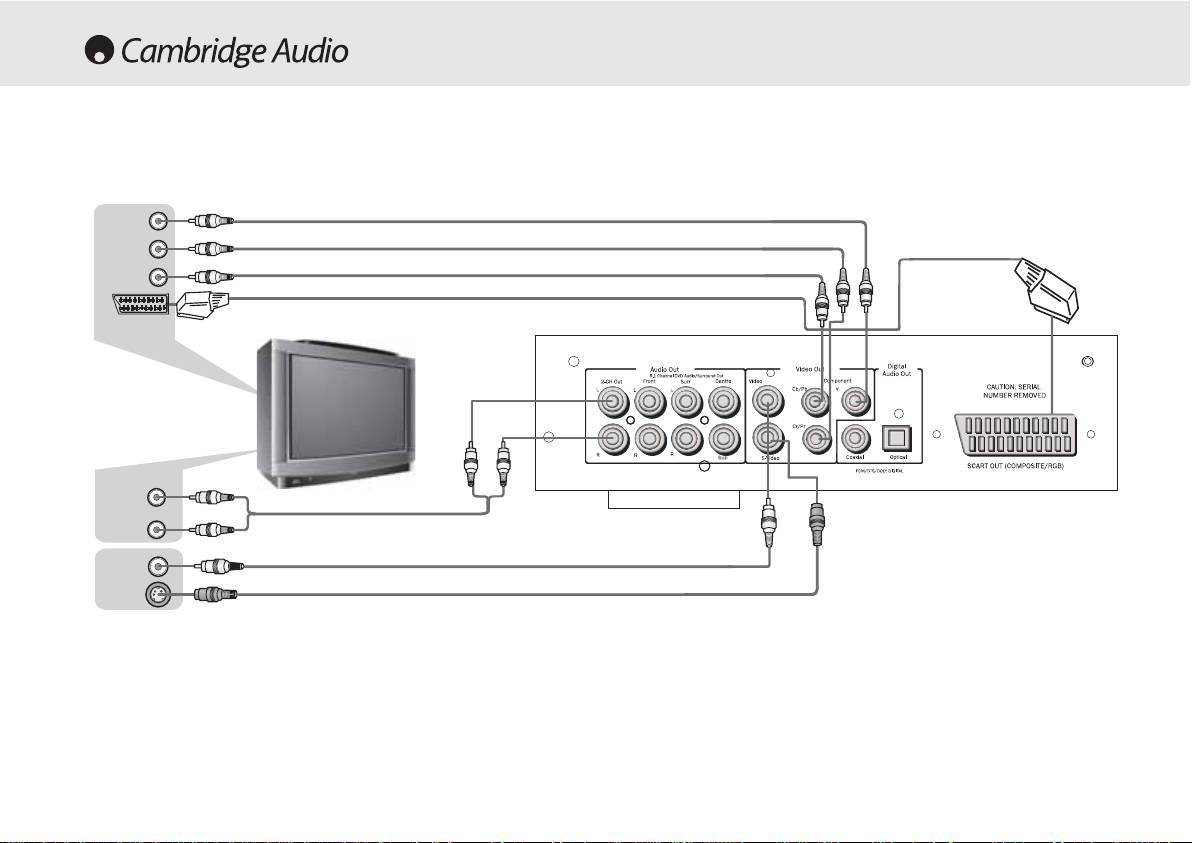
Connections to a TV /Display
((YY))
((CCrr))
((CCbb))
SSc
caarrtt
Rear
panel
AAuuddiioo
IInn
AAuuddiioo
CCaabbllee
oorr
SS-VViiddeeoo
VViiddeeoo
IInn
VViiddeeoo
CCaabbllee
SS-VViiddeeoo
SS-VViiddeeoo
CCaabbllee
The DVD85 and 89 feature a wide range of video ouputs. You should
If it is desired to connect the Audio Out of the DVD player to your TV, the
always use the best quality connection your TV supports. In order of
‘2-CH out’ sockets should be connected to your TV’s Audio In terminals.
increasing quality you should use one of composite (CVBS), S-Video,
RGB Scart, Component Video (YUV), DVI and finally HDMI.
8 80 Series DVD player
Table of contents
- 85/86/89 DVD player
- 85/86/89 DVD player
- 85/86/89 DVD player
- 85/86/89 DVD player
- 85/86/89 DVD player
- 85/86/89 DVD player
- 85/86/89 DVD player 70 Series
- 85/86/89 DVD player
- 85/86/89 DVD player
- 85/86/89 DVD player
- 85/86/89 DVD player
- 85/86/89 DVD player
- 85/86/89 DVD-Spieler
- 85/86/89 DVD-Spieler
- 85/86/89 DVD-Spieler
- 85/86/89 DVD-Spieler
- 85/86/89 DVD-Spieler
- 85/86/89 DVD-Spieler
- 85/86/89 DVD-Spieler
- 85/86/89 DVD-Spieler
- 85/86/89 DVD-Spieler
- 85/86/89 DVD-Spieler
- 85/86/89 Lecteur de DVD
- 85/86/89 Lecteur de DVD
- 85/86/89 Lecteur de DVD
- 85/86/89 Lecteur de DVD
- 85/86/89 Lecteur de DVD
- 85/86/89 Lecteur de DVD
- 85/86/89 Lecteur de DVD
- 85/86/89 Lecteur de DVD
- 85/86/89 Lecteur de DVD
- 85/86/89 Lecteur de DVD
- 85/86/89 Reproductor DVD
- 85/86/89 Reproductor DVD
- 85/86/89 Reproductor DVD
- 85/86/89 Reproductor DVD
- 85/86/89 Reproductor DVD
- 85/86/89 Reproductor DVD
- 85/86/89 Reproductor DVD
- 85/86/89 Reproductor DVD
- 85/86/89 Reproductor DVD
- 85/86/89 Reproductor DVD
- 85/86/89 Lettore DVD
- 85/86/89 Lettore DVD
- 85/86/89 Lettore DVD
- 85/86/89 Lettore DVD
- 85/86/89 Lettore DVD
- 85/86/89 Lettore DVD
- 85/86/89 Lettore DVD
- 85/86/89 Lettore DVD
- 85/86/89 Lettore DVD
- 85/86/89 Lettore DVD
- 85/86/89 dvd-speler
- 85/86/89 dvd-speler
- 85/86/89 dvd-speler
- 85/86/89 dvd-speler
- 85/86/89 dvd-speler
- 85/86/89 dvd-speler
- 85/86/89 dvd-speler
- 85/86/89 dvd-speler
- 85/86/89 dvd-speler
- 85/86/89 dvd-speler
- 85/86/89 dvd-afspiller
- 85/86/89 dvd-afspiller
- 85/86/89 dvd-afspiller
- 85/86/89 dvd-afspiller
- 85/86/89 dvd-afspiller
- 85/86/89 dvd-afspiller
- 85/86/89 dvd-afspiller
- 85/86/89 dvd-afspiller
- 85/86/89 dvd-afspiller
- 85/86/89 dvd-afspiller
- DVD-проигрыватель 85/86/89
- DVD-проигрыватель 85/86/89
- 85/86/89 DVD player
