
Acme PLB102B: Choose Mounting Position in plat or minus 5 degree
Choose Mounting Position in plat or minus 5 degree: Acme PLB102B
Table of contents
- Unpacking instructions Important safety information
- WARNING
- Supplied parts list
- Mounting the monitor brackets to a TV with flat back
- Mounting the monitor brackets to a TV with curved back
- Mounting the wall plate to the wall
- Choose Mounting Position in plat or minus 5 degree
- Attaching Monitor to Wall Plate and Insert the Locking Bar
GB
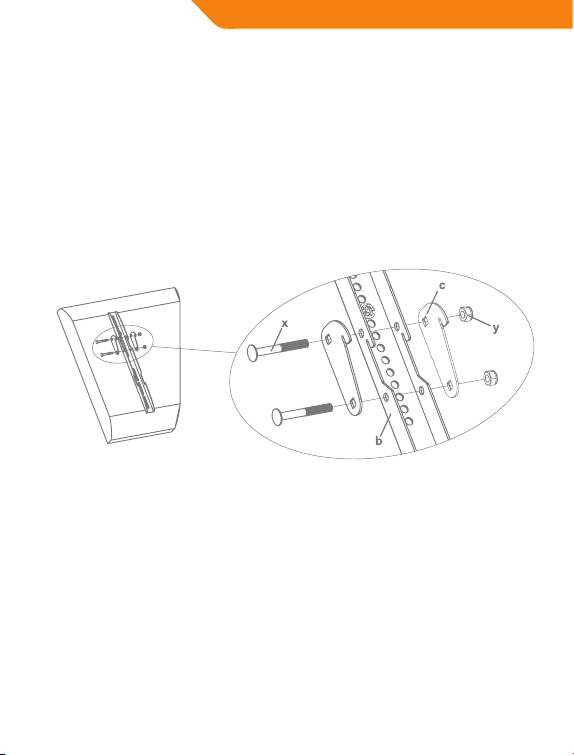
Choose Mounting Position
in plat or minus 5 degree
You can mount your television in either of two positions: at or at a
minus 5 degree downward tilt. To mount the television at to the wall
use only the Monitor Brackets(b). To mount the television in the minus 5
degree tilt position you must rst add two Small Added Hook(d) to each
Monitor Bracket with two Carriage Bolts(x) and two Nuts(y) as shown in
Diagram 3.
Diagram 3
10
Top 10 manuals
100.00
NZXT HALE90 1000W99.99
Samsung SM-R38099.97
AEG BSB 18C99.97
Dell 2700W99.97
Smeg KSEC70X99.96
Beurer HDE 4099.96
Pyramida KH 50 v.299.96
MSI CSM-H81M-P3299.96
AEG HR 562799.95
Melissa 640-048