
Yamaha CDX-397MK2: Notes
Notes: Yamaha CDX-397MK2
Table of contents
- CAUTION: READ THIS BEFORE OPERATING YOUR UNIT.
- CONTENTS
- SUPPORTED DISC TYPES FEATURES
- UNPACKING NOTES ABOUT THE REMOTE CONTROL
- CONNECTIONS
- IDENTIFICATION OF COMPONENTS Front panel Display
- Remote control
- BASIC OPERATION
- To pause playback To turn off the power To play back the desired track To stop playback To search an folder/file on an MP3 or WMA disc
- To advance or reverse playback rapidly (Manual search) To skip to the beginning of the desired track (Skip search)
- Changing display
- Changing brightness of the display Automatic spacing Adjusting the output level
- RANDOM-SEQUENCE PLAY REPEAT PLAY Repeat a selected item
- Repeat A-B
- PROGRAM PLAY
- INDEX SEARCH
- TRACK PROGRAMMING FOR RECORDING TO TAPE Automatic tape-programming (for Audio CD)
- Notes
- Manual tape-programming (for Audio CD)
- Random sequential tape-programming (for Audio CD)
- Automatic searching for the peak level on a disc (for Audio CD)
- CD SYNCHRONIZED RECORDING
- Notes about handling compact discs Discs playable with this unit NOTES ABOUT DISCS
- SYMPTOM TROUBLESHOOTING
- SPECIFICATIONS
English
17
En
Notes
●
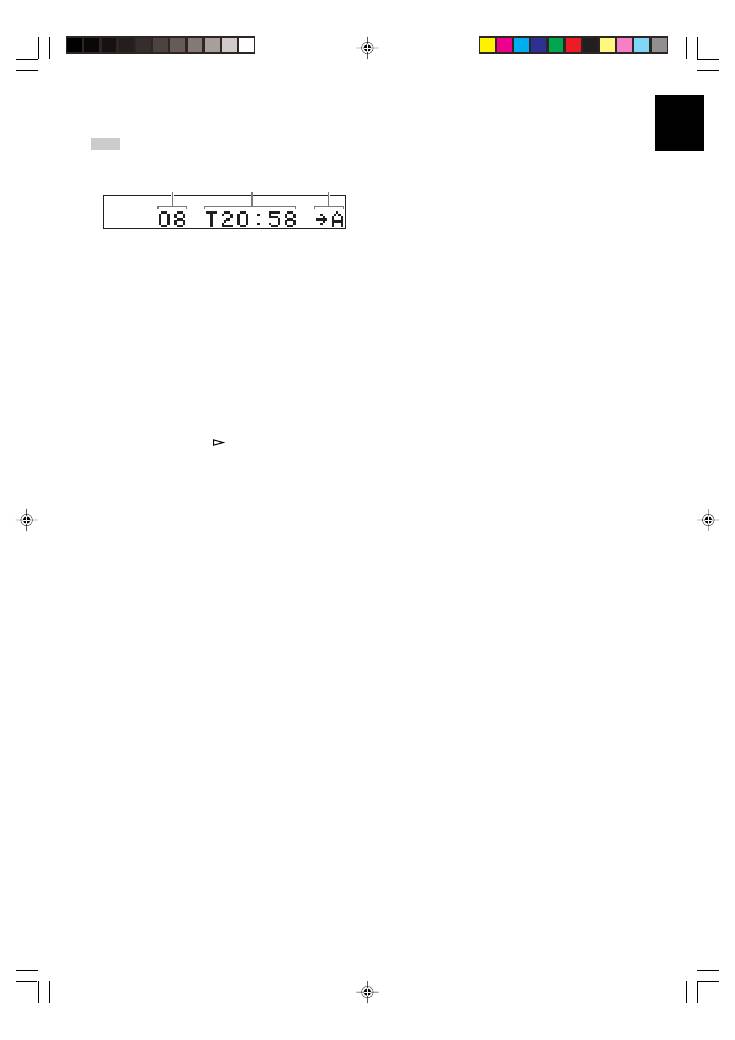
In step 4, you can check the program data for side A and side B
after pressing
REPEAT
. Information for each side is displayed
for 3 seconds.
1
Shows the number of programmed tracks.
2
Shows the total time of programmed tracks.
3
Shows the side of the tape.
●
All tracks may not be programmed if the tape length is not
enough. To program all tracks, use a tape that is longer than the
actual playing time.
●
You can check, cancel or correct program data. (For details,
refer to page 15.)
*
When checking program data, note that “Pu” appears
between track numbers for side A and side B.
●
Up to 40 tracks can be programmed. A pause inserted between
side A and B is counted as one track.
●
CD synchronized recording function can be used if your tape
deck is compatible with this unit. If so, in step 5 and 6, press
SYNCHRO
and then press
on the remote control of this
unit. Recording automatically starts. (For details, refer to page
21.)
PROG.
3
2
1
01En_02_BOD_CDX-397MK2_G.p65
1/23/07, 13:41
17
