
Yamaha CDX-397MK2: Changing display
Changing display: Yamaha CDX-397MK2
Table of contents
- CAUTION: READ THIS BEFORE OPERATING YOUR UNIT.
- CONTENTS
- SUPPORTED DISC TYPES FEATURES
- UNPACKING NOTES ABOUT THE REMOTE CONTROL
- CONNECTIONS
- IDENTIFICATION OF COMPONENTS Front panel Display
- Remote control
- BASIC OPERATION
- To pause playback To turn off the power To play back the desired track To stop playback To search an folder/file on an MP3 or WMA disc
- To advance or reverse playback rapidly (Manual search) To skip to the beginning of the desired track (Skip search)
- Changing display
- Changing brightness of the display Automatic spacing Adjusting the output level
- RANDOM-SEQUENCE PLAY REPEAT PLAY Repeat a selected item
- Repeat A-B
- PROGRAM PLAY
- INDEX SEARCH
- TRACK PROGRAMMING FOR RECORDING TO TAPE Automatic tape-programming (for Audio CD)
- Notes
- Manual tape-programming (for Audio CD)
- Random sequential tape-programming (for Audio CD)
- Automatic searching for the peak level on a disc (for Audio CD)
- CD SYNCHRONIZED RECORDING
- Notes about handling compact discs Discs playable with this unit NOTES ABOUT DISCS
- SYMPTOM TROUBLESHOOTING
- SPECIFICATIONS
10
En
Notes
●
The text information may not be displayed with some CD-TEXT discs.
●
This unit can only shows alphanumeric characters.
Notes
●
Some information of ID3 tags may not be displayed with some discs.
●
This unit can only shows alphanumeric characters.
TIME/INFO
MP3
MP3
MP3
MP3
MP3
MP3
MP3
MP3
MP3
CD
CD
CD
CD
CD
CD
CD
TIME/INFO
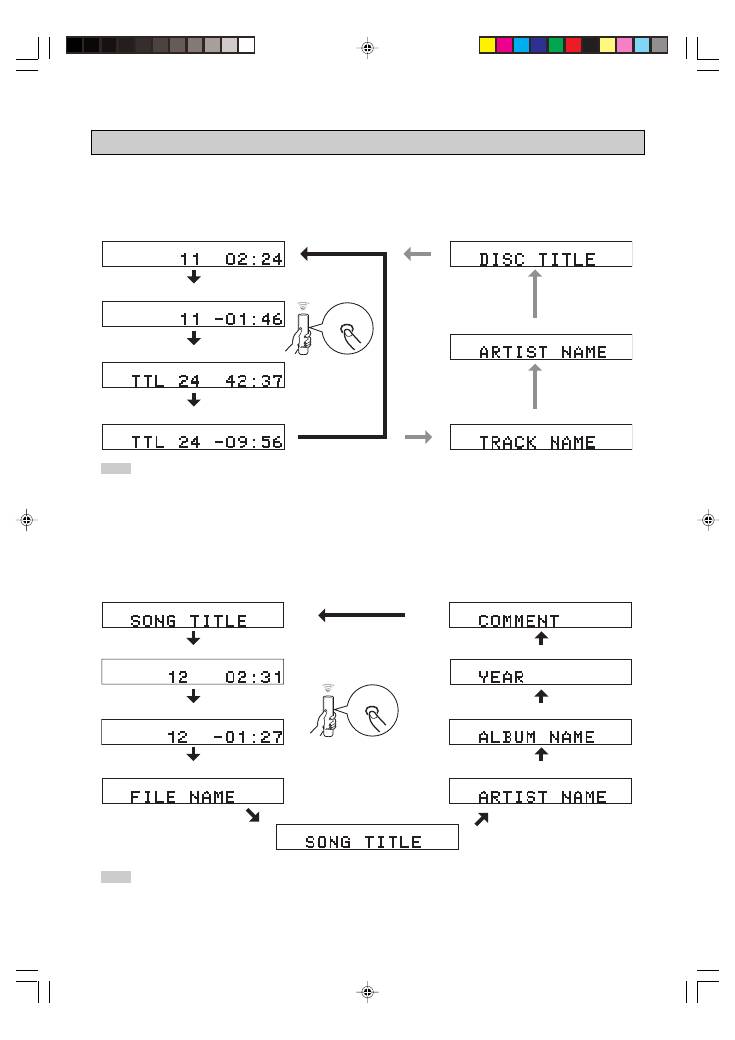
You can select the following displays (
1
–
4
)
by pressing
TIME/INFO
. When you play back a CD-TEXT disc, the disc
title, artist name, and track name (
5
–
7
) are also displayed.
1
Elapsed time of the current track (Default)
2
Remaining time of the current track
3
Total recorded time of the disc
4
Remaining time of the disc
Changing display
You can select the following displays (
1
–
9
) by pressing
TIME/INFO
.
*
Scrolling display shows the song title, artist name and album name of the selected item.
1
Scrolling display (Default)
*
2
Elapsed time of the current file
8
Year
9
Comment
7
Album name
5
Song title
4
File name
3
Remaining time of the current file
7
Disc title
6
Artist name
5
Track name
■
When playing back an Audio CD
■
When playing back an MP3 or WMA
6
Artist name
01En_02_BOD_CDX-397MK2_G.p65
1/23/07, 13:41
10
