
Yamaha CDX-397MK2: CD SYNCHRONIZED RECORDING
CD SYNCHRONIZED RECORDING: Yamaha CDX-397MK2
Table of contents
- CAUTION: READ THIS BEFORE OPERATING YOUR UNIT.
- CONTENTS
- SUPPORTED DISC TYPES FEATURES
- UNPACKING NOTES ABOUT THE REMOTE CONTROL
- CONNECTIONS
- IDENTIFICATION OF COMPONENTS Front panel Display
- Remote control
- BASIC OPERATION
- To pause playback To turn off the power To play back the desired track To stop playback To search an folder/file on an MP3 or WMA disc
- To advance or reverse playback rapidly (Manual search) To skip to the beginning of the desired track (Skip search)
- Changing display
- Changing brightness of the display Automatic spacing Adjusting the output level
- RANDOM-SEQUENCE PLAY REPEAT PLAY Repeat a selected item
- Repeat A-B
- PROGRAM PLAY
- INDEX SEARCH
- TRACK PROGRAMMING FOR RECORDING TO TAPE Automatic tape-programming (for Audio CD)
- Notes
- Manual tape-programming (for Audio CD)
- Random sequential tape-programming (for Audio CD)
- Automatic searching for the peak level on a disc (for Audio CD)
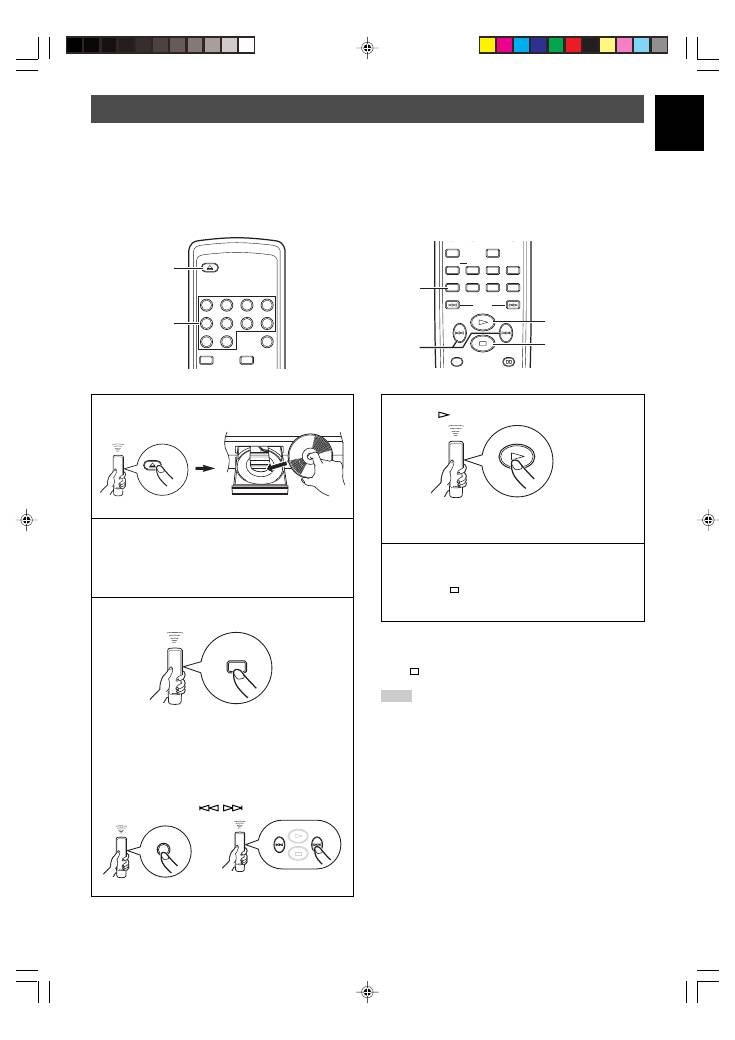
- CD SYNCHRONIZED RECORDING
- Notes about handling compact discs Discs playable with this unit NOTES ABOUT DISCS
- SYMPTOM TROUBLESHOOTING
- SPECIFICATIONS
English
21
En
4
Press
.
Both CD playback and tape deck recording start.
*
CD playback starts shortly after starting the recording.
5
If you want to stop recording temporarily and restart
recording from a desired track, stop this unit by
pressing , and the tape deck as well, then follow
steps 3 – 4 again.
To cancel synchronized CD-tape recording
function
Press
.
Notes
●
To finish or stop the recording, make proper operations on the
tape deck. (For details, refer to the owner’s manual of the tape
deck.)
●
Programmed sequence of tracks can also be recorded with this
function instead of recording an entire disc. (For details, refer
to pages 14 – 15.)
●
This function can also be used together with the automatic
tape-programming function. (For details, refer to pages
16 – 17.)
This unit can automatically synchronize a tape deck recording with CD play. With this function, you can record a CD on tape
easily and precisely.
This recording method requires a Yamaha tape deck compatible with this function. (Refer to the tape deck operation manual to
find out whether it is compatible or not.)
*
This unit and the tape deck must be placed close to each other so that both of them can simultaneously receive the signals from the
remote control of this unit.
CD SYNCHRONIZED RECORDING
1
Press
)
)
)
)
)
OPEN/CLOSE
to open the disc tray, and
load a disc.
2
Load a tape on the tape deck.
*
The peak level search function of this unit is useful for
adjusting recording level on the tape deck. (For
details, refer to page 20.)
3
Press
SYNCHRO
.
This unit enters into the pause mode, and the tape
deck enters into the REC/PAUSE mode.
*
In this state, the time display on this unit blinks on and
off.
If necessary, select a desired track by pressing a
numeric button or
/
.
or
DIMMER
RANDOM
INDEX
0
9
6
5
8
7
2
1
4
3
OPEN/CLOSE
1 3
SEARCH
TIME/INFO
SYNCHRO
TAPE
PEAK
SPACE
REPEAT
DIMMER
RANDOM
A–B
PROGRAM
CLEAR
3 3 4 5
OPEN/CLOSE
SYNCHRO
5
01En_02_BOD_CDX-397MK2_G.p65
1/23/07, 13:41
21
