
Yamaha CDX-397MK2: BASIC OPERATION
BASIC OPERATION: Yamaha CDX-397MK2
Table of contents
- CAUTION: READ THIS BEFORE OPERATING YOUR UNIT.
- CONTENTS
- SUPPORTED DISC TYPES FEATURES
- UNPACKING NOTES ABOUT THE REMOTE CONTROL
- CONNECTIONS
- IDENTIFICATION OF COMPONENTS Front panel Display
- Remote control
- BASIC OPERATION
- To pause playback To turn off the power To play back the desired track To stop playback To search an folder/file on an MP3 or WMA disc
- To advance or reverse playback rapidly (Manual search) To skip to the beginning of the desired track (Skip search)
- Changing display
- Changing brightness of the display Automatic spacing Adjusting the output level
- RANDOM-SEQUENCE PLAY REPEAT PLAY Repeat a selected item
- Repeat A-B
- PROGRAM PLAY
- INDEX SEARCH
- TRACK PROGRAMMING FOR RECORDING TO TAPE Automatic tape-programming (for Audio CD)
- Notes
- Manual tape-programming (for Audio CD)
- Random sequential tape-programming (for Audio CD)
- Automatic searching for the peak level on a disc (for Audio CD)
- CD SYNCHRONIZED RECORDING
- Notes about handling compact discs Discs playable with this unit NOTES ABOUT DISCS
- SYMPTOM TROUBLESHOOTING
- SPECIFICATIONS
English
7
En
Notes
●
After closing the disc tray by pressing
)
OPEN/CLOSE
, the
display shows the following information.
Caution
When the disc tray is open, do not touch the inside gear
wheel. If you touch the gear wheel, your finger may be
caught in the closing tray and injured.
1
Gear wheel
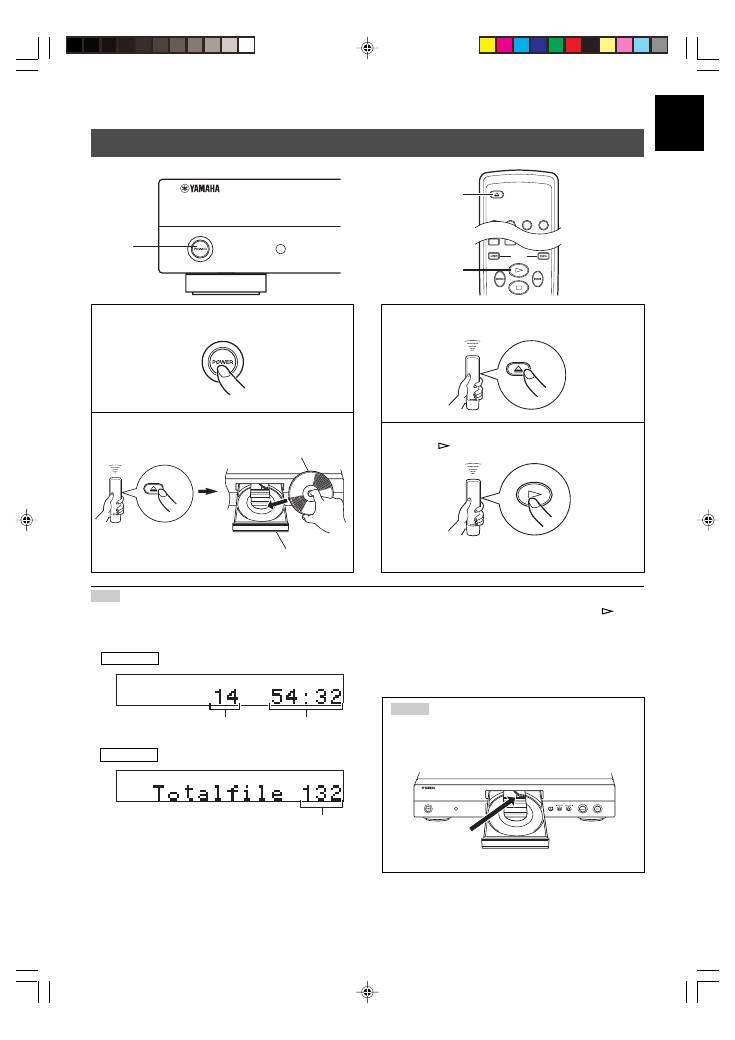
BASIC OPERATION
This manual describes how to operate this unit by using the remote control.
To operate this unit from the front panel, use the corresponding buttons on the front panel.
1
Press
POWER
to turn on the power.
2
Press
)
OPEN/CLOSE
to open the disc tray, and
load a disc.
3
Press
)
OPEN/CLOSE
to close the disc tray.
4
Press
to start playback.
Playback starts from the first track of the disc
.
Label side up.
Disc tray
SEARCH
SYNCHRO
TAPE
2
4
3
OPEN/CLOSE
2, 3 4
OPEN/CLOSE
OPEN/CLOSE
CD
Total number
of tracks
Total recorded
time of a disc
●
Additionally, you can close the disc tray by pressing
, a
numeric button or
RANDOM
, or by pressing the front edge of
the disc tray gently. If the tray is closed in one of these ways,
playback starts automatically; however, the display will not
show the total number of tracks nor the total recorded time of
the disc.
Total number
of files
MP3, WMA
Audio CD
01En_02_BOD_CDX-397MK2_G.p65
1/23/07, 13:41
7
