
Toshiba TDP P5: MENU ADJUSTMENTS MENÜEINSTELLUNGEN OPTIONS DE MENU
MENU ADJUSTMENTS MENÜEINSTELLUNGEN OPTIONS DE MENU: Toshiba TDP P5
Table of contents
- TABLE OF CONTENTS
- SUPPLIED MATERIAL LIEFERUMFANG EQUIPMENT FOURNI MATERIAL SUMINISTRADO
- OVERVIEW
- SETUP PROCEDURE SETUP PROCÉDURE
- SETUP PROCEDURE SETUP PROCÉDURE
- SETUP PROCEDURE SETUP PROCÉDURE
- START - STOP
- IMAGE ADJUSTMENT BILDEINSTELLUNG MISE AU POINT DE L’ IMAGE
- REMOTE CONTROL & KEYPAD FERNBEDIENUNG UND BEDIENFELD TELECOMANDE ET CLAVIER
- REMOTE CONTROL & KEYPAD FERNBEDIENUNG UND BEDIENFELD TELECOMANDE ET CLAVIER
- REMOTE CONTROL & KEYPAD FERNBEDIENUNG UND BEDIENFELD TELECOMANDE ET CLAVIER
- REMOTE CONTROL & KEYPAD FERNBEDIENUNG UND BEDIENFELD TELECOMANDE ET CLAVIER
- MENU ADJUSTMENTS MENÜEINSTELLUNGEN OPTIONS DE MENU MEN
- MENU ADJUSTMENTS MENÜEINSTELLUNGEN OPTIONS DE MENU
- MENU ADJUSTMENTS MENÜEINSTELLUNGEN OPTIONS DE MENU
- MENU ADJUSTMENTS MENÜEINSTELLUNGEN OPTIONS DE MENU
- MENU ADJUSTMENTS MENÜEINSTELLUNGEN OPTIONS DE MENU
- MENU ADJUSTMENTS MENÜEINSTELLUNGEN OPTIONS DE MENU
- MENU ADJUSTMENTS MENÜEINSTELLUNGEN OPTIONS DE MENU
- MENU ADJUSTMENTS MENÜEINSTELLUNGEN OPTIONS DE MENU
- MENU ADJUSTMENTS MENÜEINSTELLUNGEN OPTIONS DE MENU
- MENU ADJUSTMENTS MENÜEINSTELLUNGEN OPTIONS DE MENU
- MENU ADJUSTMENTS MENÜEINSTELLUNGEN OPTIONS DE MENU
- MENU ADJUSTMENTS MENÜEINSTELLUNGEN OPTIONS DE MENU
- USER’S LOGO LOGO DES BENUTZERS LOGO DE L’UTILISATEUR
- USER’S LOGO LOGO DES BENUTZERS LOGO DE L’UTILISATEUR
- L E D DISPLAYS L E D ANZEIGEN INDICATEURS LUMINEUX
- L E D DISPLAYS L E D ANZEIGEN INDICATEURS LUMINEUX
- Display Power Management Settings (DPMS) DISPLAY POWER MANAGEMENT SETTINGS (DPMS)
- TROUBLESHOOTING FEHLERBEHEBUNG SOLUTION AUX PROBLEMES LES PLUS FREQUENTS
- TROUBLESHOOTING FEHLERBEHEBUNG SOLUTION AUX PROBLEMES LES PLUS FREQUENTS
- TROUBLESHOOTING FEHLERBEHEBUNG SOLUTION AUX PROBLEMES LES PLUS FREQUENTS TECHNICAL DATA TECNISCHE DATEN CARACTERISTIQUES TECHNIQUES DATOS T
- TECHNICAL DATA TECNISCHE DATEN CARACTERISTIQUES TECHNIQUES DATOS T
- TECHNICAL DATA TECNISCHE DATEN CARACTERISTIQUES TECHNIQUES DATOS T
- SERVICE INFORMATION SERVICE-INFO REPARATIONS INFORMACI
- LAMP REPLACEMENT LAMPENAUSTAUSCH REMPLACEMENT DE LA LAMPE
- LAMP REPLACEMENT LAMPENAUSTAUSCH REPLACEMENT DE LA LAMPE
- MAINTENANCE (FOR LONG TERM RUNNING) WARTUNG ENTRETIEN MANTENIMIENTO
- MAINTENANCE (FOR LONG TERM RUNNING) WARTUNG ENTRETIEN MANTENIMIENTO
- FCC WARNING
P5 Ruby UG .qxd 13.05.2002 14:21 Page 22
MENU ADJUSTMENTS MENÜEINSTELLUNGEN OPTIONS DE MENU
MEN
Ú DE AJUSTES IMPOSTAZIONI DAL MENU
НАСТРОЙКА С ПОМОЩЬЮ МЕНЮ
MENYINNSTILLINGER
5.4.6
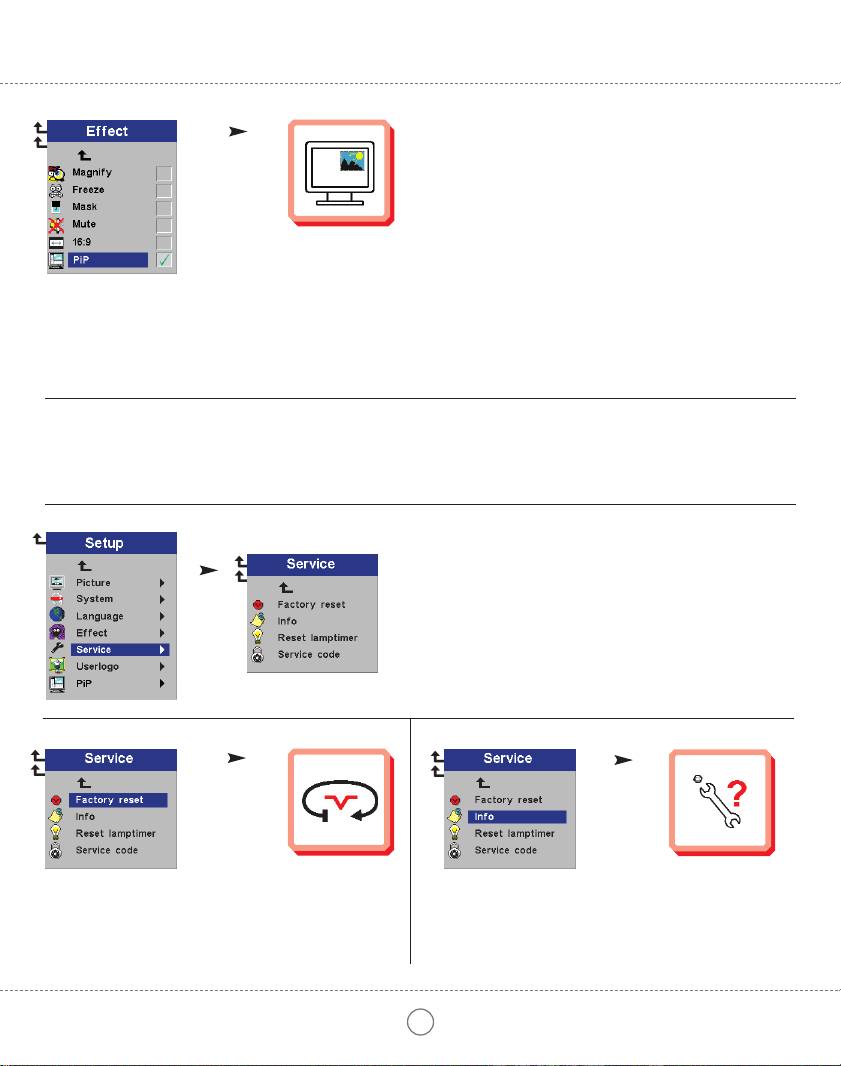
Select Picture in Picture to see a down-scaled image of the video source on top of the computer image.
Wählen Sie "Picture in Picture", wenn Sie ein verkleinertes Bild der Videoquelle über dem Computerbild sehen möchten.
Sélectionnez "Picture in Picture" si vous souhaitez voir une image à échelle réduite de la source vidéo sur le haut de l'écran de votre ordinateur.
Seleccione Picture in Picture para visualizar una imagen a escala reducida de la fuente de vídeo, encima de la imagen.
Selezionare Picture in Picture (Immagine in Immagine) per vedere un immagine a scala ridotta della sorgente video sopra l'immagine del computer.
Выберите Picture in Picture (Картинка в картинке), чтобы вывести уменьшенное изображение с видеоисточника поверх изображения с компьютера.
Velg Bilde i Bilde hvis du vil se bildet fra videokilden i mindre størrelse oppå datamaskinbildet.
SERVICE MENU FUNCTIONS SERVICE - MENÜFUNKTIONEN OPTIONS DU MENU SERVICE FUNCIONES DEL MENÚ DE SERVICIO
FUNZIONI DI SERVIZIO DEL MENU ФУНКЦИИ МЕНЮ SERVICE (СЛУЖЕБНЫЕ) FUNKSJONER PÅ SERVICE-MENYEN
5.5
5.5.1
5.5.2
Select to reset all options to factory settings.
Select to display service information.
Aktivieren, um alle Optionen auf Werkseinstellung zu setzen.
Aktivieren, um Serviceinformationen anzuzeigen.
Sélectionner pour remettre toutes les options sur paramètres usine.
Sélectionner pour afficher l'information réparations.
Seleccionar para restablecer todas las opciones a la configuración original.
Sólo para personal técnico.
Selezione per il ripristino di tutte le opzioni sulle impostazioni di fabbrica.
Selezione per visualizzare le informazioni sull'assistenza.
Установка заводских параметров по умолчанию.
Вывод служебной информации.
Velges hvis du vil tilbakestille alle innstillinger til fabrikkinnstillingene.
Velges hvis du vil vise serviceinformasjon.
22
