
Nikon AF-S VR 24-120mm f-4G ED: Focusing, zooming, and depth Using the lens hood of field Setting the aperture
Focusing, zooming, and depth Using the lens hood of field Setting the aperture: Nikon AF-S VR 24-120mm f-4G ED
Table of contents
- Notes on Safety Operations
- Nomenclature
- Major features Usable cameras and available functions
- Focusing
- Vibration reduction mode (VR
- Notes on using vibration reduction
- Focusing, zooming, and depth Using the lens hood of field Setting the aperture
- The built-in flash and vignetting Recommended focusing screens
- Lens care Standard accessories Optional accessories
- Specifications
Focusing, zooming, and depth
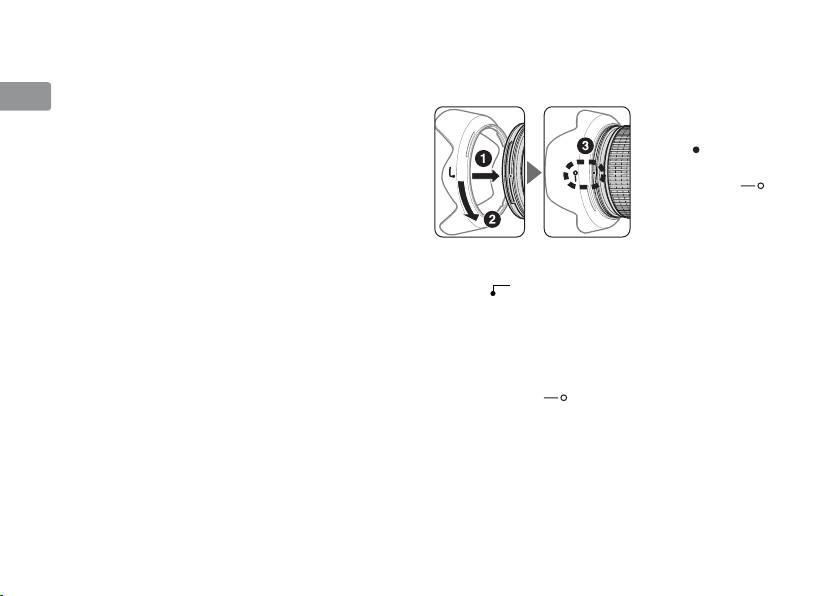
Using the lens hood
Jp
of field
Lens hoods minimize stray light and protect the lens.
Before focusing, rotate the zoom ring to adjust the
Attaching the hood
En
focal length until the desired composition is
• Be sure that the lens
framed. If your camera has a depth-of-field
De
hood mounting
preview (stop-down) button or lever, depth of field
index ( ) is aligned
can be previewed through the camera viewfinder.
with the lens hood
Fr
• This lens is equipped with the Internal Focusing
setting index ( )
(IF) system. As the shooting distance decreases,
(3).
Es
the focal length also decreases.
• The distance scale does not indicate the precise
Se
distance between the subject and the camera.
• To facilitate attachment or removal of the hood,
Values are approximate and should be used only
hold it by the base (near the lens hood attachment
Ru
as a general guide. When shooting distant
index (
))
rather than its outer edge.
landscapes, depth of field may influence
• If the lens hood is not correctly attached, vignetting
Nl
operation and the subject may appear in focus
may occur.
at a position that is closer than infinity.
• To store the lens hood, attach it in the reverse
It
• For more information, see page 144.
position. To facilitate attachment or removal of
the hood, hold it by the base (near the lens hood
Cz
Setting the aperture
setting index ( )) rather than its outer edge.
Use the camera to adjust the aperture setting.
Sk
Ck
Ch
Kr
18
