
Nikon 24mm-f-14G-ED-AF-S-Nikkor: Recommended focusing screens Lens care
Recommended focusing screens Lens care: Nikon 24mm-f-14G-ED-AF-S-Nikkor
Table of contents
- Notes on Safety Operations
- Nomenclature
- Major features Usable cameras and available functions
- Focusing (Fig. A)
- Depth of field Using the lens hood Setting the aperture The built-in flash and vignetting
- Recommended focusing screens Lens care
- Specifications Standard accessories Optional accessory
- Shooting
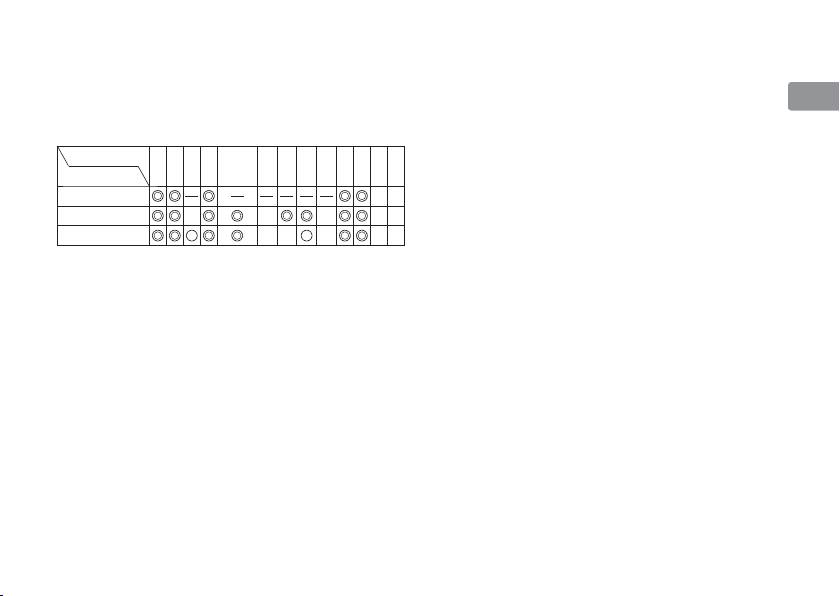
Recommended focusing screens
• For F5 cameras, only EC-B, EC-E, B, E, J, A, L
Jp
Various interchangeable focusing screens are
focusing screens are usable in Matrix Metering.
available for certain Nikon SLR cameras to suit any
• When using the B and E focusing screens in
En
picture-taking situation. The ones recommended
cameras other than those listed above, refer to
for use with this lens are:
the columns for the B and E screens.
De
Screen
EC-B
Lens care
ABCE
G1
G2 G3 G4
JL
M
U
Camera
EC-E
•
Be careful not to allow the CPU contacts to
Fr
become dirty or damaged.
F6
• If the lens mount rubber gasket is damaged, be
Es
F5+DP-30
sure to visit the nearest Nikon-authorized service
F5+DA-30
representative for repair.
Se
: Excellent focusing
•
Clean lens surfaces with a blower brush. To remove
Ⴟ
: Acceptable focusing
dirt and smudges, use a soft, clean cotton cloth or
Ru
Ⴜ
Slight vignetting or moire patterns appear in
lens tissue moistened with ethanol (alcohol) or lens
the viewfinder, but not on the film.
cleaner. Wipe in a circular motion from the center
Nl
—
: Not available
to outer edge, taking care not to leave traces or
Blank box means not applicable. Since type M
touch other parts of the lens.
It
screen can be used for both macro photography at
• Never use organic solvent such as thinner or
a magnification ratio of 1:1 or above and for
benzene to clean the lens.
Cz
photomicrography, it has different applications
• NC filters are available to protect the front lens
than other screens.
element. The lens hood also helps to protect the
Sk
Important
front of the lens.
• For F6 cameras, when using screens other than
• When storing the lens in its flexible lens pouch,
Ck
type B or E, “Other screen” must be selected in
attach both the front and rear lens caps.
Custom Setting. Refer to camera's User's
• When the lens is mounted on a camera, do not
Ch
Manual for details.
pick up or hold the camera and lens by the lens
hood.
Kr
15
