
Nikon 200MM F-2G ED AF-S VR II NIKKOR: ■ Focusing
■ Focusing: Nikon 200MM F-2G ED AF-S VR II NIKKOR
Table of contents
- Notes on Safety Operations
- Observe the following precautions when handling the camera and lens
- ■ Nomenclature
- En
- ■ Major features ■ Usable cameras and available functions
- ■ Focusing
- ■ Focus operation selection switch and focus operation button (See page 20 for compatible cameras.)
- ■ Vibration reduction mode (VR
- Setting the vibration reduction ON/OFF ring switch Setting the vibration reduction mode switch Notes on using vibration reduction
- ■ Depth of field ■ Setting the aperture ■ Using a built-in rotating tripod collar
- ■ The built-in flash and vignetting ■ Using the lens hood
- ■ Recommended focusing screens
- ■ Lens care ■ Standard accessories ■ Optional accessories
- ■ Specifications
- Ru
*4: Press the memory set button or a focus operation button while pressing the shutter
release button halfway.
*5: Possible, with limited restrictions
Jp
■ Focusing
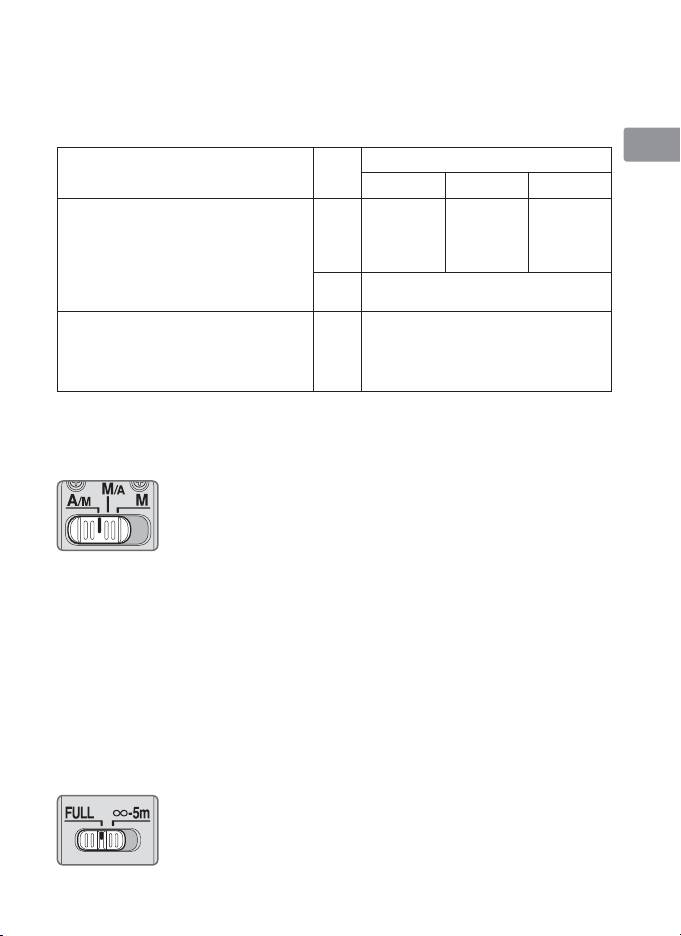
Set your camera focus mode according to the chart below:
En
Camera
Lens focus mode switch
Cameras
focus
mode
A/M M/A M
De
Nikon digital SLR (Nikon FX/DX format)
Manual
Autofocus
Autofocus
cameras, F6, F5, F4-Series, F100,
focus
AF
with manual
with manual
(Electronic
Fr
F90X/N90s*, F90-Series/N90*,
(C/S)
override
override
rangefinder
F80-Series/N80-Series*,
(AF priority)
(MF priority)
can be used.)
F75-Series/N75-Series*, F70-Series/N70*,
Es
F65-Series/N65-Series*, Pronea 600i/6i*,
Manual focus
MF
Pronea S
(Electronic rangefinder can be used.)
F60-Series/N60*, F55-Series/N55-Series*,
Se
F50-Series/N50*, F-801s/N8008s*,
AF
Manual focus
F-801/N8008*, F-601
M/N6000*,
(C/S)
(Electronic rangefinder can be used,
F-401x/N5005*, F-401s/N4004s*,
MF
except with the F-601
M/N6000*.)
Ru
F-401/N4004*
*Sold exclusively in the USA
Nl
AF: Autofocus MF: Manual focus
A/M (Autofocus with manual override. AF priority) mode and M/A
It
(Autofocus with manual override. MF priority) mode
M/A: Autofocus can be overridden by manually focusing with
Ck
the focus ring.
A/M: Autofocus can be overridden by manually focusing with
Ch
the focus ring, but focus ring detection sensitivity is lower
than in M/A mode. Use this mode to avoid canceling the
AF setting by unintentionally moving the focus ring.
Kr
1
Set the focus mode switch to A/M or M/A.
2
Autofocus can be manually overridden by rotating the focus ring while
pressing the shutter release button halfway, pressing the AF-ON button on
the camera or pressing a focus operation button (with focus operation set to
AF-ON) on the lens.
3
Pressing the shutter release button halfway, pressing the AF-ON button on
the camera again or pressing a focus operation button on the lens again will
cancel manual override and return the lens to autofocus mode.
To limit the range of autofocus
This function is only available with autofocus.
FULL: If the subject is sometimes closer than 5 m (16.4 ft.),
set the switch to FULL.
∞–5m: If the subject is always 5 m (16.4 ft.) or more away, set
the switch to ∞–5m to reduce focusing time.
21


