
HP 8270: Chapter 1 Transparent materials adapter (TMA) Automatic document feeder (ADF) Scanning overview Scan from the scanner front panel buttons Scan from HP Solution Center
Chapter 1 Transparent materials adapter (TMA) Automatic document feeder (ADF) Scanning overview Scan from the scanner front panel buttons Scan from HP Solution Center: HP 8270
Table of contents
- How to use the scanner Scanner setup Where to get additional information How to use the HP Photosmart Software
- Front panel and accessories overview Front panel buttons
- Chapter 1 Transparent materials adapter (TMA) Automatic document feeder (ADF) Scanning overview Scan from the scanner front panel buttons Scan from HP Solution Center
- Scan from other software programs Select original type–document or picture Scan documents Scan pictures
- Scan multiple pictures with one scan Scan text for editing Save a document to a drive, disk, or CD
- E-mail a scanned document or picture Make copies
- Cancel a scan in progress Change scan settings Use the Power Save button
- How to scan from the automatic document feeder (ADF) Choose acceptable media for the ADF Load originals in the ADF
- Scan two-sided documents from the ADF Make copies from the ADF
- How to scan from the transparent materials adapter (TMA) Tips for scanning transparent items Scan slides
- Chapter 3
- Scan negatives
- Chapter 3
- Care and maintenance Clean the scanner glass Clean the transparent materials adapter (TMA) Clean and maintain the automatic document feeder (ADF)
- Clean the ADF scan glass Maintain the ADF Order maintenance and scanner supplies
- Troubleshooting 5 Scanner installation or setup problems Uninstall and reinstall the software Check the cables
- Cable type Action Scanner initialization or hardware problems Scanner is off Reset the scanner Test the scanner hardware
- Scanner has stopped working properly Paper jams Additional troubleshooting information Scanner operation problems
- Scanner will not turn on Scanner lamp stays on Scanner does not scan right away Buttons appear not to work
- Resolve issues with scanning documents or text (OCR) Scanned image is fuzzy Scanner is scanning items very slowly Scanner glass needs to be cleaned
- Slides, negatives, and TMA issues The image cannot be enlarged Incorrect colors print, or the image is too light or dark Dots or streaks appear in the scanned image The scanned images are dark The TMA does not work at all
- No light or only dim light is visible in the TMA after selecting slides or negatives in the Scan dialog box
- Product support 6 Accessibility Web site HP Scanjet Web site Support process
- Regulatory information and 7 product specifications Scanner specifications
- Name Description Transparent materials adapter (TMA) specifications Automatic document feeder (ADF) specifications
- Environmental specifications for the scanner, ADF, and TMA
Chapter 1
(continued)
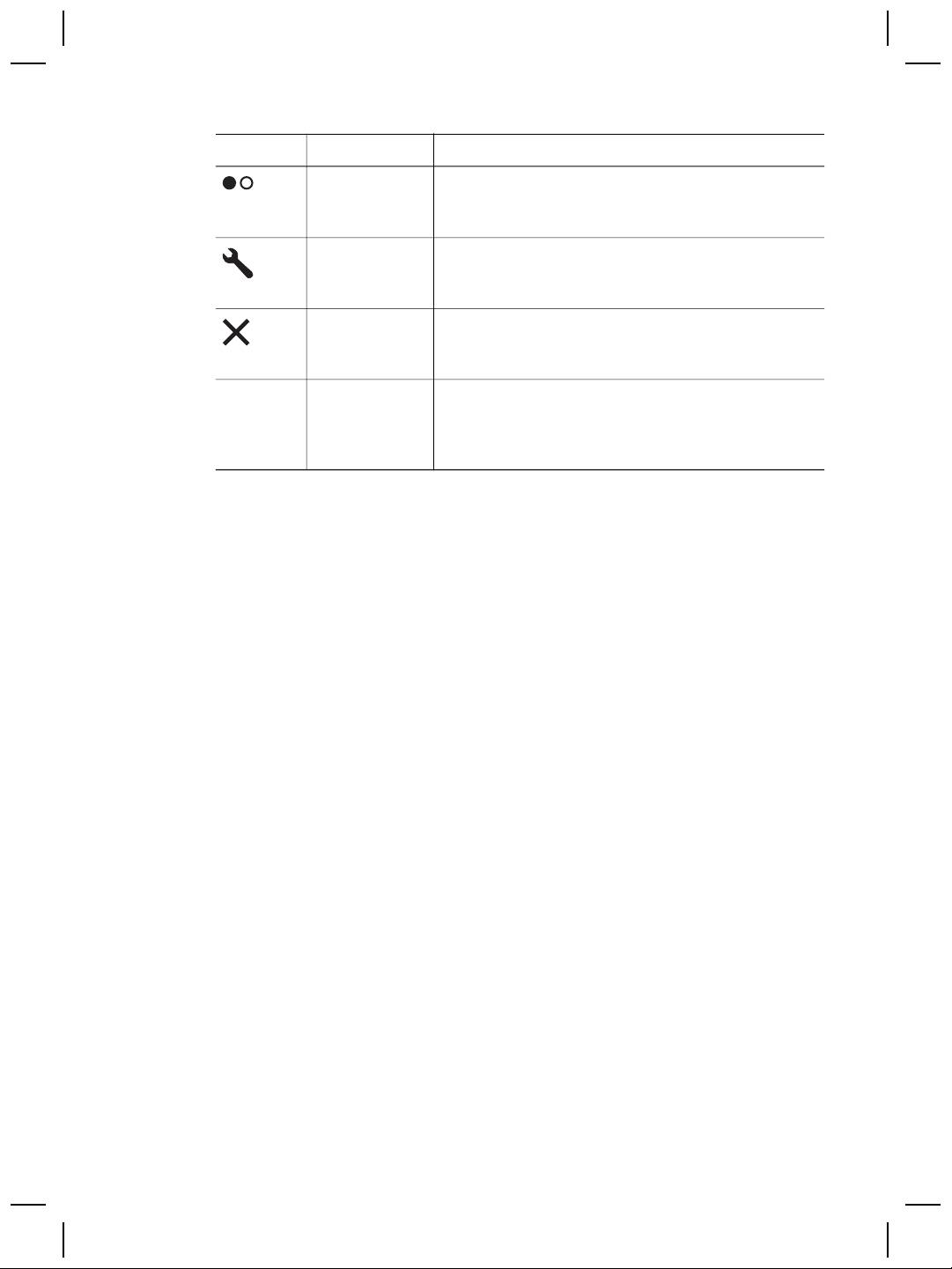
Icon Feature name Description
Color/Black &
Determines whether items will be scanned in color or
White copy
in black and white when you press the Copy button.
button
Button
Opens the Button Settings dialog box. From this
Settings button
dialog box, you can change how the scanner buttons
work.
Cancel button
Cancels a scan while the scanner is scanning, or
cancels a series of scans from the automatic
document feeder (ADF).
16-character
Indicates the number of copies that will be printed
LCD
when you press the Copy button. Also shows status
information and error codes that identify scanner
problems.
Transparent materials adapter (TMA)
You can use the transparent materials adapter (TMA) to scan 35 mm slides or
negatives. For more information about the TMA, see How to scan from the
transparent materials adapter (TMA) on page 13.
Automatic document feeder (ADF)
The scanner comes with an automatic document feeder (ADF) that you can use to
scan multiple documents quickly and easily. For more information, see How to scan
from the automatic document feeder (ADF) on page 11.
Scanning overview
Start scanning in one of three ways:
● From the front panel buttons—to get started quickly using basic functions
● From HP Solution Center—to have more control during the scanning process
● From other software programs
Scan from the scanner front panel buttons
Use the front panel buttons on the scanner for basic scanning functions, such as
scanning pictures and documents. Instructions for using the front panel buttons are
located in this manual.
Scan from HP Solution Center
Scan from HP Solution Center when you want more control during the scanning
process, such as when you want to use more advanced features or change scan
settings.
6
HP Scanjet 8270 Document Flatbed Scanner
