
Acme PLB103S: Attaching Monitor to Wall Plate and Insert the Locking Bar
Attaching Monitor to Wall Plate and Insert the Locking Bar: Acme PLB103S
Table of contents
- Unpacking instructions Important safety information
- WARNING
- Supplied parts list
- Mounting the monitor brackets to a TV with flat back
- Mounting the monitor brackets to a TV with curved back
- Mounting the wall plate to the wall
- Attaching Monitor to Wall Plate and Insert the Locking Bar
GB
Attaching Monitor to Wall
Plate and Insert the Locking
Bar
Warning: Some TVs may require two people to lift! We are not responsible
for personal injury or product damage.
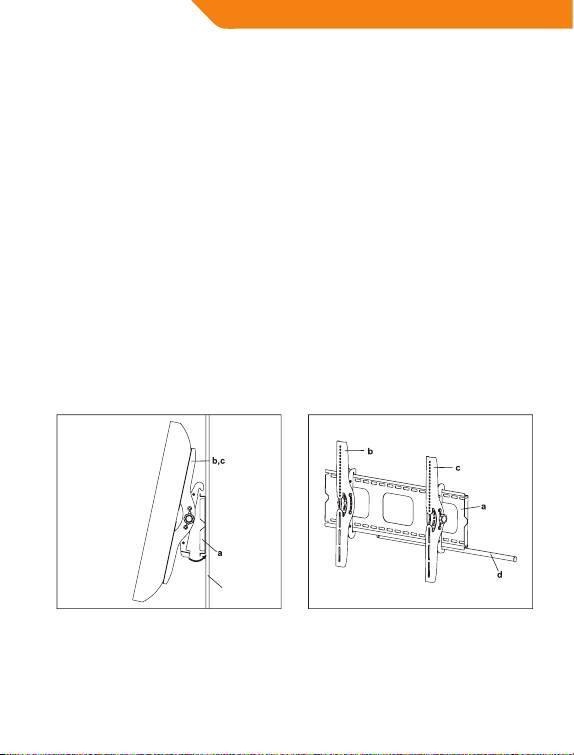
First hook the Monitor Brackets(b,c) over the top of the wall Plate(a), then
let the bottom of the Monitor Brackets rotate to the bottom of the Wall
Plate as shown in the Diagram 3A. Insert the Locking Bar(d) into the slots
in the bottom of the Monitor Brackets so that is sits behind the bottom
tab on the Wall Plate. Once the Locking Bar passes out from the other
side of wall plate, a padlock can be added for additional security. Details
see Diagram 3B.
Diagram 3BDiagram 3A
wall
Thanks for choosing our products, enjoy the using.
10
Top 10 manuals
100.00
NZXT HALE90 1000W99.99
Samsung SM-R38099.97
AEG BSB 18C99.97
Dell 2700W99.97
Smeg KSEC70X99.96
Beurer HDE 4099.96
Pyramida KH 50 v.299.96
MSI CSM-H81M-P3299.96
AEG HR 562799.95
Melissa 640-048