
Acme BH-02: INTRODUCTION BLUETOOTH WIRELESS TECHNOLOGY GET STARTED OVERVIEW CHARGER AND BATTERIES
INTRODUCTION BLUETOOTH WIRELESS TECHNOLOGY GET STARTED OVERVIEW CHARGER AND BATTERIES: Acme BH-02
Table of contents
- INTRODUCTION BLUETOOTH WIRELESS TECHNOLOGY GET STARTED OVERVIEW CHARGER AND BATTERIES
- CHARGE THE BATTERY SWITCH THE HEADSET ON OR OFF PAIR THE HEADSET WITH A COMPATIBLE PHONE DISCONNECT THE HEADSET FROM THE PHONE RECONNECT THE PAIRED HEADSET TO YOUR PHONE
- TROUBLESHOOTING BASIC USE REDIAL THE LAST DIALED NUMBER VOICE DIALING DIALING A NUMBER BY SAYING A NAME ADJUST THE EARPHONE VOLUME ADJUST THE MICROPHONE VOLUME SWITCH THE CALL BETWEEN PHONE AND HEADSET
- BATTERY INFORMATION CARE AND MAINTENANCE
EN
INTRODUCTION
Thank you for purchasing the BH02. Together with Bluetooth mobile phones
and other Bluetooth embedded devices. The Bluetooth headset BH02 allows you
freedom to make and receive calls while on the move or in the oce. You can
connect the headset to a compatible phone that supports Bluetooth wireless
technology.
Please read the user’s manual to make the best use of this headset and its many
features.
BLUETOOTH WIRELESS TECHNOLOGY
Bluetooth wireless technology makes it possible to connect compatible
communication devices without using cables. A Bluetooth connection does not
require that the phone and the headset be in line of sight, but both devices should
be within 10 meters of each other. Connections can be subject to interference from
obstructions, such as walls or other electronic devices.
The headset is compliant with Bluetooth Specication 2.0 supporting the
following proles: Headset proles 1.1 and Hands-Free Proles 1.5 check with the
manufactures of other devices to determine their compatibility with this device.
There may be restrictions on using Bluetooth technology in some locations. Check
with your local authorities or service provider.
GET STARTED
OVERVIEW
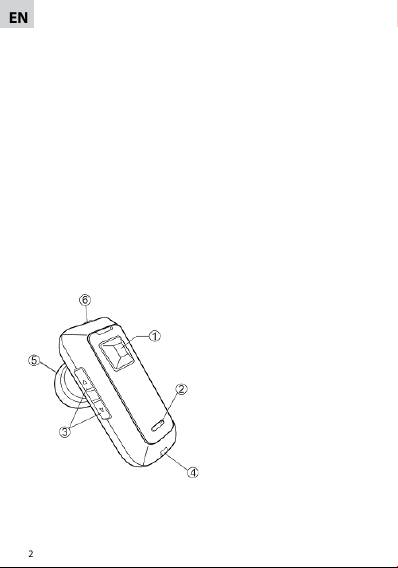
The headset contains the following parts as shown in the gure:
1. Answer/end key.
2. Led Indicator (red/blue)
3. Volume up () and volume down
(∇) buttons
4. Microphone
5. Earphone
6. Charger socket
Before you can start using the headset,
you must charge the battery and pair
the headset with a compatible phone.
Note: Parts of the headset are magnetic.
Metallic materials may be attracted to
the headset. Do not place credit cards or
other magnetic storage media near the
headset, because information stored on
them may be erased.
CHARGER AND BATTERIES
Check the model number of any charger before using it with this device. The
Bluetooth headset is intended for use with the chargers that is included in the
package.
2
