
Sharp AR-M277: ENTERING A METADATA SET AT THE MACHINE
ENTERING A METADATA SET AT THE MACHINE: Sharp AR-M277
Table of contents
- Warranty Trademark Acknowledgments TABLE OF CONTENTS
- INTRODUCTION Third-party Applications
- METADATA ACTIVATION To activate the Application Integration Module: [For MX models:] [For AR models:] NETWORK SCANNER TOOL (NST) SETUP FTP DESTINATION SETUP
- METADATA SETUP Enabling Metadata Delivery [For MX models:] [For AR models:] Configure Metadata Prompts & Delivery Save and Load Settings
- ENTERING A METADATA SET AT THE MACHINE
- METADATA FIELD DESCRIPTIONS
ENGLISH
ENTERING A METADATA SET AT
THE MACHINE
Once the machine has been installed (and machine settings have been configured), users can scan an
image file at the machine, enter metadata associated with the file, and have the metadata automatically
routed to a computer folder or a third-party application. Follow the steps below to enter metadata at the
operation panel.
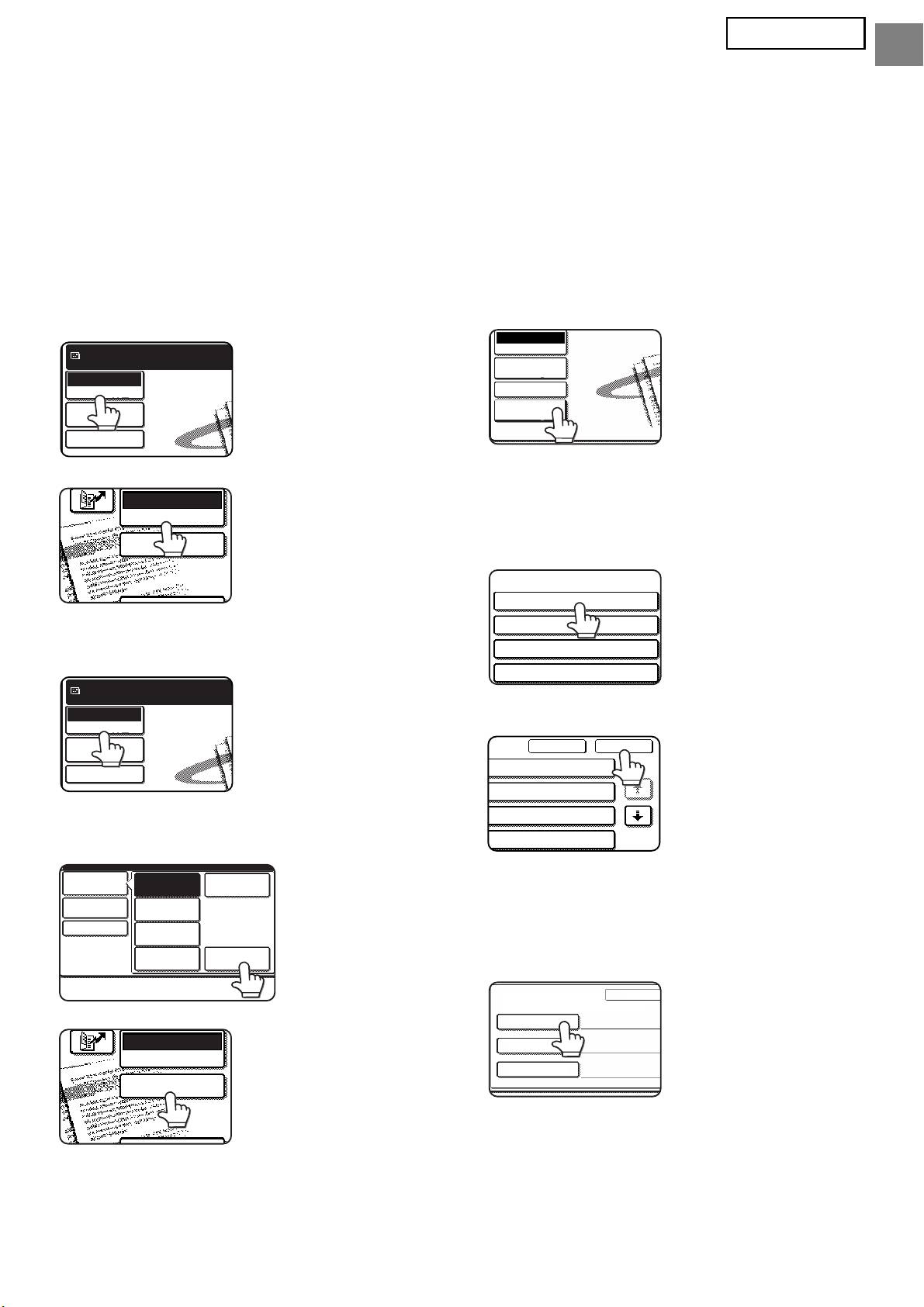
Select the image send function.
Touch the [Metadata Settings] key.
1
4
The base screen appears.
(MX models only)
[For MX models:]
If default settings have
Ready to send.
been configured in the
Scan
Web pages, go to step
Mode Switch
Image
7.
Settings
Send Settings
[For AR models:]
The metadata sets that have been
5
defined will appear (metadata set
selection screen). Touch the key of the
metadata set that you wish to use.
Touch the [Mode Switch] key. (MX
2
models only)
Touch the [OK] key.
6
Touch the [Data Entry] key.
3
[For MX models:]
The items defined in the metadata
7
set will appear as keys (metadata
settings screen). Touch the key of
the item that you wish to enter.
If you selected the
[For AR models:]
wrong metadata set,
touch the [Metadata
Set] key to return to the
metadata set selection
screen.
5
E-MAIL/FTP
MODE SWITCH
DATA ENTRY
Ready to send.
Scan
Mode Switch
Image
Settings
Send Settings
Mode Switch
Scan
Fax
Image
Settings
Internet Fax
Send Settings
USB Mem. Scan
Data EntryPC Scan
E-MAIL/FTP
MODE SWITCH
DATA ENTRY
Data Entry
Mode Switch
Image
Settings
Send Settings
Metadata
Settings
Metadata Set
Metadata Set Name :
Metadata 01
Metadata 03
Metadata 05
Metadata 07
Cancel OK
ta 02
1/2
ta 04
ta 06
ta 08
Metadata Entry
Metadat
Metadata Set Name : Metadata 01
User ID
User Password
Bill Code1
