
Nikon Otro-control-remoto: Timed Photography (3/7)
Timed Photography (3/7): Nikon Otro-control-remoto
Table of contents
- For Your Safety (1/2)
- For Your Safety (2/2) Notices (1/2)
- Body
- When the MC-36 Is Not in Use
- Parts of the MC-36 (3/3) Connecting the MC-36
- Using the MC-36 Timed Photography (1/7)
- Timed Photography (2/7)
- Timed Photography (3/7)
- Timed Photography (5/7) 3. Start the Timer
- 4. End Shooting
- Timed Photography (7/7)
- Manual Release
- Precautions for Use Caring for the MC-36
- Speci cations
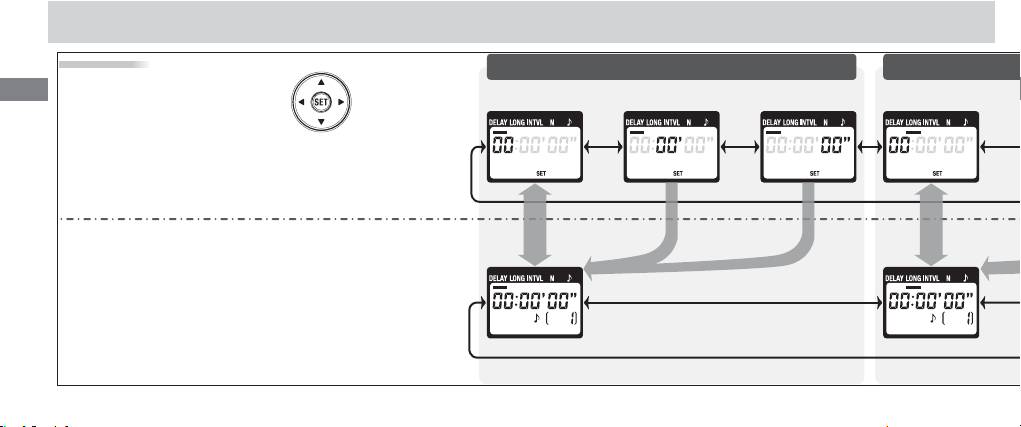
Timed Photography (3/7)
Setting the Timer
Delay (time until shooting starts)
Use the arrow button to set the timer.
En
Press left or right to select, up or down
SecondMinuteHour
Hour
to change. The current selection is in-
Adjust
dicated by the selection cursor ().
settings
Press SET () at any time to complete the opera-
tion and display the new settings for the selected
item. To view other settings, press the arrow but-
ton left or right. The current selection is indicated
Setting
by the selection cursor (). Press the SET button
complete
to edit the current setting as described above.
10
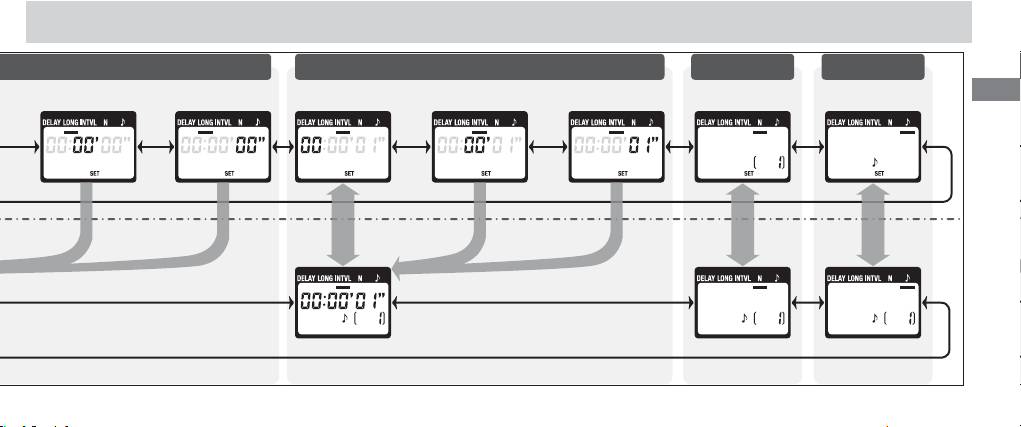
Timed Photography (4/7)
Exposure time Interval Number of shots Speaker
En
Minute Second
Hour Minute Second
11
Top 10 manuals
100.00
NZXT HALE90 1000W99.99
Samsung SM-R38099.97
AEG BSB 18C99.97
Dell 2700W99.97
Smeg KSEC70X99.96
Beurer HDE 4099.96
Pyramida KH 50 v.299.96
MSI CSM-H81M-P3299.96
AEG HR 562799.95
Melissa 640-048