
Nikon Otro-control-remoto: Timed Photography (2/7)
Timed Photography (2/7): Nikon Otro-control-remoto
Table of contents
- For Your Safety (1/2)
- For Your Safety (2/2) Notices (1/2)
- Body
- When the MC-36 Is Not in Use
- Parts of the MC-36 (3/3) Connecting the MC-36
- Using the MC-36 Timed Photography (1/7)
- Timed Photography (2/7)
- Timed Photography (3/7)
- Timed Photography (5/7) 3. Start the Timer
- 4. End Shooting
- Timed Photography (7/7)
- Manual Release
- Precautions for Use Caring for the MC-36
- Speci cations
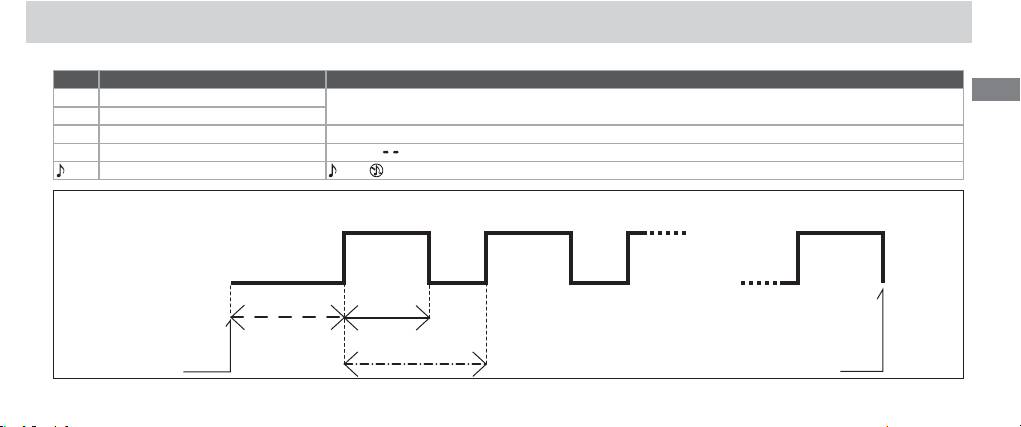
2.2 Adjust the following settings:
Option Description Supported settings
En
DELAY Delay before shutter is released
0 s to 99 hrs 59 min 59 s (in one-second increments)
LONG Exposure time
INTVL Interval 1 s to 99 hrs 59 min 59 s (in one-second increments)
N Number of shots 1 to 399,
(unlimited)
Speaker on/off (on), (off )
Delay, Exposure, and Interval Settings
Number of shots (N)Number of shots (N)
Shutter opensShutter opens
1st frame1st frame 2nd frame2nd frame nth framenth frame
Shutter closesShutter closes
Exposure
Exposure
Delay
time
time
Interval
9
T
Timed Photography (2/7)
imer starts Timer ends
Top 10 manuals
100.00
NZXT HALE90 1000W99.99
Samsung SM-R38099.97
AEG BSB 18C99.97
Dell 2700W99.97
Smeg KSEC70X99.96
Beurer HDE 4099.96
Pyramida KH 50 v.299.96
MSI CSM-H81M-P3299.96
AEG HR 562799.95
Melissa 640-048