
Nikon AF-S Nikkor 300mm f/2.8G ED VR II: Vibration reduction mode (VRⅡ)
Vibration reduction mode (VRⅡ): Nikon AF-S Nikkor 300mm f/2.8G ED VR II
Table of contents
- Notes on Safety Operations
- Observe the following precautions when handling the camera and lens
- Nomenclature
- En
- Major features Usable cameras and available functions
- Focusing
- Focus operation selection switch and focus operation button (See p. 20 for compatible cameras.)
- Vibration reduction mode (VRⅡ)
- Setting the vibration reduction ON/OFF ring switch Setting the vibration reduction mode switch
- Depth of field Setting the aperture Using a built-in rotating tripod collar
- The built-in flash and vignetting Using the lens hood Slip-in filter holder
- Recommended focusing screens
- Lens care Standard accessories Optional accessories
- Specifications
b
Set the focus operation selection switch to MEMORY RECALL.
c
Press a focus operation button. After the lens beeps twice, fully press the
shutter release button to take the picture.
Jp
• The saved focus distance is recalled when a focus operation button is pressed
even when the shutter release button is pressed halfway.
En
• To take pictures at the saved focus distance, hold the focus operation button
down and fully press the shutter release button.
• The lens reverts from memory recall to autofocus or manual focus when the
De
focus operation button is released.
Autofocus (AF) start on the lens (AF-ON)
Fr
a
Set the focus mode switch to A/M or M/A.
b
Set the focus operation selection switch to AF-ON.
Es
c
Press a focus operation button to take pictures.
• Autofocus is activated while a focus operation button is pressed and held
down.
Se
• The AF-ON function can be engaged either from the camera or from the lens.
Ru
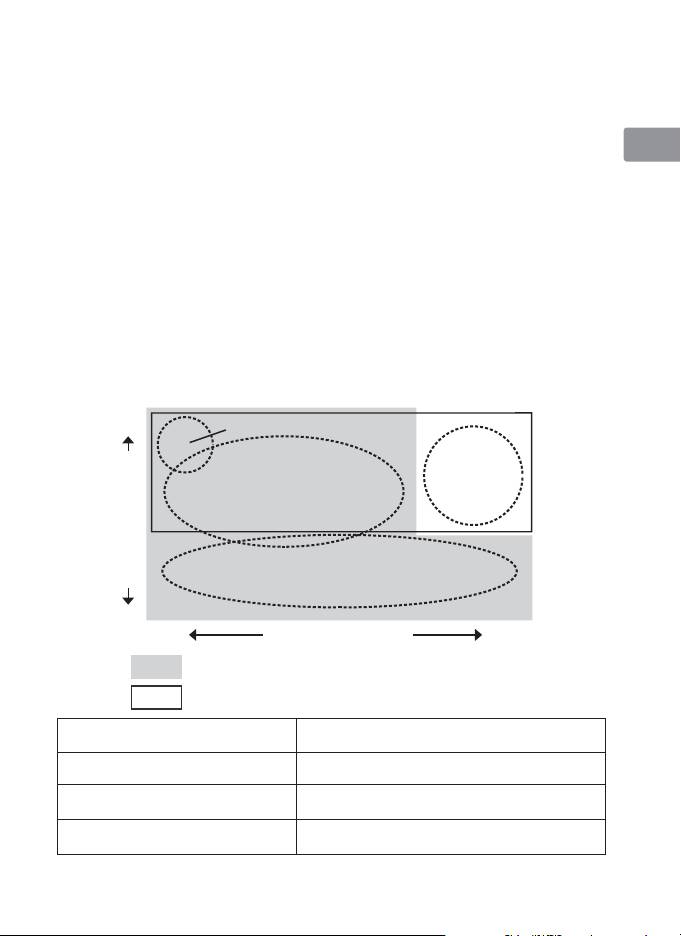
Vibration reduction mode (VRⅡ)
Basic concept of vibration reduction
Nl
Camera shake when using a tripod
High
Strong
It
camera shake
when taking
pictures
Camera shake
Ck
from a moving
vehicle
Ch
Panning shots
Number of vibrations
Kr
Low
Weak
Strength of vibrations
Strong
Set the vibration reduction mode switch to NORMAL.
Set the vibration reduction mode switch to ACTIVE .
Set the vibration reduction mode switch to
When taking pictures
either NORMAL or ACTIVE.
Set the vibration reduction mode switch
When taking panning shots
to NORMAL.
When taking pictures from
Set the vibration reduction mode switch
a moving vehicle
to ACTIVE.
When taking pictures using
Set the vibration reduction mode switch
a tripod
to either NORMAL or ACTIVE .
23
