
Nikon 40mm-f-28G-AF-S-DX-Micro-Nikkor: ■ Changes to the Effective f-number ■ Built-in Flash Units ■ The Lens Hood
■ Changes to the Effective f-number ■ Built-in Flash Units ■ The Lens Hood: Nikon 40mm-f-28G-AF-S-DX-Micro-Nikkor
Table of contents
- For Your Safety
- ■ Parts of the Lens
- ■ Attaching and Removing the Lens ■ Focus
- M/A (Autofocus with Manual Override) The Focus Limit Switch ■ Aperture ■ Depth of Field
- ■ Reproduction Ratio ■ Close ups and Reproduction Work ■ Exposure Factor
- ■ Changes to the Effective f-number ■ Built-in Flash Units ■ The Lens Hood
- ■ Lens Care ■ Supplied Accessories
- ■ Compatible Accessories ■ Specifications
Jp
■ Changes to the Effective f-number
With this lens, the higher the reproduction ratio (the shorter
En
the focus distance), the darker the image that falls on the
image sensor and the higher the effective f-number (see the
De
figure on page 162).
The camera automatically compensates
for this effect when metering exposure or adjusting flash
Fr
output using TTL flash control, and shows the adjusted value
Es
for aperture in the control panel and viewfinder displays.
■ Built-in Flash Units
Sv
When using the built-in flash on cameras equipped with a
Ru
built-in flash unit, shoot at ranges of 0.6 m (2 ft) or more and
remove the lens hood to prevent vignetting (shadows created
Nl
where the end of the lens obscures the built-in flash).
Pt
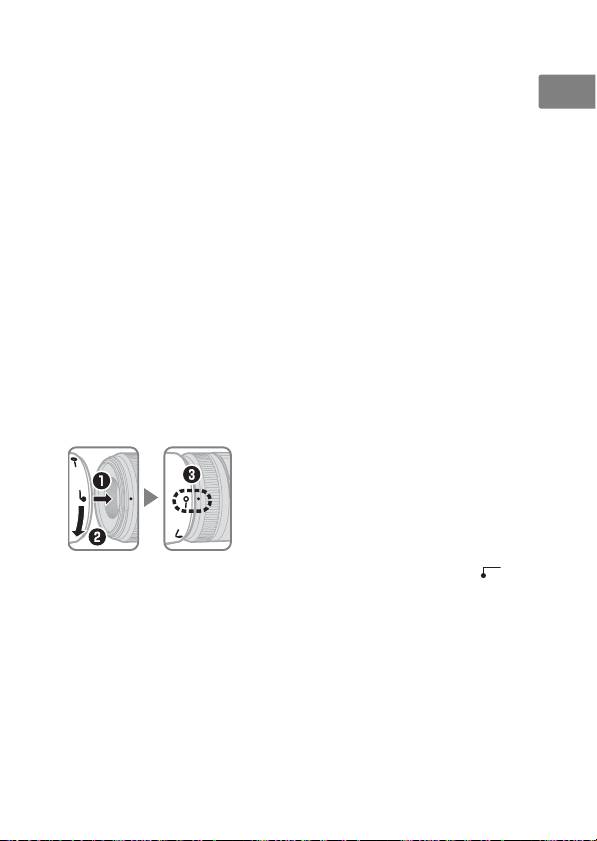
■ The Lens Hood
The lens hoods protect the lens and block stray light that
Pb
would otherwise cause flare or ghosting.
It
Align the lens hood lock mark (—{) with the
lens hood mounting mark (●) on the lens
Cz
(e).
Sk
When attaching or removing the hood, hold it near the
Ro
symbol on its base and avoid gripping it too tightly.
Ua
Vignetting may occur if the hood is not correctly attached.
The hood can be reversed and mounted on the lens when not
Ck
in use. When the hood is reversed, it can be attached and
removed by rotating it while holding it near the lock mark (
—
{
).
Ch
Kr
Id
17
