
Nikon 40mm-f-28G-AF-S-DX-Micro-Nikkor: ■ Attaching and Removing the Lens ■ Focus
■ Attaching and Removing the Lens ■ Focus: Nikon 40mm-f-28G-AF-S-DX-Micro-Nikkor
Table of contents
- For Your Safety
- ■ Parts of the Lens
- ■ Attaching and Removing the Lens ■ Focus
- M/A (Autofocus with Manual Override) The Focus Limit Switch ■ Aperture ■ Depth of Field
- ■ Reproduction Ratio ■ Close ups and Reproduction Work ■ Exposure Factor
- ■ Changes to the Effective f-number ■ Built-in Flash Units ■ The Lens Hood
- ■ Lens Care ■ Supplied Accessories
- ■ Compatible Accessories ■ Specifications
Jp
■ Attaching and Removing the Lens
En
Attaching the Lens
z
Turn the camera off and remove the camera body cap.
De
x
Remove the rear lens cap.
Fr
c
Attach the lens.
Keeping the lens mounting mark aligned with the
Es
mounting mark on the camera body, position the lens in
the camera’s bayonet mount and then rotate the lens
Sv
counter-clockwise until it clicks into place with the lens
Ru
mounting mark at the top.
Removing the Lens
Nl
z
Turn the camera off.
Pt
x
Remove the lens.
To remove the lens, press the lens release button while
Pb
turning the lens clockwise.
It
■ Focus
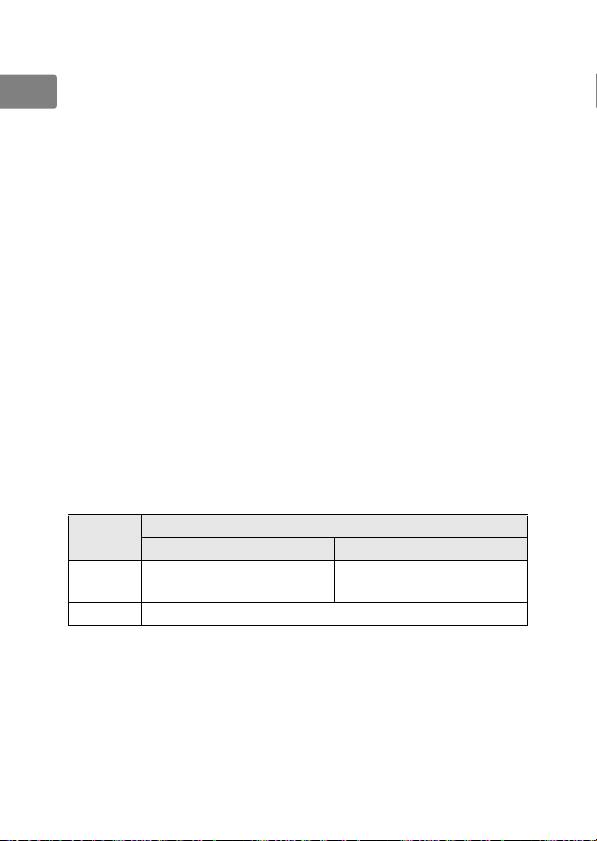
Supported focus modes are shown in the following table (for
Cz
information on camera focus modes, see the camera manual).
Lens focus mode
Camera
Sk
focus mode
M/A M
Ro
Autofocus with manual
Manual focus with electronic
AF
override
rangefinder
Ua
MF Manual focus with electronic rangefinder
Ck
Ch
Kr
Id
14
