
JVC KD-DV7402: Basic operations
Basic operations: JVC KD-DV7402
Basic operations
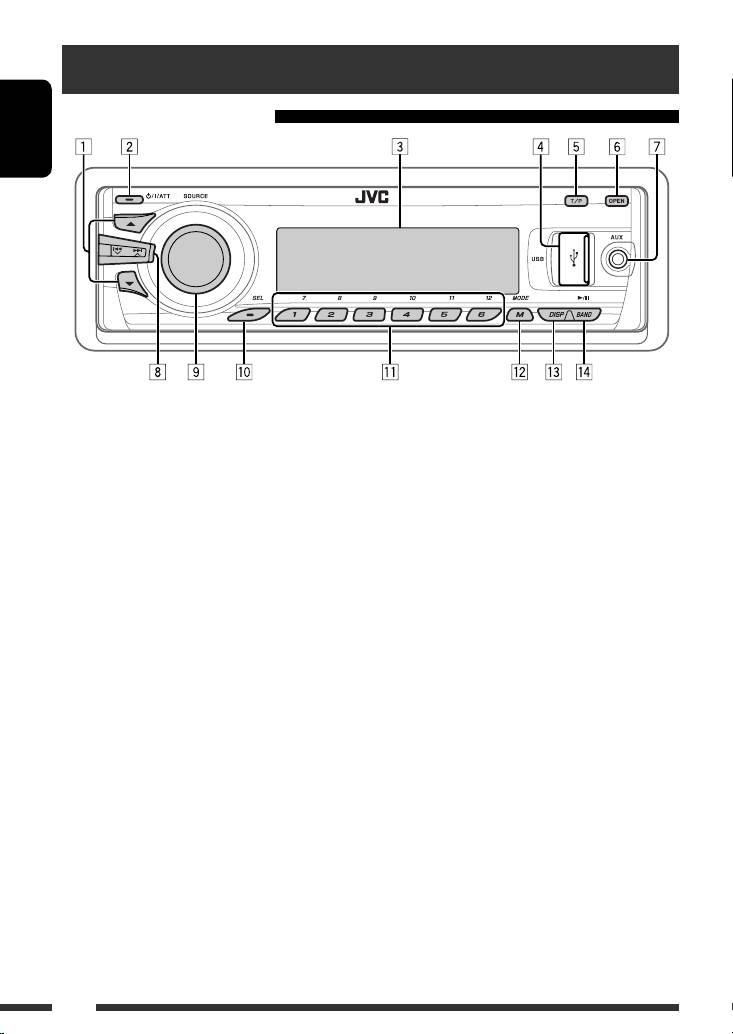
Using the control panel
ENGLISH
1 • DAB: Select DAB service.
9 • Volume control [Turn].
1
• DISC/USB/CD-CH: Select title/program/
• Select the source [Press] *
.
2
2
2
playlist/folder.
TUNER = DAB *
= DISC *
= USB *
(or
2
2
2
• USB-iPod: Enter the main menu [Hold].
USB-iPod) *
= CD-CH *
/iPod *
(or EXT IN)
2
2
• iPod: Enter the main menu/Pause playback/
= BT-PHONE *
= BT-AUDIO *
= LINE IN
Confirm selection.
= AV IN = (back to the beginning)
• BT-PHONE/BT-AUDIO: Select a registered
p • Select/adjust the sound mode.
device.
• Enter the PSM settings [Hold].
2 • Turn on the power.
q • TUNER/DAB: Select preset station/DAB service.
• Turn off the power [Hold].
• DISC/USB/CD-CH: Select chapter/title/
• Attenuate the sound (if the power is on).
program/folder/track/disc (for CD changer).
3
3 Display window
• BT-PHONE: Dial preset phone number *
.
4 USB (Universal Serial Bus) input jack
w • Enter functions mode.
5 • Activate/deactivate TA Standby Reception.
• BT-PHONE: Activate Voice Dialing [Hold].
• Enter programme type searching mode [Hold].
e Change the display information and pattern.
6 Flip down the control panel.
r • TUNER/DAB: Select the bands.
• To eject the disc, flip down the control panel
• DISC/USB/USB-iPod: Start/pause playback.
then press 0 on the unit.
• BT-AUDIO: Start/pause playback.
7 AV-IN (video) input jack
8 • TUNER: Search for station.
1
• DAB: Search for DAB ensemble.
*
Holding SOURCE will enter Bluetooth menu if a
• DISC/USB/USB-iPod/CD-CH/iPod: Select
Bluetooth phone is connected.
2
chapter/track.
*
You cannot select these sources if they are not ready
• BT-AUDIO: Reverse skip/forward skip.
or not connected.
3
*
For storing preset phone number, see page 32.
8
EN02-09_KD-DV7402_003A_f.indd 8EN02-09_KD-DV7402_003A_f.indd 8 2/19/08 5:22:07 PM2/19/08 5:22:07 PM
Using the remote controller (RM-RK252)
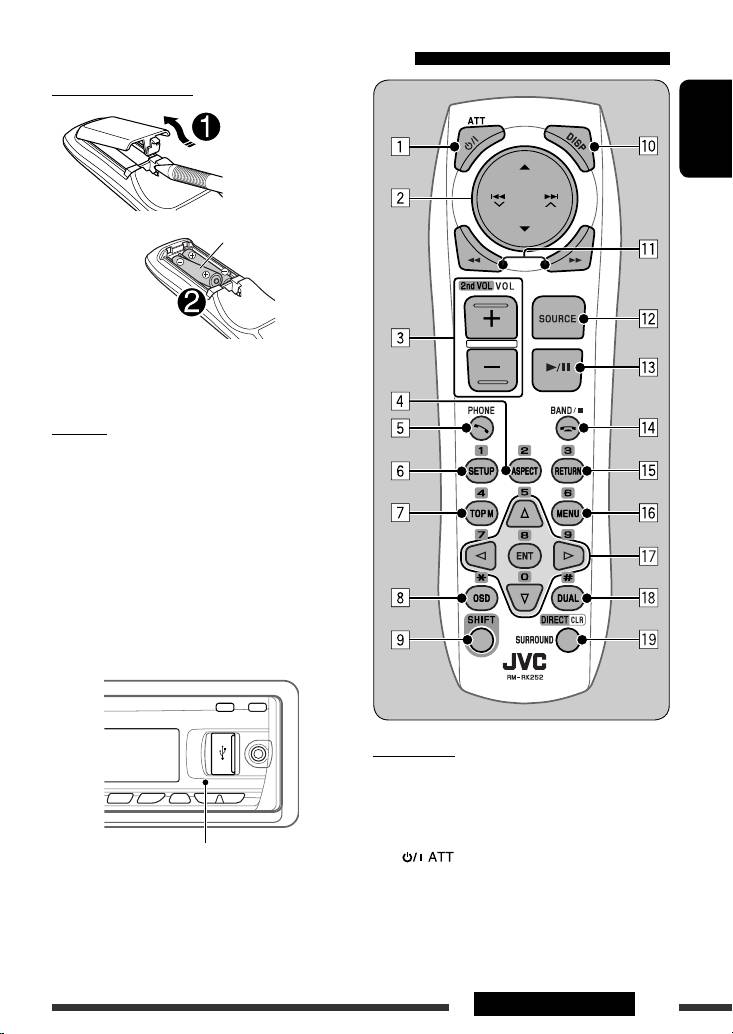
Installing the battery
ENGLISH
R03/LR03/AAA
Insert the batteries into the remote controller by
matching the polarity (+ and –) correctly.
Caution:
Battery shall not be exposed to excessive heat such as
sunshine, fire, or the like.
If the effectiveness of the remote controller
decreases, replace both batteries.
Before using the remote controller:
• Aim the remote controller directly at the remote
sensor on the unit.
• DO NOT expose the remote sensor to bright light
(direct sunlight or artificial lighting).
IMPORTANT:
If Dual Zone is activated (see page 27), the remote
controller only functions for operating the DVD/CD
player.
Remote sensor
1
1*
button
• Turns the power on if pressed briefly or
attenuates the sound when the power is on.
• Turns the power off if pressed and held.
Continued on the next page
9OPERATIONS
EN02-09_KD-DV7402_003A_5.indd 9EN02-09_KD-DV7402_003A_5.indd 9 1/22/08 11:14:17 AM1/22/08 11:14:17 AM
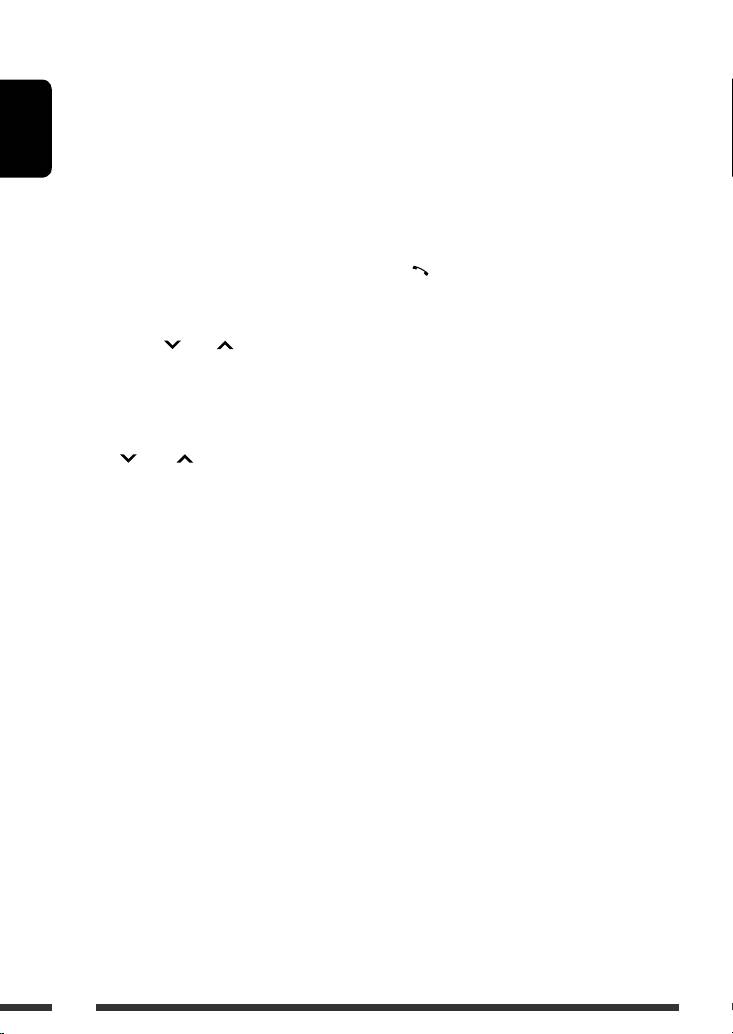
2 5/∞ buttons
3 VOL (volume) + / – buttons
• TUNER/DAB: Selects the preset stations/
• Adjusts the volume level.
services.
2nd VOL (volume) buttons
• DISC:
• Adjust the volume level through the 2nd AUDIO
– DVD-Video: Selects the title.
OUT plug when pressed with SHIFT button (see
– DVD-VR: Selects the program/playlist.
ENGLISH
page 27).
– DivX/MPEG Video/MP3/WMA/WAV: Selects
the folders if included.
2
4 *
ASPECT button
• USB:
• Not applicable for this unit.
– DivX/MPEG Video/MP3/WMA/WAV: Selects
the folders if included.
1
5*
PHONE button
• CD-CH: Selects the folders if included.
• Answer incoming calls.
• iPod:
• Enters “Redial” menu when a Bluetooth phone
–
5 : Enters the main menu (then 5 / ∞ /
is connected [Hold].
4 / ¢ work as menu
selecting buttons.)
2
6 *
SETUP button
5 : Returns to the previous menu.
• Enters disc setup menu (during stop).
∞ : Confirms the selection.
– ∞ : Pauses or resumes playback.
2
7 *
TOP M (menu) button
4 / ¢ buttons
• DVD-Video/DivX: Shows the disc menu.
• TUNER:
• DVD-VR: Shows the Original Program screen.
– Searches for stations automatically if pressed
• VCD: Resumes PBC playback.
briefly.
• USB-iPod: Enters the search mode menu (see
– Searches for stations manually if pressed and
page 39).
held.
2
• DAB:
8 *
OSD (on-screen display) button
– Select ensembles if pressed briefly.
• Shows the on-screen bar.
– Searches for ensembles if pressed and held.
• DISC/USB/USB-iPod/CD-CH:
9 SHIFT button
– Reverse skip/forward skip if pressed briefly.
• Functions with other buttons.
– Reverse search/forward search if pressed and
held.
p DISP (display) button
• BT-AUDIO: Reverse skip/forward skip if pressed
• Changes the display information.
briefly.
• iPod:
q 1 / ¡ buttons
– Reverse skip/forward skip if pressed briefly.
• DVD-Video: Slow motion playback (during
– Reverse search/forward search if pressed and
pause).
held.
• DVD-VR/VCD: Forward slow motion playback
In menu selecting mode:
(during pause).
– Selects an item if pressed briefly. (Then, press
• DISC/USB/USB-iPod: Reverse search/forward
∞ to confirm the selection.)
search.
– Skips 10 items at a time if pressed and held.
1
w*
SOURCE button
• Selects the source.
10
EN10-19_KD-DV7402_003A_f.indd 10EN10-19_KD-DV7402_003A_f.indd 10 2/19/08 5:24:46 PM2/19/08 5:24:46 PM
e 3 (play) / 8 (pause) button
DIRECT button
• DISC/USB/USB-iPod/BT-AUDIO: Starts/
• DISC/USB: Enters direct search mode for
pauses playback.
chapter/title/program/playlist/folder/track
when pressed with SHIFT button (see page 20
for details).
r (end call) button
ENGLISH
• Ends the call.
CLR (clear) button
• DISC/USB: Erases the misentry when pressed
BAND /
7 (stop) buttons
with SHIFT button.
• TUNER/DAB: Selects the bands.
• DISC/USB/USB-iPod/BT-AUDIO: Stops
playback.
1
*
When Dual Zone is activated, these buttons cannot be
used.
2
t *
RETURN button
2
*
Functions as number buttons/* (asterisk)/# (hash)
• VCD: Returns to the PBC menu.
when pressed with SHIFT button.
• USB-iPod: Returns to Control Screen.
–
TUNER/DAB: Selects the preset stations/services
(1 – 6).
2
y *
MENU button
–
DISC: Enters chapter/title/program/playlist/folder/
• DVD-Video/DivX: Shows the disc menu.
track number after entering search mode by
• DVD-VR: Shows the Playlist screen.
pressing SHIFT and DIRECT (see page 20 for details).
• VCD: Resumes PBC playback.
• USB-iPod: Enters the search mode menu (see
page 39).
2
u *
% / fi buttons
• DVD-Video: Makes selection/settings.
• CD-CH: Changes discs in the magazine.
@ / # buttons
• DVD-Video: Makes selection/settings.
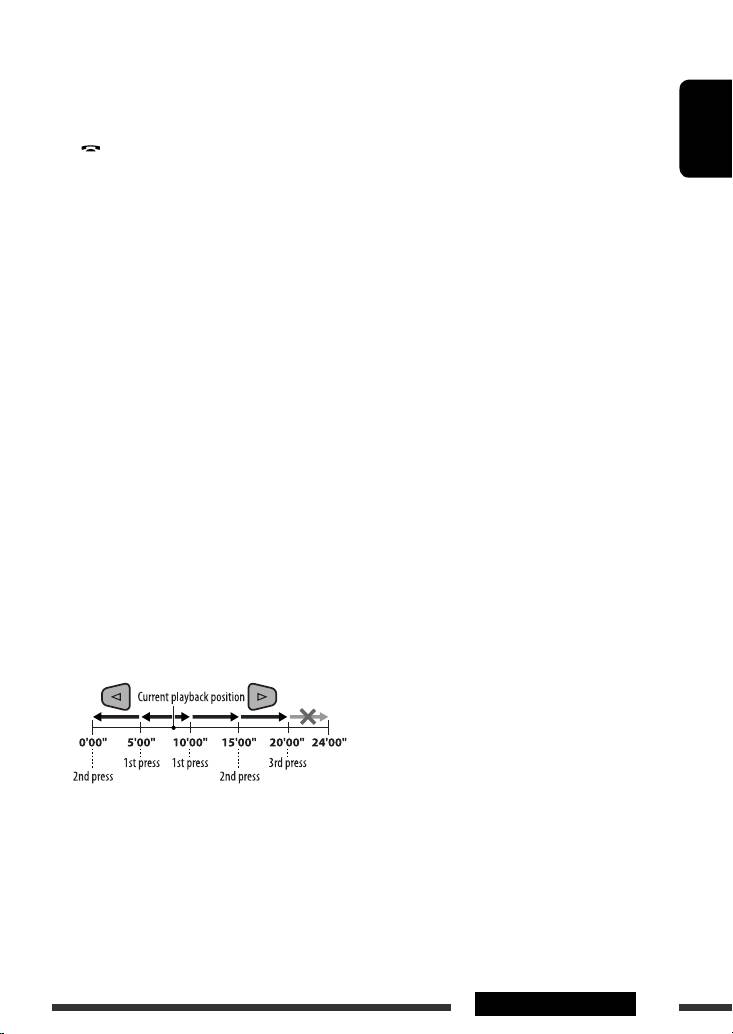
• DivX/MPEG Video: Skips back or forward by
about five minutes.
ENT (enter) button
• Confirms selection.
2
i *
DUAL button
• Activates or deactivates Dual Zone.
o SURROUND button
• Not applicable for this unit.
11OPERATIONS
EN10-19_KD-DV7402_003A_f.indd 11EN10-19_KD-DV7402_003A_f.indd 11 2/11/08 10:24:50 AM2/11/08 10:24:50 AM
Table of contents
- Playable disc type
- Preparation
- Basic operations
- Listening to the radio
- Disc operations
- Listening to the USB device
- Dual Zone operations
- Listening to the Bluetooth ® devices
- Listening to the CD changer
- Listening to the DAB tuner
- Listening to the iPod
- Listening to the other external components
- Selecting a preset sound mode
- General settings — PSM
- Disc setup menu
- Bluetooth settings
- Maintenance
- More about this unit
- Troubleshooting
- Specifications
- Type de disque compatible
- Préparation
- Opérations de base
- Écoute de la radio
- Opérations des disques
- Écoute du périphérique USB
- Fonctionnement sur Deux Zones
- Écoute d’un périphérique Bluetooth ®
- Écoute du changeur de CD
- Écoute du tuner DAB
- Écoute de iPod
- Écoute d’un autre appareil extérieur
- Sélection d’un mode sonore préréglé
- Réglages généraux—PSM
- Menu de réglage du disque
- Réglages Bluetooth
- Entretien
- Pour en savoir plus à propos de cet autoradio
- Guide de dépannage
- Spécifications
- Тип воспроизводимых дисков
- Подготовка
- Основные операции
- Прослушивание радио
- Операции с дисками
- Прослушивание устройства USB
- Операции в режиме “Dual Zone”
- Прослушивание устройств Bluetooth®
- Прослушивание с устройства автоматической смены компакт-дисков
- Прослушивание тюнера DAB
- Прослушивание проигрывателя iPod
- Прослушивание с других внешних устройств
- Выбор запрограммированного режима звучания
- Общие настройки—PSM
- Меню настройки диска
- Настройки Bluetooth
- Обслуживание
- Дополнительная информация о приемнике
- Устранение проблем
- Технические характеристики
