
Canon MF3010: English Setting a Paper Type Réglage du type de papier Impostazione di un tipo di carta Einstellen eines Papiertyps
English Setting a Paper Type Réglage du type de papier Impostazione di un tipo di carta Einstellen eines Papiertyps: Canon MF3010
Table of contents
- Starter Guide
- Check! Check!
- English
- English Contents Table des matières Sommario Inhalt
- English About the Supplied Manuals A propos des manuels fournis Informazioni sui manuali forniti a corredo con il prodotto Informationen zu den mitgelieferten Handbüchern
- English Connecting the Power Cord and Turning ON the Power Branchement du cordon d'alimentation et allumage de la machine Collegamento del cavo di alimentazione e accensione della macchina Anschließen des Netzkabels und Einschalten des Geräts
- English Setting a Paper Type Réglage du type de papier Impostazione di un tipo di carta Einstellen eines Papiertyps
- English English
- English Installing the Driver/Software Installation du pilote/logiciel Installazione di driver/software Installieren des Treibers bzw. der Software
- Perform Useful Tasks
English Français
Italiano Deutsch
4
1 2 3 4 5
English
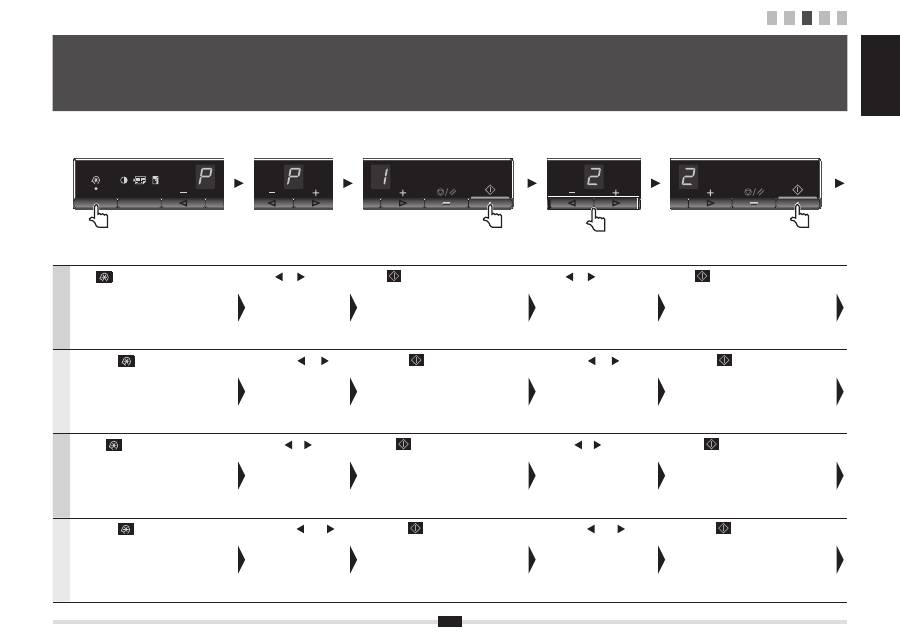
Press [
] (Menu setting key), and then start
the menu operation.
Press [ ] or [ ] until "P" is
displayed.
Press [
], and set the menu to be able to
change the settings.
Press [ ] or [ ] to change the
setting values.
Press [
] to con
fi
rm the setting.
Français
Appuyez sur [
] (touche de réglage du
menu), puis commencez à utiliser le menu.
Appuyez sur [ ] ou [ ]
jusqu'à ce que la lettre "P"
s'af
fi
che.
Appuyez sur [
] et sélectionnez le menu de
manière à pouvoir modi
fi
er les paramètres.
Appuyez sur [ ] ou [ ] pour
modi
fi
er les valeurs de réglage.
Appuyez sur [
] pour con
fi
rmer le réglage.
Italiano
Premere [
] (tasto Impostazioni menu),
quindi iniziare a utilizzare il menu.
Premere [ ] o [ ]
fi
no a
visualizzare la lettera "P".
Premere [
] e impostare il menu in modo da
poter modi
fi
care le impostazioni.
Premere [ ] o [ ] per modi
fi
care
i valori di impostazione.
Premere [
] per confermare l'impostazione.
Deutsch
Drücken Sie [
] (Menüeinstellungstaste) und
starten Sie dann den Menübetrieb.
Drücken Sie [ ] oder [ ],
bis "P" angezeigt wird.
Drücken Sie [
], und stellen Sie das Menü
so ein, dass die Einstellungen geändert werden
können.
Drücken Sie [ ] oder [ ], um
die Einstellungswerte zu ändern.
Drücken Sie [
], um die Einstellung zu
bestätigen.
