
Canon LEGRIA HF R38: Wi-Fi connection Wi-Fi connection Wi-Fi connection
Wi-Fi connection Wi-Fi connection Wi-Fi connection: Canon LEGRIA HF R38
Table of contents
- Table of Contents Trademark Acknowledgements
- Getting Started Introduction to Wi-Fi
- Wi-Fi connection Wi-Fi connection Wi-Fi connection
- Connecting to a Wi-Fi Network (Wi-Fi Protected Setup) General requirements POINTS TO CHECK About the camcorder's Wi-Fi standard
- Operating modes: 1 Press 2 Set up a new connection point.
- 3 WPS button setup: Press and hold the WPS button on your wireless router. 4 Within 2 minutes, touch [OK] on the camcorder's screen. 5 Touch [Automatic] to automatically obtain an IP address. 6 Select whether to test the settings. 7 Save the settings of the connection point.
- Requirements for Wi-Fi Functions Transferring Files to a Computer or FTP Server General requirements
- Uploading Recordings to YouTube and Facebook General requirements Uploading Videos Using an iOS Device
- Wireless Playback on a DLNA-Compatible Device General requirements
- Glossary
- Troubleshooting List of Messages
- Wi-Fi connection terminated Wireless communication is not working correctly
4
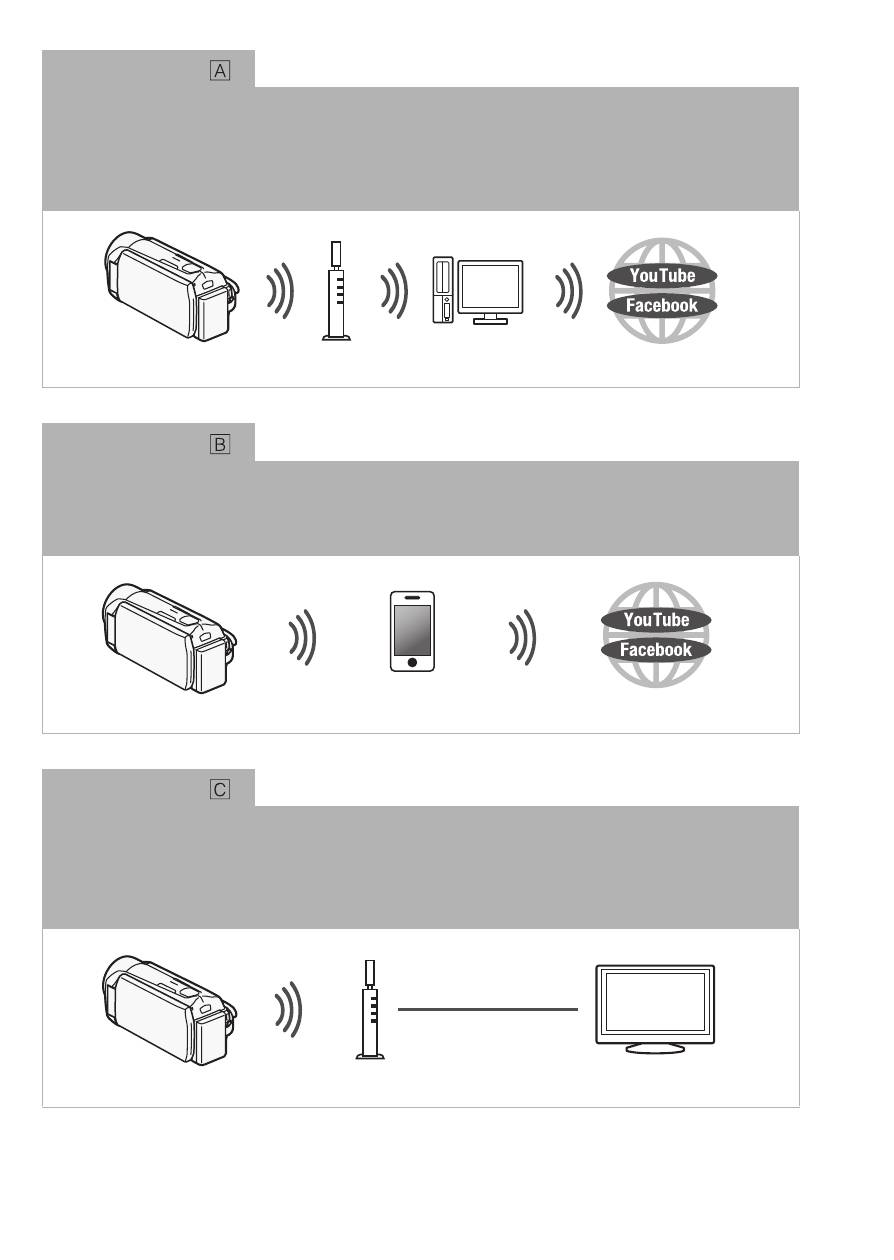
Wi-Fi connection
Infrastructure mode
Connect the camcorder to an access point on a Wi-Fi network (explained in this guide).
Use this connection if you plan to save your recordings on a computer or FTP server
(
;
Transferring Files to a Computer or FTP Server
) and then upload videos to
YouTube and Facebook (
;
Uploading Recordings to YouTube and Facebook
).
Wi-Fi connection
Ad hoc mode
Connect the camcorder to an iOS device (
;
Uploading Videos Using an iOS
Device
). Use this connection type if you plan to upload videos to YouTube and Facebook
on the go (
;
Uploading Recordings to YouTube and Facebook
).
Wi-Fi connection
Infrastructure mode
Connect the camcorder to an access point on a Wi-Fi network (explained in this guide).
Use this connection if you plan to play back videos on a DLNA-compatible TV
(
;
Wireless Playback on a DLNA-Compatible Device
) connected to the network
using a LAN cable.
Access point
Computer
iOS device
Access point
LAN cable
HDTV


