
Yamaha KMA-700: REMOTE CONTROL
REMOTE CONTROL: Yamaha KMA-700
Table of contents
- IMPORTANT SAFETY INSTRUCTIONS
- FCC INFORMATION (for US customers)
- Caution: Read this before operating your unit
- CONTENTS
- HANDLING PRECAUTIONS BEFORE CONNECTING
- NAMES OF PARTS AND THEIR FUNCTIONS Front panel
- NAMES OF PARTS AND THEIR FUNCTIONS Rear panel
- NAMES OF PARTS AND THEIR FUNCTIONS
- SYSTEM CONNECTIONS
- CONNECTIONS
- CONNECTIONS
- CONNECTIONS
- CONFIGURATION DIAGRAM
- REMOTE CONTROL
- REMOTE CONTROL
- GENERAL OPERATION
- SETUP MODE
- SETUP MODE
- TROUBLESHOOTING MAINTENANCE
- AFTER-SALES SERVICING KARAOKE ETIQUETTE COPYRIGHT
- SPECIFICATIONS
REMOTE CONTROL
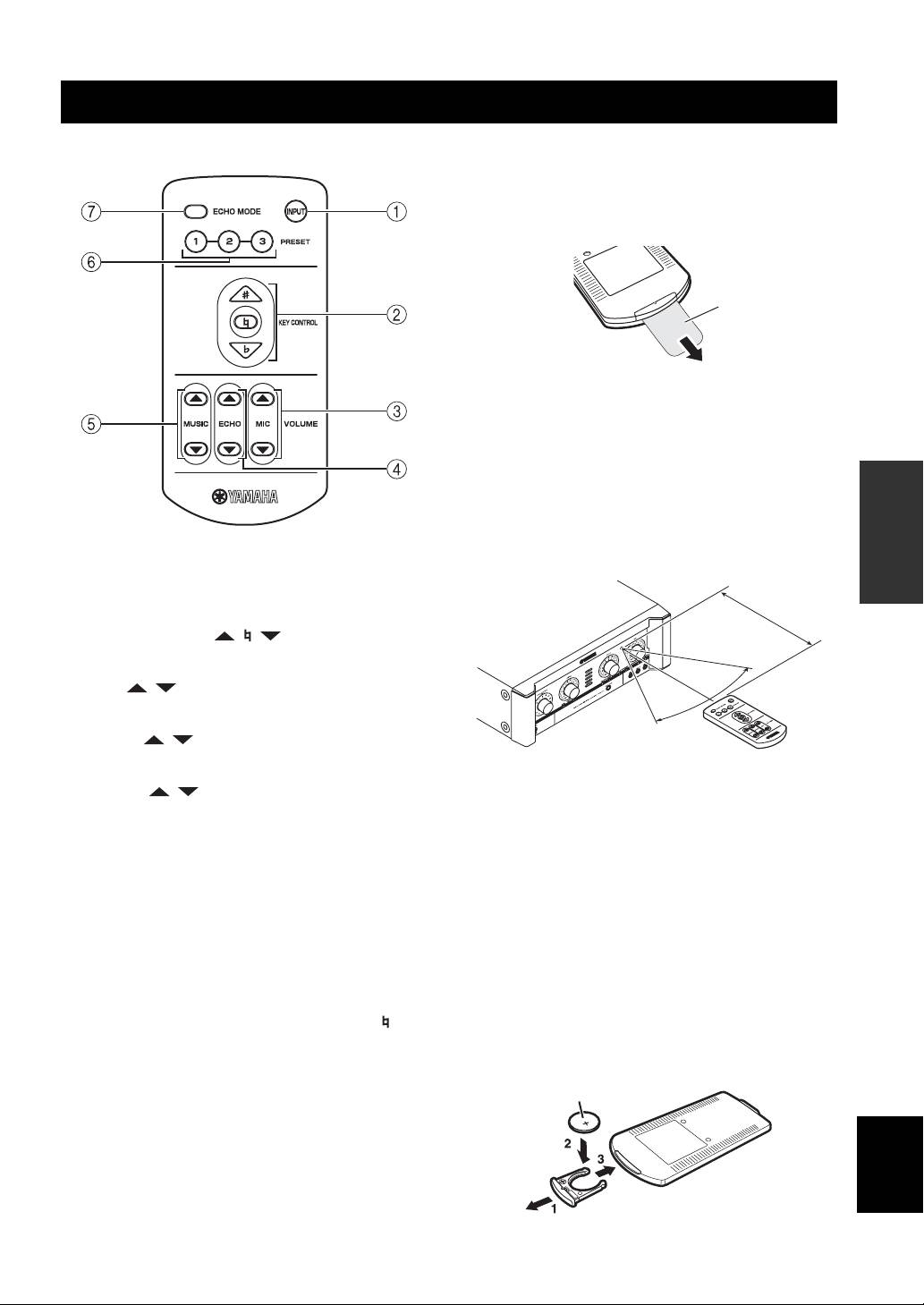
■ Names of parts and their functions
■ Preparing the remote control
The remote control comes with the battery already
installed. Before using the remote control for the very first
time, pull out the plastic tab, as shown.
Plastic tab
For information on replacing the battery, refer to next
section.
■ Operation of remote control
1. Remote control
OPERATION
The distance between the remote control and the remote
sensor of this unit should be within 6 m (20’). Be sure to
aim the remote control directly at the remote sensor on the
front panel.
1 INPUT
INPUT is not available in default setting.
Within 6 m
(20’)
To activate INPUT, refer to “Input mode” on page 14.
2 KEY CONTROL ( / / )
Transpose the key of the played music.
30°
3 MIC ( / )*
30°
Adjust the overall volume of the microphones.
4 ECHO ( / )*
Adjust the amount of echo.
2. Loading a battery
5 MUSIC ( / )*
The life of the battery used in the remote control is about
Adjust the music volume.
half a year under normal use. Remove the battery if the
* The LED on the corresponding control on the front panel blinks
remote control is not used for an extended period. When
during adjustment.
the battery becomes weak, replace with a new CR2025
battery.
6 PRESET (1/2/3)
Recall saved preset settings for MIC volume/ECHO
To replace the battery:
amount/MUSIC volume/ECHO MODE.
1. Using a small screwdriver, carefully slide out the
battery holder.
To save current settings of the above, press the desired
2. Remove the expired battery, and place the new
button (PRESET 1, 2, 3 or KEY CONTROL on the front
CR2025 battery onto the battery holder with the + side
panel) for 3 seconds. Pressing KEY CONTROL saves
facing up.
settings to PRESET 1. When save is completed, “ ” on
3. Slide the battery holder into the remote control, and
the KEY CONTROL blinks once. You can save up to 3
push it so that it clicks shut.
presets (PRESET 1/2/3) on this unit. Refer to “Power ON
recall” on page 14.
+ side up
7 ECHO MODE
English
Select NORMAL, WIDE or SPACIOUS (KMA-700 only)
echo.
11 En
