
Sharp MX-1810U: About consumables Handling precautions Laser information Noise emission values
About consumables Handling precautions Laser information Noise emission values: Sharp MX-1810U
Table of contents
- START GUIDE English - START GUIDE
- CAUTIONS Power notes Installation notes
- About consumables Handling precautions Laser information Noise emission values
- SPECIFICATIONS Basic Specifications / Copier specifications OPERATION MANUALS AND HOW TO USE THEM Automatic document feeder HOW TO USE THE OPERATION GUIDE (on the accessory CD-ROM) Tray Fax Specifications
- Information on Disposal for Business Users INFORMATION ON DISPOSAL For the users of the fax function Important safety instructions Trademark acknowledgments TO THE ADMINISTRATOR OF THE MACHINE System settings password Forwarding all transmitted and received data to the administrator (document administration function)
EN2
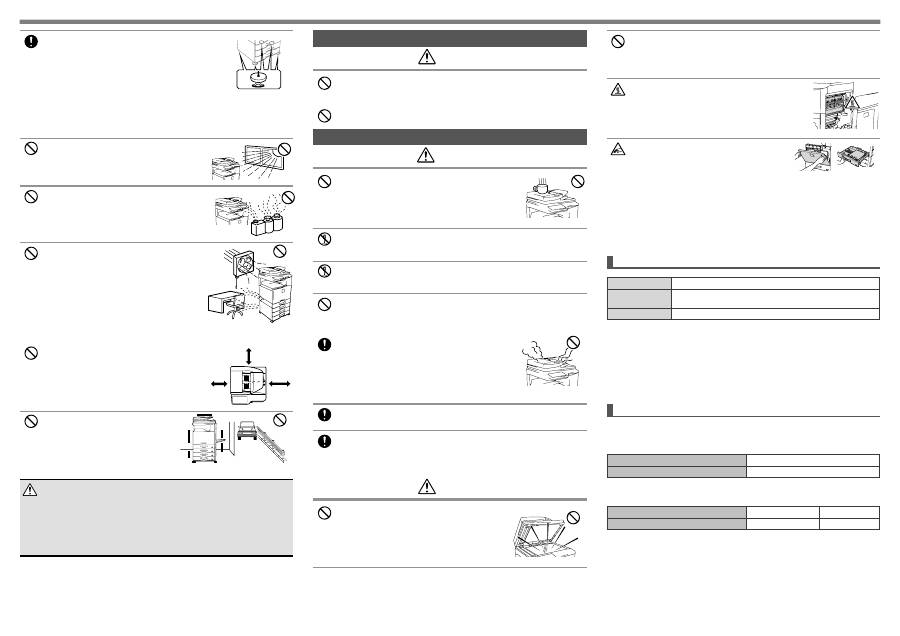
When the machine is installed, the adjusters (5) must be
lowered to the floor to secure the machine (prevent it from
moving).
Rotate the adjusters in the locking direction until they are in
firm contact with the floor.
If you find it necessary to reposition the machine due
to rearrangement of your office layout or other reason,
retract the adjusters from the floor, turn off the power, and
then move the machine.
(After moving the machine, lower the adjusters again to
secure the machine.)
Locations exposed to direct sunlight
Plastic parts may become deformed and dirty output
may result.
Locations with ammonia gas
Installing the machine next to a diazo copy machine may
cause dirty output.
Do not install the machine in a location with poor air
circulation.
A small amount of ozone is created inside the machine
during printing. The amount of ozone created is not
sufficient to be harmful; however, an unpleasant odor
may be noticed during large copy runs, and thus the
machine should be installed in a room with a ventilation
fan or windows that provide sufficient air circulation.
(The odor may occasionally cause headaches.)
* Install the machine so that people are not directly exposed to
exhaust from the machine. If installed near a window, ensure that
the machine is not exposed to direct sunlight.
Near a wall
Be sure to allow the required space around the machine
for servicing and proper ventilation. (The machine
should be no closer than the distances indicated below
from walls. The indicated distances are for the case
when a saddle finisher and large capacity paper tray
are not installed.)
30 cm
30 cm
45 cm
Locations subject to vibration.
Vibration may cause failure.
CAUTION
The machine includes a built-in hard drive. Do not subject the machine to shock or
vibration. In particular, never move the machine while the power is on.
•
The machine should be installed near an accessible power outlet for easy
connection.
•
Connect the machine to a power outlet which is not used for other electric
appliances. If a lighting fixture is connected to the same outlet, the light may flicker.
Lock
Release
Do not throw a toner cartridge into a fire.
Toner may fly and cause burns.
Store a toner cartridge out of the reach of children.
About consumables
CAUTION
Do not place a container of water or other liquid, or a
metal object that might fall inside, on the machine.
If the liquid spills or the object falls into the machine, fire or
electrical shock may result.
Do not remove the machine casing.
High-voltage parts inside the machine may cause electrical shock.
Do not make any modifications to this machine.
Doing so may result in personal injury or damage to the machine.
Do not use a flammable spray to clean the machine.
If gas from the spray comes in contact with hot electrical components or the fusing
unit inside the machine, fire or electrical shock may result.
If you notice smoke, a strange odor, or other abnormality,
do not use the machine.
If used in this condition, fire or electrical shock may result.
Immediately switch off the main power and remove the
power plug from the power outlet.
Contact your dealer or nearest authorised service
representative.
If a thunder storm begins, switch off the main power and remove the power plug
from the outlet to prevent electrical shock and fire due to lightning.
If a piece of metal or water enters the machine, switch off the main power and
remove the power plug from the power outlet.
Contact your dealer or nearest authorised service representative. Using the machine
in this condition may result in electrical shock or fire.
Handling precautions
WARNING
Do not look directly at the light source.
Doing so may damage your eyes.
CAUTION
The machine includes the document filing function, which stores document image data on
the machine’s hard drive. Stored documents can be called up and printed or transmitted
as needed. If a hard drive failure occurs, it will no longer be possible to call up the stored
document data. To prevent the loss of important documents in the unlikely event of a hard drive
failure, keep the originals of important documents or store the original data elsewhere.
With the exception of instances provided for by law, Sharp Corporation bears no responsibility
for any damages or loss due to the loss of stored document data.
Laser information
Wave length
790 nm ± 10 nm
Pulse times
Normal paper mode (P/S = 104 mm/s) = (5.15 µs ± 0.03 ns) / 7 mm
Heavy paper mode (P/S = 70 mm/s) = (3.83 µs ± 0.03 ns) / 7 mm
Output power
Max 0.405 mW
Caution
Use of controls or adjustments or performance of procedures other than those specified
herein may result in hazardous radiation exposure.
This Digital Equipment is CLASS 1 LASER PRODUCT (IEC 60825-1 Edition 2-2007)
Each instruction also covers the optional units used with these products.
Noise emission values
Do not block the ventilation ports on the machine. Do not install the machine in a
location that will block the ventilation ports.
Blocking the ventilation ports will cause heat to build up in the machine, creating a
risk of fire.
The fusing unit and paper exit area are hot. When
removing a misfeed, do not touch the fusing unit and
paper exit area. Take care not to burn yourself.
When loading paper, removing a misfeed,
performing maintenance, closing the front and side
covers, and inserting and removing trays, take care
that your fingers are not pinched.
Sound power level L
WA
d
Printing mode (continuous printing)
7.0 B
Standby mode (Low power level mode)
-
Sound pressure level LpA (actual measurement)
Printing mode (continuous printing)
Bystander positions
53 dB(A)
Standby mode
Bystander positions
-
(-:less than Background noise)
Noise emission values as measured according to ISO7779 are listed to the right.
