
Nikon AF-S 50mm f-1.4G: The built-in flash and vignetting Recommended focusing screens Using the lens hood
The built-in flash and vignetting Recommended focusing screens Using the lens hood: Nikon AF-S 50mm f-1.4G
Table of contents
- Notes on Safety Operations
- Nomenclature
- Major features Usable cameras and available functions
- Focusing (Fig. A) Depth of field Setting the aperture
- The built-in flash and vignetting Recommended focusing screens Using the lens hood
- Lens care Standard accessories Optional accessory
- Specifications
The built-in flash and vignetting
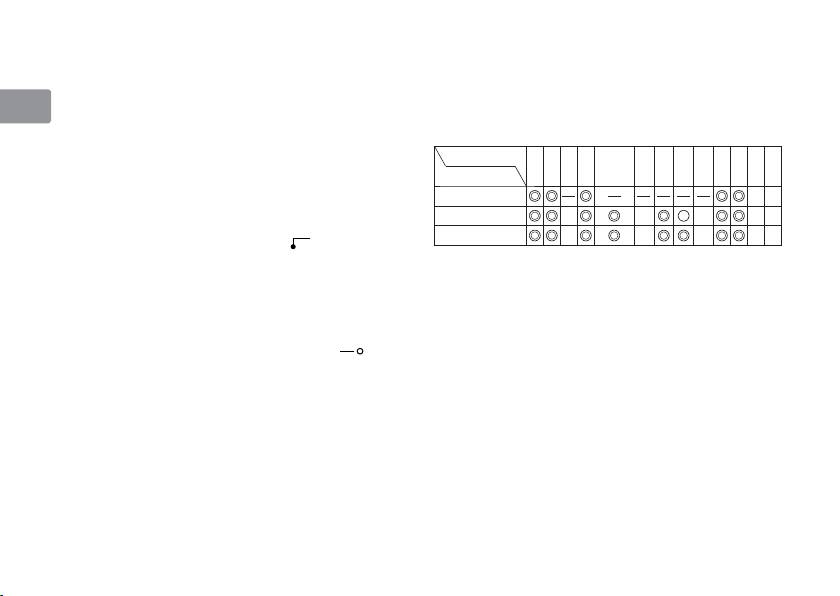
Recommended focusing screens
• The built-in flash cannot be used over distances
Various interchangeable focusing screens are
of less than 0.6 m (2.0 ft.).
available for certain Nikon SLR cameras to suit any
En
•
To prevent vignetting, do not use the lens hood.
picture-taking situation. The ones recommended
* Vignetting is the darkening of the corners around
for use with this lens are:
the image that occurs when the light emitted by
Screen
EC-B
the flash is obstructed by the lens hood, or lens
A
BCE
G1
G2 G3 G4
JL
M
U
Camera
EC-E
barrel, depending on the shooting distance.
F6
Using the lens hood
F5+DP-30
Attaching the hood
F5+DA-30
Align the lens hood attachment index ( , either of two
indexes)
2
on the hood with the lens hood mounting
: Excellent focusing
Ⴟ
index
4
on the lens, and turn the hood counterclockwise
: Acceptable focusing
Ⴜ
(as viewed when holding the camera with the lens facing
Slight vignetting or moire patterns appear in
away from you) until it clicks into place (Fig. B).
the viewfinder, but not on the film.
• Be sure that the lens hood mounting index is
—
: Not available
aligned with the lens hood setting index ( ) 3.
Blank box means not applicable. Since type M
• If the lens hood is not correctly attached,
screen can be used for both macro photography at
vignetting may occur.
a magnification ratio of 1:1 or above and for
• To facilitate attachment or removal of the hood,
photomicrography, it has different applications
hold it by the base (near the lens hood
than other screens.
attachment index) rather than its outer edge.
Important
•
To store the lens hood, attach it in the reverse position.
• For F6 cameras, when using screens other than
Detaching the hood
type B or E, “Other screen” must be selected in
Hold the lens hood by the base (near the lens
Custom Setting. Refer to camera’s User’s Manual
hood attachment index) and turn clockwise, as
for details.
viewed when holding the camera with the lens
facing away from you, to detach.
14
