
Nikon AF-S 300mm f-2.8G ED VR II: The built-in flash and vignetting Using the lens hood Slip-in filter holder
The built-in flash and vignetting Using the lens hood Slip-in filter holder: Nikon AF-S 300mm f-2.8G ED VR II
Table of contents
- Notes on Safety Operations
- Observe the following precautions when handling the camera and lens
- Nomenclature
- En
- Major features Usable cameras and available functions
- Focusing
- Focus operation selection switch and focus operation button (See p. 20 for compatible cameras.)
- Vibration reduction mode (VRⅡ)
- Setting the vibration reduction ON/OFF ring switch Setting the vibration reduction mode switch Notes on using vibration reduction
- Depth of field Setting the aperture Using a built-in rotating tripod collar
- The built-in flash and vignetting Using the lens hood Slip-in filter holder
- Recommended focusing screens
- Lens care Standard accessories Optional accessories
- Specifications
The built-in flash and vignetting
To prevent vignetting, do not use the lens hood.
Jp
Cameras
Vignetting occurs at any
F65-Series/N65-Series*, F60-Series/N60*, F55-Series/N55-Series*,
En
shooting distance.
F50-Series/N50*, F-601/N6006*, F-401x/N5005*, F-401s/N4004s*,
F-401/N4004*, Pronea 600i/6i*, Pronea S
De
* Sold exclusively in the USA
Using the lens hood
Lens hoods minimise stray light and protect the lens.
Fr
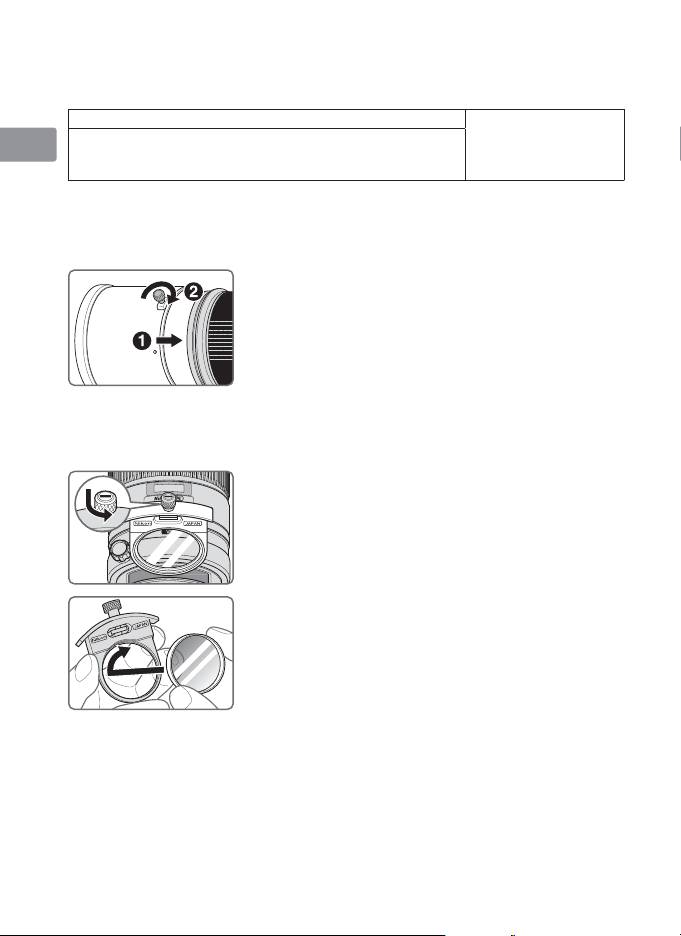
Attaching the hood
Es
• Fully tighten the lens hood screw (2).
• If the lens hood is not correctly attached, vignetting
may occur.
Se
• To store the lens hood, attach it in the reverse
position.
Ru
Nl
Slip-in filter holder
Always use a (52mm screw-on) filter. A 52mm Screw-on NC Filter is attached to
It
the filter holder when shipped from the factory.
a
Press down on the slip-in filter holder knob, and turn
Ck
counterclockwise until the white line on the knob is
at a right angle to the axis of the lens.
Ch
b
Pull the slip-in filter holder from the lens body
c
Detach the attached filter from the filter holder.
Kr
d
Screw a filter onto the side of the filter holder
marked with the words “Nikon” and “JAPAN”.
• The slip-in filter holder can be attached either facing
lens or camera side without having any effect on your
pictures.
Slip-in Circular Polarizing Filter C-PL1L (optional)
• Blocks reflections from nonmetallic surfaces such as glass and water.
• The focus point of a Slip-in Circular Polarizing Filter C-PL1L differs from that of
a 52mm screw-on filter. The distance scale is shifted from the correct position.
The closest focused distance is extended slightly.
• The memory set position may change slightly when using focus preset. Attach
the C-PL1L filter before using the memory set function.
26
