
Nikon 35mm-f-18G-AF-S-DX-Nikkor: ■ Using the lens hood ■ Focusing (Fig. A)
■ Using the lens hood ■ Focusing (Fig. A): Nikon 35mm-f-18G-AF-S-DX-Nikkor
Table of contents
■ Using the lens hood
■ Focusing (Fig. A)
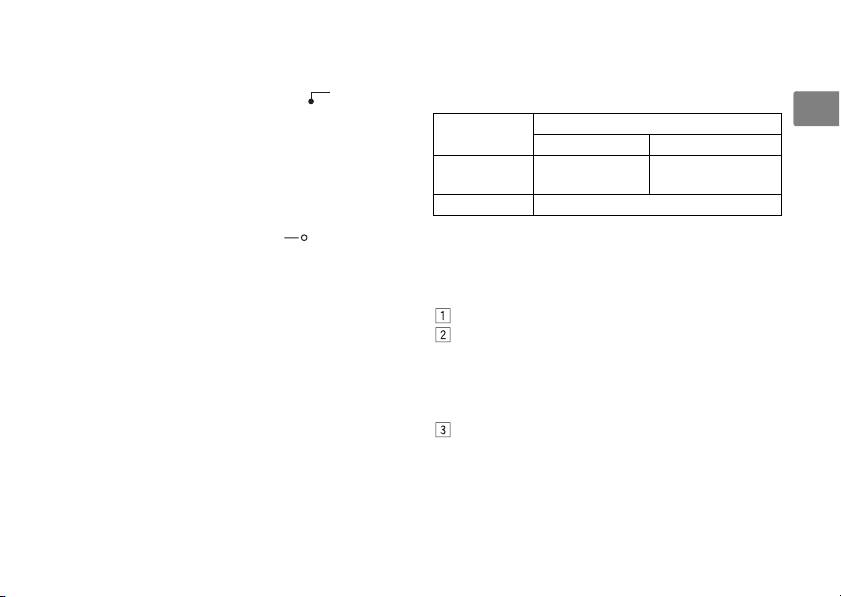
Set your camera’s focus mode selector according to the
Attaching the hood
chart below:
Align the lens hood attachment index ( , either of
En
two indexes) 3 on the hood with the lens hood
Camera focus
Lens’ focus mode switch
mounting index 4 on the lens, and turn the hood
mode
M/A M
counterclockwise (as viewed when holding the camera
Autofocus with
Manual focus (Focus
with the lens facing away from you) until it clicks into
AF (A/S/C)
manual override
assist is available.)
place (Fig. B).
MF Manual focus (Focus assist is available.)
• Be sure that the lens hood mounting index is aligned
For more information on camera focus modes, refer to
with the lens hood setting index ( ) 2.
your camera’s User’s Manual.
• If the lens hood is not correctly attached, vignetting
may occur.
Autofocus with manual override (M/A
• To facilitate attachment or removal of the hood, hold
mode)
it by the base (near the lens hood attachment index)
Set the lens focus mode switch 9 to M/A.
rather than its outer edge.
Autofocus is enabled, but autofocus operation can
• To store the lens hood, attach it in the reverse
be overridden by rotating the separate focus ring
position.
5 while pressing the shutter-release button
halfway, or by pressing the AF-ON button on the
Detaching the hood
camera body of cameras so equipped.
Hold the lens hood by the base (near the lens hood
Press the shutter-release button halfway or the AF-
attachment index) and turn clockwise, as viewed when
ON button once again to cancel manual focus and
holding the camera with the lens facing away from you,
resume autofocus.
to detach.
13
