
Toshiba JournE Scan: No. Name Function/description No. Name Function/description Rear view
No. Name Function/description No. Name Function/description Rear view: Toshiba JournE Scan
Table of contents
- Important Safety Instructions
- n When handling the power cable/cord, follow these precautions:
- n Attaching the power cable/cord
- Introduction Checking the Components Parts of the Scanner and Their Functions Front view
- No. Name Function/description No. Name Function/description Rear view
- Using the Scanner Preparation
- Making a Scan
- Scanning to a Digital Photo Frame Connecting the Scanner to a Computer System requirements (for computer)
- Making connection More Information Suitable and unsuitable types of originals
- Orientation of the original and scanned image Cropping on scanned images
- Care and Maintenance Cleaning the Scanner Cleaning the roller
- Cleaning the image sensor Calibrating the Scanner
- Troubleshooting
- Specifications
- TOSHIBA Support Copyright Statement Disclaimer Trademarks
- Regulatory Statements Working Environment
- Additional Environments not Related to EMC Following Information is Only for EU-member States
User’s Manual 7
EN
No. Name Function/description
Status/card
Indicates the operating status of the scanner and
indicator
memory card.
Press this button to turn the power on or off.
Press and hold this button for 5 seconds to enter
Power button
cleaning mode. See “Cleaning the Scanner” on
page 13.
Power indicator Indicates the power status of the scanner.
Used to guide the material to be scanned to ensure
Paper guide
the alignment.
Slide the paper guide to this position when scanning
4" x 6" mark
4" x 6" photos.
Feeding slot Insert an original into this slot to begin scanning.
Orientation mark Indicates the correct original orientation.
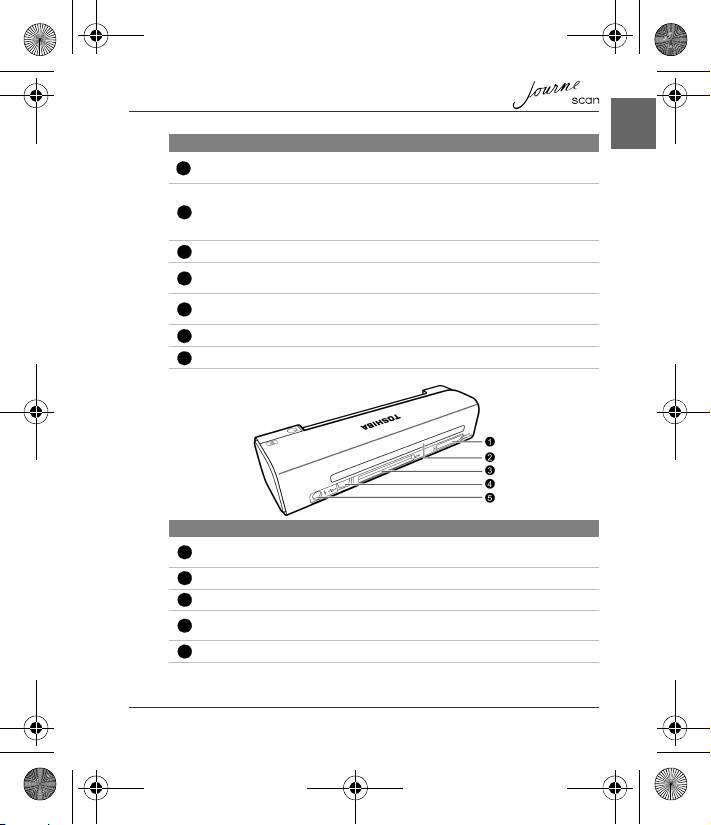
No. Name Function/description
SD/xD/MMC/MS
Accepts the following types of memory cards: SD, xD,
card slot
MMC and MS.
Output slot The scanned original comes out from this slot.
CF card slot Accepts a Type I CF card.
For connecting to a computer (or digital photo frame)
Mini USB socket
via a USB cable.
Power socket For connecting to the supplied power adapter.
1
2
3
4
5
6
7
Rear view
1
2
3
4
5
UM_EEMEA_Scan_1108.book Page 7 Monday, December 15, 2008 2:26 PM
