
Toshiba JournE Scan: Introduction Checking the Components Parts of the Scanner and Their Functions Front view
Introduction Checking the Components Parts of the Scanner and Their Functions Front view: Toshiba JournE Scan
Table of contents
- Important Safety Instructions
- n When handling the power cable/cord, follow these precautions:
- n Attaching the power cable/cord
- Introduction Checking the Components Parts of the Scanner and Their Functions Front view
- No. Name Function/description No. Name Function/description Rear view
- Using the Scanner Preparation
- Making a Scan
- Scanning to a Digital Photo Frame Connecting the Scanner to a Computer System requirements (for computer)
- Making connection More Information Suitable and unsuitable types of originals
- Orientation of the original and scanned image Cropping on scanned images
- Care and Maintenance Cleaning the Scanner Cleaning the roller
- Cleaning the image sensor Calibrating the Scanner
- Troubleshooting
- Specifications
- TOSHIBA Support Copyright Statement Disclaimer Trademarks
- Regulatory Statements Working Environment
- Additional Environments not Related to EMC Following Information is Only for EU-member States
6 User’s Manual
EN
Introduction
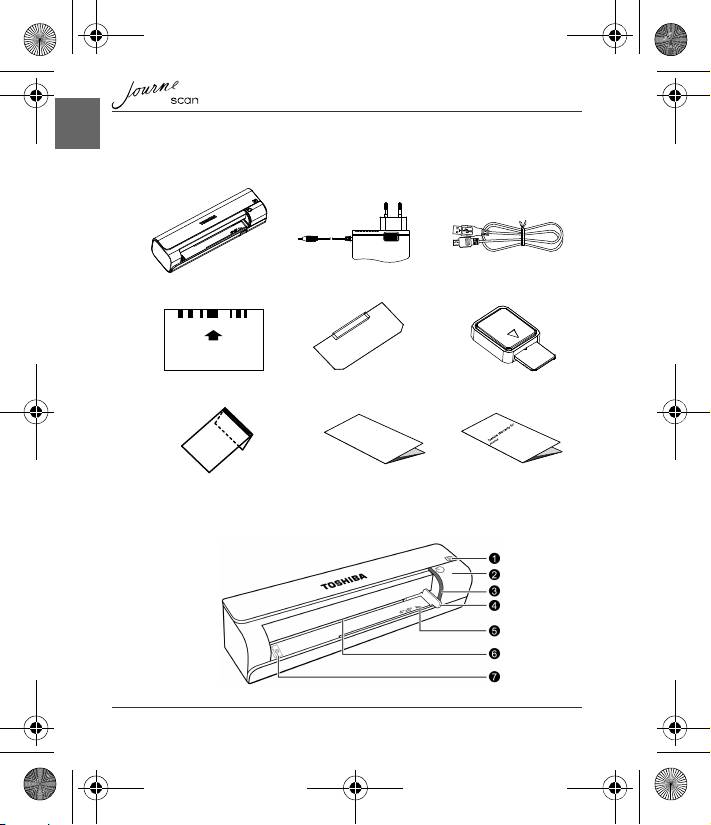
Checking the Components
Parts of the Scanner and Their Functions
Calibrate
調整
/
校准
/
校正
/ Calibrer / Kalibrieren / Calibra / Calibrar
Journe Scan AC Adapter USB Cable
Calibration Card Roller cleaning sheet Sensor cleaning swab
User’s Manual Warranty leafletProtective Sheath
Front view
UM_EEMEA_Scan_1108.book Page 6 Monday, December 15, 2008 2:26 PM
Top 10 manuals
100.00
NZXT HALE90 1000W99.99
Samsung SM-R38099.97
AEG BSB 18C99.97
Dell 2700W99.97
Smeg KSEC70X99.96
Beurer HDE 4099.96
Pyramida KH 50 v.299.96
MSI CSM-H81M-P3299.96
AEG HR 562799.95
Melissa 640-048