
Sharp LC-70UD20E: Initial installation
Initial installation: Sharp LC-70UD20E
Table of contents
Initial installation
Follow the steps below one by one when using the TV for the first time. Some steps may not be necessary
depending on your TV installation and connection.
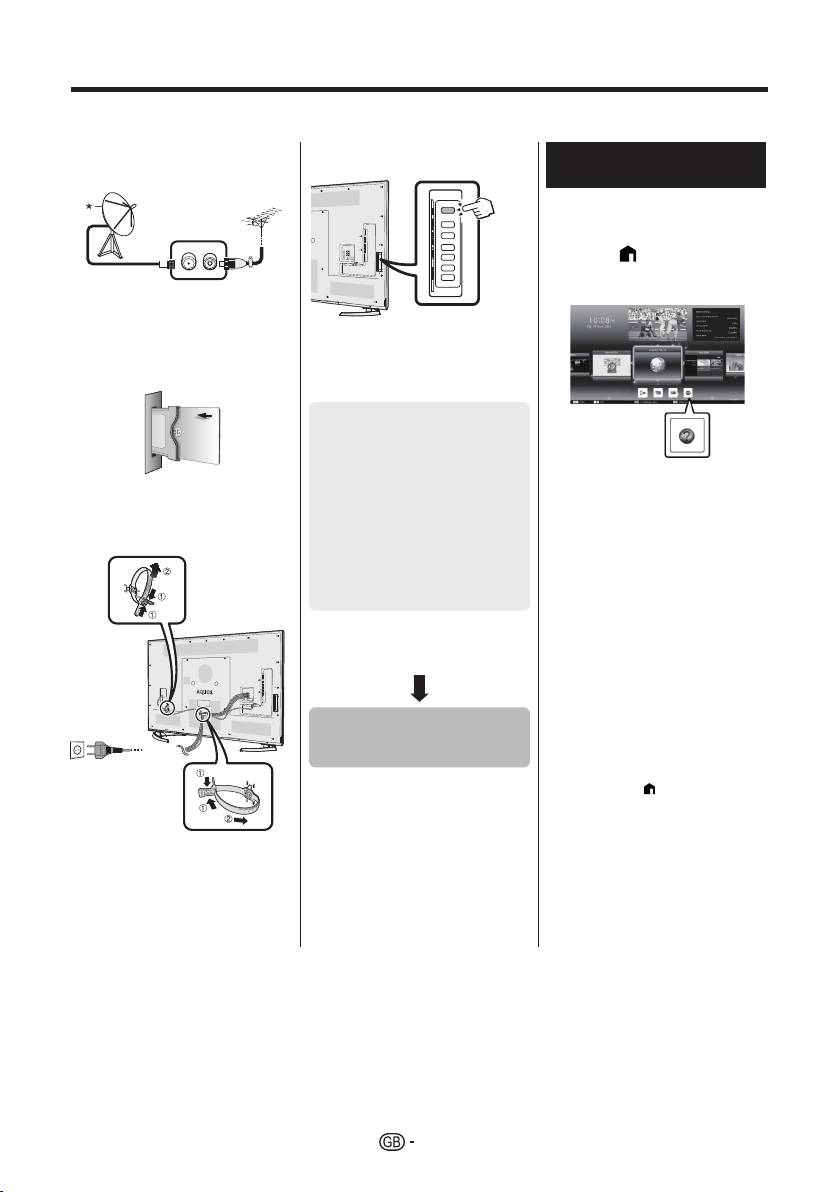
n Connect an antenna cable to the
q Press a on the TV.
Viewing the operation
antenna terminal.
manual stored in the TV
• Refer to the operation manual
(JPEG) stored in the TV for
details.
1 Press (HOME) and the
“HOME” screen will be
* Only connect a satellite antenna
displayed.
to models capable of receiving
satellite broadcasts
o If necessary, insert a CA card into
the CI slot to watch scrambled
r Run the initial auto installation.
broadcasts.
• Follow the guide on the TV screen
to set the following settings.
■ Language setting
■ Home/Store setting
1
■ Country setting*
2 Press a/b/c/d to select
■ PIN setting
p Plug the AC cord into the AC
“Manual”, and then press
outlet.
■ Channel search setting
;.
• Digital search
3 Select the folder/file you wish
− Terrestrial
to view.
2
− Cable*
NOTE
• Analogue search
1
• To change the language of the
• Satellite search*
operation manual, please select the
folder of the language to which you
I Some models do not have this setting.
would like to change.
J Refer to the operation manual stored
The language of the operation manual
in the TV for details on the settings for
will not change even if the OSD
cable broadcasts.
language in the language settings from
the TV main menu is changed.
• If you open the operation manual during
USB-recording, a caution screen will be
displayed that confirms your consent to
Start searching
stop recording.
channels
• When the operation manual is
displayed, returning to the “HOME”
screen is not possible by pressing 6
(Return). Press
(HOME) on the
remote control to return to the “HOME”
screen.
• Place the TV close to the AC
outlet, and keep the power plug
within reach.
• Product shape varies in some
countries.
6
