
Nikon AF-S 70-200mm f-4G ED VR: The Optional RT-1 Tripod Collar Ring
The Optional RT-1 Tripod Collar Ring: Nikon AF-S 70-200mm f-4G ED VR
Table of contents
- For Your Safety
- Parts of the Lens
- Compatibility Focus
- A/M (Autofocus with Manual Override/AF Priority) The Focus Limit Switch Zoom and Depth of Field Aperture
- Built-in Flash Units Vibration Reduction Using the Vibration Reduction ON/OFF Switch Using the Vibration Reduction Mode Switch
- Using Vibration Reduction: Notes
- The Lens Hood Focusing Screens
- The Optional RT-1 Tripod Collar Ring
- Lens Care Supplied Accessories Compatible Accessories
- Specifications
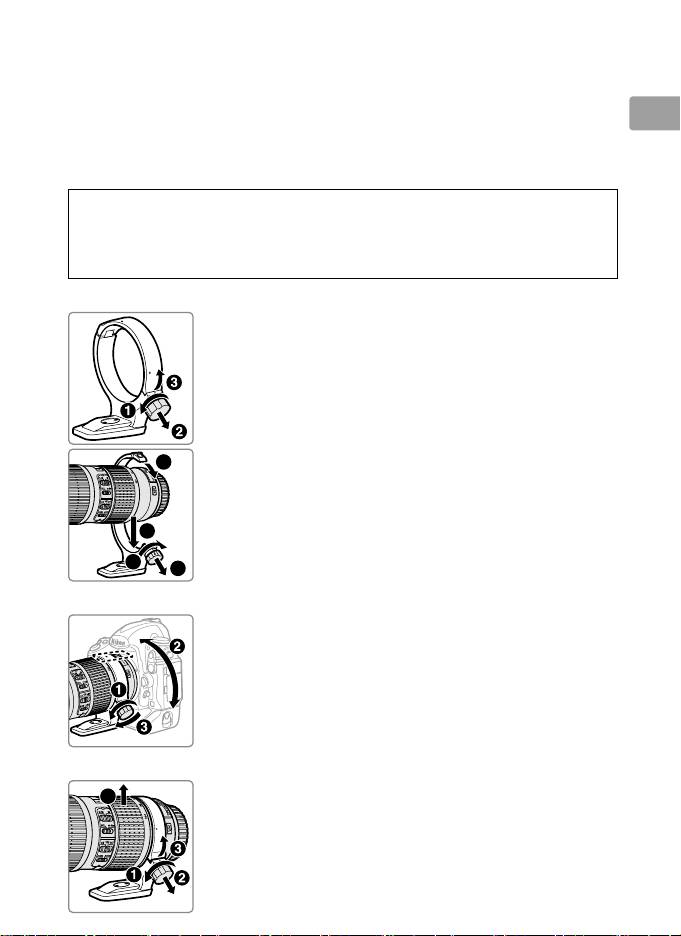
The Optional RT-1 Tripod Collar Ring
Loosen the tripod collar ring attachment knob to rotate the camera to the
desired position and orient the display horizontally or vertically. Note that
your hand may come into contact with the tripod if you rotate the camera
En
while holding it by the handgrip. Depending on how the camera or
tripod is attached, camera shake may be reduced by attaching the tripod
to the camera tripod mount.
A
WARNING
Fully tighten the tripod collar ring attachment knob when attaching
tripod collar ring.
Failure to observe this precaution could result in the
tripod collar ring becoming detached from the lens, causing injury.
Attaching the Tripod Collar Ring
19
En_03
6
4
7
5
z
Loosen the tripod collar ring attachment knob
(q).
x
Open the ring.
Pull the attachment knob toward you (w) and
open the ring (e).
c
Place the lens in the ring (r).
v
Close the ring.
Pull the attachment knob toward you (t) and close
the ring (y).
Do not use excessive force, as your
hand could be caught in the ring.
b
Tighten the attachment knob (u).
Positioning the Camera
Loosen the attachment knob (q), adjust the position
indices to the desired vertical or horizontal orientation
(w), and then tighten the attachment knob (e).
Removing the Tripod Collar Ring
4
■
z
Loosen the attachment knob (q).
x
Remove the ring.
Pulling the attachment knob toward you (w), open
(e) and remove the lens (r).
