
Nikon 70-200mm-f4G-ED-AF-S-VR-Zoom-Nikkor: Built-in Flash Units Vibration Reduction Using the Vibration Reduction ON/OFF Switch Using the Vibration Reduction Mode Switch
Built-in Flash Units Vibration Reduction Using the Vibration Reduction ON/OFF Switch Using the Vibration Reduction Mode Switch: Nikon 70-200mm-f4G-ED-AF-S-VR-Zoom-Nikkor
Table of contents
- For Your Safety
- Parts of the Lens
- Compatibility Focus
- A/M (Autofocus with Manual Override/AF Priority) The Focus Limit Switch Zoom and Depth of Field Aperture
- Built-in Flash Units Vibration Reduction Using the Vibration Reduction ON/OFF Switch Using the Vibration Reduction Mode Switch
- Using Vibration Reduction: Notes
- The Lens Hood Focusing Screens
- The Optional RT-1 Tripod Collar Ring Attaching the Tripod Collar Ring Positioning the Camera Removing the Tripod Collar Ring
- Lens Care Supplied Accessories Compatible Accessories
- Specifications
■
Built-in Flash Units
When using the built‑in flash on cameras equipped with a built‑in flash
unit, remove the lens hood to prevent vignetting (shadows created
En
where the end of the lens obscures the built‑in flash).
■
Vibration Reduction
Vibration reduction reduces blur caused by camera shake, allowing
shutter speeds up to five stops slower than would otherwise be the case
(Nikon measurements; effects vary with the photographer and shooting
conditions).
This increases the range of shutter speeds available and
permits hand‑held, tripod‑free photography in a wide range of situations.
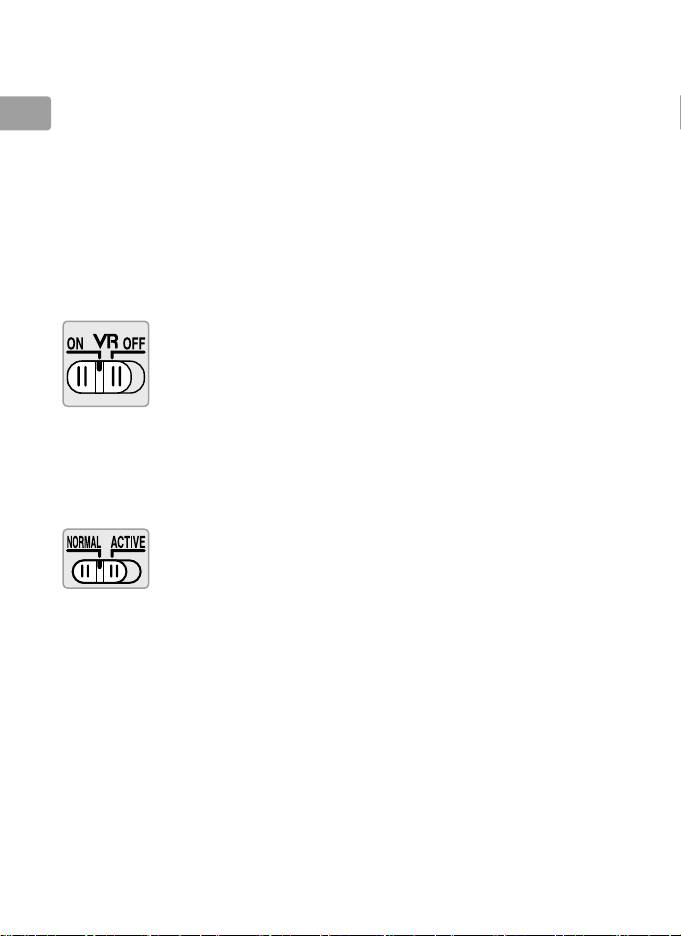
Using the Vibration Reduction ON/OFF Switch
Select ON to enable vibration reduction.
Vibration reduction is
activated when the shutter‑release button is pressed
halfway, reducing the effects of camera shake for
improved framing and focus.
Select OFF to turn vibration reduction off.
Using the Vibration Reduction Mode Switch
The vibration reduction mode switch is used to select the vibration
reduction mode when vibration reduction is on.
Select NORMAL to reduce the effects of vibration when
photographing from a fixed position and in other
situations with comparatively little camera motion.
Select ACTIVE to reduce the effects of vibration when
shooting from a moving vehicle, while walking, and in
other situations with active camera motion.
16
En_03
