
LG 50PB690V – page 2
Manual for LG 50PB690V
A-18
MAKING CONNECTIONS
Slovenčina
K televízoru môžete pripájať rôzne externé zariadenia
a prepínaním režimov vstupu vybrať príslušné externé
zariadenie. Viac informácií o pripájaní externého
zariadenia nájdete v príručke dodanej s príslušným
zariadením.
Dostupné externé zariadenia sú: HD prijímače, DVD
prehrávače, videorekordéry, zvukové systémy, úložné
zariadenia USB, počítač, herné zariadenia a iné ex
-
terné zariadenia.
y
Pripojenie externého zariadenia sa môže líšiť
podľa príslušného modelu.
y
Externé zariadenia pripájajte k televízoru bez
ohľadu na poradie TV portu.
y
Ak zaznamenávate televízny program na DVD
rekordér alebo videorekordér, pripojte televízny
vstupný signálový kábel k televízoru cez DVD
rekordér alebo videorekordér. Viac informácií o
zaznamenávaní nájdete v príručke dodanej s
pripojeným zariadením.
y
Postupujte podľa pokynov v príručke k externému
zariadeniu.
y
Ak pripájate k televízoru herné zariadenie,
použite kábel dodaný s herným zariadením.
y
V režime PC sa môže s rozlíšením, vertikálnym
vzorom, kontrastom alebo jasom spájať šum.
Ak je prítomný šum, zmeňte výstup z PC na iné
rozlíšenie, zmeňte obnovovací kmitočet na iný
kmitočet, prípadne nastavujte v ponuke OBRAZ
jas a kontrast, až kým nedosiahnete čistý obraz.
y
V režime PC sa v závislosti od grafickej karty
môže stať, že určité nastavenia rozlíšenia
nemusia pracovať správne.
pOZNÁMKA
Română
Conectaţi diferite dispozitive externe la televizor şi
comutaţi modurile de intrare pentru a selecta un
dispozitiv extern. Pentru mai multe informaţii privind
conectarea dispozitivului extern, consultaţi manualul
furnizat cu fiecare dispozitiv.
Dispozitivele externe disponibile sunt: receptoare
HD, playere DVD, VCR-uri, sisteme audio, dispozitive
de stocare USB, PC, dispozitive pentru jocuri şi alte
dispozitive externe.
y
Conectarea dispozitivului extern poate diferi de
model.
y
Conectaţi dispozitivele externe la televizor,
indiferent de ordinea portului televizorului.
y
Dacă înregistraţi un program TV pe un dispozitiv
de înregistrare DVD-uri sau pe un VCR, asiguraţi
conectarea cablului de intrare pentru semnalul
TV la televizor printr-un dispozitiv de înregistrare
DVD-uri sau printr-un VCR. Pentru mai multe
informaţii privind înregistrarea, consultaţi
manualul furnizat cu dispozitivul conectat.
y
Consultaţi manualul echipamentului extern
pentru instrucţiuni de funcţionare.
y
În cazul în care conectaţi un dispozitiv pentru
jocuri la televizor, utilizaţi cablul furnizat cu
dispozitivul pentru jocuri.
y
În modul PC, este posibil să existe interferenţă
legată de rezoluţie, model vertical, contrast
sau luminozitate. Dacă există interferenţă,
schimbaţi modul PC la altă rezoluţie, schimbaţi
rata de reîmprospătare sau reglaţi luminozitatea
şi contrastul din meniul IMAGINE până când
imaginea este clară.
y
În modul PC, este posibil ca unele setări ale
rezoluţiei să nu opereze corect, în funcţie de
placa video.
NOTĂ
A-19
MAKING CONNECTIONS
Български
Свържете различни външни устройства с
телевизора и превключвате режимите за входния
сигнал, за да изберете съответното външно
устройство. За допълнителна информация относно
свързването на външни устройства, разгледайте
ръководството на съответното устройство.
Наличните външни устройства са: HD приемници,
DVD плейъри, VCR, аудиосистеми, USB устройства
за съхранение, компютри, устройства за игри и
други външни устройства.
y
Свързването на външното устройство може да
е различно в зависимост от модела.
y
Свържете външните устройства с телевизора,
независимо от реда на подреждане на
телевизионните портове.
y
Ако записвате телевизионна програма с DVD
рекордер или VCR, непременно включете
входния кабел за сигнала от телевизора в
самия телевизор чрез DVD рекордер или
VCR. За подробности относно записването
направете справка в ръководството на
потребителя на свързаното устройство.
y
За да се запознаете с инструкциите за работа,
разгледайте ръководството за използване на
външното оборудване.
y
Ако включвате устройство за игри в
телевизора, използвайте кабела, предоставен
с това устройство.
y
В режим на работа с компютър е възможно да
се появи шум, произтичащ от резолюцията,
вертикалния шаблон, контраста или яркостта.
Ако доловите шум, променете режима
компютър на вариант с друга резолюция,
настройте различна норма на опресняване
или регулирайте яркостта и контраста от меню
PICTURE, докато картината се изчисти.
y
В режим на компютър някои настройки на
разделителната способност може да не
работят правилно в зависимост от графичната
карта.
ЗАБЕЛЕЖКА
Eesti
Ühendage teleriga erinevad välisseadmed ning lülit-
age sisendrežiimid valima välisseadmeid. Lisateavet
väliseadmete ühendamise kohta leiate vastava seadme
kasutusjuhendist.
Kasutatavad välisseadmed on järgmised: HD
vastuvõtjad, DVD-mängijad, videokassettmakid,
audiosüsteemid, USB-mäluseadmed, arvuti, mänguse-
admed ja muud välisseadmed.
y
Välisseadmete ühendamine võib sõltuvalt
mudelist erineda.
y
Ühendage välisseadmed teleriga TV-portide
järjekorrast sõltumatult.
y
Kui salvestate telesaate DVD-le või
videokassetile, veenduge, et ühendate
telesignaali sisendkaabli teleriga DVD-salvesti või
videokassettmaki kaudu. Lisateavet salvestamise
kohta leiate ühendatud seadme kasutusjuhendist.
y
Juhiseid vt välisseadme kasutusjuhendist.
y
Mänguseadme ühendamisel teleriga kasutage
mänguseadme ühenduskaablit.
y
Arvutirežiimis võib esineda eraldusvõime,
vertikaalmustri, kontrasti või heledusega seotud
müra. Müra olemasolul muutke arvutiväljundi
eraldusvõimet, värskendussagedust või
reguleerige heledust ja kontrasti menüüs PILT,
kuni jääte kvaliteediga rahule.
y
Kõik eraldusvõime sätted ei pruugi arvutirežiimis
sõltuvalt graafikakaardist korralikult töötada.
MÄRKuS
A-20
MAKING CONNECTIONS
Lietuvių k.
Prijunkite įvairius išorinius įrenginius prie televizoriaus
ir perjunkite įvesties režimus, kad pasirinktumėte išorinį
įrenginį. Daugiau informacijos apie išorinių įrenginių
prijungimą rasite su kiekvienu įrenginiu pateiktame
vadove.
Gali būti naudojami išoriniai įrenginiai: HD imtuvai,
DVD leistuvai, vaizdo leistuvai, garso sistemos, USB
atmintinės, kompiuteriai, žaidimų įranga ir kiti išoriniai
įrenginiai.
y
Išorinio įrenginio prijungimas gali skirtis, tai
priklauso nuo modelio.
y
Prijunkite išorinius įrenginius prie televizoriaus
nepaisydami televizoriaus jungties tvarkos.
y
Jei DVD arba vaizdo įrašymo įrenginiu įrašote
televizijos programą, įsitikinkite, kad prijungėte
televizoriaus signalo įvesties kabelį prie
televizoriaus per DVD arba vaizdo įrašymo
įrenginį. Daugiau informacijos rasite su prijungtu
įrenginiu pateiktame vadove.
y
Išorinio įrenginio naudojimo instrukcijas rasite
vadove.
y
Jei prie televizoriaus jungiate žaidimų įrangą,
naudokite su ja pateiktą kabelį.
y
Kompiuterio režimu gali atsirasti skiriamosios
gebos, vertikalaus vaizdo, kontrasto ar
šviesumo trikdžių. Jei yra trikdžių, nustatykite
kompiuterio išvestį į kitą skiriamąją gebą,
pakeiskite atnaujinimo dažnį arba VAIZDO meniu
reguliuokite šviesumą ir kontrastą, kol vaizdas
taps ryškus.
y
Kompiuterio režimu kai kurie raiškos nustatymai
gali tinkamai neveikti atsižvelgiant į vaizdo
plokštę.
pASTABA
Latviešu
Pievienojiet televizoram dažādas ārējās ierīces un
pārslēdziet ievades signāla režīmus, lai atlasītu
ārējo ierīci. Lai uzzinātu vairāk par ārējās ierīces
pievienošanu, skatiet katras ierīces komplektācijā
iekļauto rokasgrāmatu.
Pievienojamās ārējās ierīces ir šādas: HD uztvērēji,
DVD atskaņotāji, videomagnetofoni, audiosistēmas,
USB atmiņas ierīces, dators, spēļu ierīces un citas
ārējās ierīces.
y
Ārējās ierīces savienojums var atšķirties atkarībā
no modeļa.
y
Pievienojiet ārējās ierīces televizoram neatkarīgi
no televizora portu secības.
y
Ja ierakstāt televīzijas pārraidi, izmantojot DVD
rakstītāju vai videomagnetofonu, pārbaudiet,
vai televīzijas signāla ievades kabeli pievienojāt
televizoram, izmantojot DVD rakstītāju vai
videomagnetofonu. Lai uzzinātu vairāk, skatiet
pievienotās ierīces komplektācijā iekļauto
rokasgrāmatu.
y
Ārējās aparatūras lietošanas norādījumus skatiet
tās attiecīgajā rokasgrāmatā.
y
Lai pievienotu televizoram spēļu ierīci, izmantojiet
spēļu ierīces komplektācijā iekļauto kabeli.
y
Datora režīmā var rasties trokšņi, ko izraisa
izšķirtspēja, vertikālā attēla struktūra, kontrasts
vai spilgtums. Ja troksnis nezūd, mainiet datora
režīmu uz citu izšķirtspēju, mainiet atsvaidzes
intensitāti vai izvēlnē PICTURE (Attēls)
pielāgojiet spilgtumu un kontrastu, līdz attēls ir
skaidrs.
y
Datora režīmā daži izšķirtspējas iestatījumi,
iespējams, nedarbosies pareizi. Tas ir atkarīgs
no grafiskās kartes.
PIEZĪME
A-21
MAKING CONNECTIONS
Srpski
Povežite različite spoljne uređaje sa televizorom i
aktivirajte odgovarajući ulazni režim da biste izabrali
željeni spoljni uređaj. Da biste dobili više informacija o
povezivanju spoljnih uređaja, pogledajte priručnik koji
se isporučuje sa svakim uređajem.
Podržani su sledeći spoljni uređaji: HD risiveri, DVD
plejeri, videorikorderi, audio sistemi, USB memorije,
računar, igračke konzole i drugi spoljni uređaji.
y
Povezivanje spoljnih uređaja može se razlikovati
u zavisnosti od modela.
y
Povežite spoljne uređaje sa televizorom bez
obzira na redosled TV priključaka.
y
Pre snimanja TV programa na DVD rikorderu
ili videorikorderu proverite da li je ulazni kabl
TV signala povezan na televizor preko DVD
rikordera ili videorikordera. Da biste dobili više
informacija o snimanju, pogledajte priručnik koji
se isporučuje sa svakim uređajem.
y
Uputstvo za upotrebu potražite u priručniku
spoljnog uređaja.
y
Ako povezujete igračku konzolu sa televizorom,
koristite kabl koji se isporučuje uz igračku
konzolu.
y
U PC režimu može se pojaviti šum koji potiče
od rezolucije, vertikalnog šablona, kontrasta
ili osvetljenosti. Ako se javi šum, promenite
rezoluciju signala na računaru, promenite brzinu
osvežavanja ili podesite osvetljenost i kontrast u
meniju SLIKA sve dok slika ne postane jasna.
y
U zavisnosti od grafičke kartice, pojedine
postavke rezolucije možda neće ispravno raditi u
PC režimu.
NApOMENA
hrvatski
Za odabir vanjskog uređaja priključite vanjske uređaje
na televizor i promijenite načine ulaza. Dodatne
informacije o priključivanju vanjskog uređaja potražite u
priručniku svakog uređaja.
Dostupni vanjski uređaji su: HD prijemnici, DVD uređaji,
videorekorderi, USB memorije, računala, uređaji za igru
i drugi vanjski uređaji.
y
Priključak vanjskog uređaja može se razlikovati
ovisno o modelu.
y
Priključite vanjske uređaje na televizor bez obzira
na redoslijed priključaka na televizoru.
y
Ako snimate televizijski program pomoću DVD
snimača ili videorekordera, kabel za ulazni
televizijski signal obavezno uključite u televizor
preko DVD snimača ili videorekordera. Dodatne
informacije o snimanju potražite u priručniku
priključenog uređaja.
y
Upute za rukovanje potražite u priručniku
vanjskog uređaja..
y
Ako na televizor priključujete igraću konzolu,
koristite kabel koji ste dobili s igraćom konzolom.
y
U PC načinu rada može doći do šuma koji je
povezan s razlučivošću, okomitim uzorkom,
kontrastom ili svjetlinom. Ako postoji šum,
promijenite izlaznu razlučivost računala,
promijenite stopu osvježavanja ekrana ili
podesite svjetlinu i kontrast slike u izbornik SLIKA
kako biste postigli jasnu sliku.
y
U PC načinu rada neke postavke razlučivosti
možda neće pravilno funkcionirati, ovisno o
grafičkoj kartici.
NApOMENA
A-22
MAKING CONNECTIONS
Shqip
Lidhni disa pajisje të jashtme në TV dhe vendosni
regjimet e hyrjes për të zgjedhur një pajisje të jashtme.
Për më shumë informacione për lidhjen e pajisjes së
jashtme, referojuni manualit të ofruar për çdo pajisje.
Pajisjet e jashtme të mundshme janë: marrësit HD,
lexuesit DVD, VCR-të, sistemet audio, pajisjet e ruajtjes
USB, PC, pajisjet e lojërave dhe pajisje të tjera të
jashtme.
y
Lidhja e pajisjes së jashtme mund të ndryshojë
sipas modelit.
y
Lidhini pajisjet e jashtme me TV-në, pavarësisht
renditjes së portës së TV-së.
y
Nëse regjistroni një program televiziv në një
regjistrues DVD ose VCR, sigurohuni të lidhni
kabllon e hyrjes së sinjalit të TV-së në TV
nëpërmjet një regjistruesi DVD ose VCR. Për më
shumë informacione për regjistrimin, referojuni
manualit të ofruar me pajisjen e lidhur.
y
Referojuni manualit të pajisjes së jashtme për
udhëzimet e përdorimit.
y
Nëse lidhni një pajisje lojërash në TV, përdorni
kabllon që ofrohet me pajisjen e lojërave.
y
Në regjimin PC, mund të ketë zhurmë që lidhet
me rezolucionin, modelin vertikal, kontrastin dhe
shkëlqimin. Nëse vihet re zhurmë, ndryshojeni
daljen e PC-së në një rezolucion tjetër, ndryshoni
shpejtësinë e rifreskimit në një shpejtësi tjetër
ose rregulloni shkëlqimin dhe kontrastin në
menynë FIGURA derisa të qartësohet figura.
y
Në regjimin PC, disa cilësime të rezolucionit
mund të mos funksionojnë siç duhet, në varësi të
kartë grafike.
ShËNiM
Bosanski
Povežite različite vanjske uređaje sa TV-om i mijen
-
jajte ulazne načine rada kako biste odabrali vanjski
uređaj. Za više informacija o povezivanju sa vanjskim
uređajima pogledajte priručnike isporučene sa svakim
tim uređajem.
Dostupni vanjski uređaji su: HD prijemnici, DVD uređaj
za reproduciranje, videorekorderi, zvučni sistemi, USB
uređaji za pohranjivanje, računari, uređaji za igre, te
drugi vanjski uređaji.
y
Povezivanje vanjskih uređaja može se razlikovati
od modela do modela.
y
Povezujte vanjske uređaje na TV bez obzira na
redoslijed TV priključka.
y
Ako snimate neki TV program na DVD rekorderu
ili videorekorderu, pazite da povežete ulazni kabl
TV signala na TV uređaj preko DVD rekordera ili
videorekordera. Za više informacija o snimanju
pogledajte priručnik isporučen s povezanim
uređajem.
y
Informacije o rukovanju vanjskim uređajem
potražite u njegovom priručniku za korištenje.
y
Ako povezujete uređaj za igre sa TV-om, koristite
kabl isporučen sa uređajem za igre.
y
U PC načinu rada mogu se pojaviti smetnje
povezane sa rezolucijom, vertikalnim uzorkom,
kontrastom ili svjetlinom. Ako ima smetnji,
promijenite PC izlaz na drugu rezoluciju,
promijenite brzinu osvježavanja ili podešavajte
svjetlinu i kontrast na izborniku SLIKA dok slika
ne bude jasna.
y
Moguće je da neke postavke rezolucije neće
funkcionirati pravilno u PC načinu ovisno o datoj
grafičkoj kartici.
NApOMENA
A-23
MAKING CONNECTIONS
Македонски
Поврзувајте различни надворешни уреди со
телевизорот и менувајте ги режимите за влезен
сигнал за да изберете надворешен уред. За повеќе
информации околу поврзувањето на надворешен
уред, погледнете во упатството испорачано со секој
од уредите.
Достапни надворешни уреди се: HD ресивери,
DVD плеери, VCR, аудио системи, USB уреди за
складирање, PC, уреди за игри и други надворешни
уреди.
y
Поврзувањето со надворешниот уред може да
се разликува во зависност од моделот.
y
Надворешните уреди поврзувајте ги со
телевизорот без оглед на редоследот на TV
приклучокот.
y
Ако снимате TV програма на DVD рекордер
или VCR, кабелот за влезен сигнал во
телевизорот поврзете го преку DVD
рекордерот или VCR уредот. За повеќе
информации околу снимањето, погледнете во
упатството испорачано со секој од поврзаните
уреди.
y
Упатства за ракување побарајте во
прирачникот за надворешната опрема.
y
Ако сакате да поврзете уред за игри со
телевизорот, користете го кабелот испорачан
со уредот за игри.
y
Во PC режим, може да има шум поврзан со
резолуцијата, вертикалната шема, контрастот
или осветленоста. Ако е присутен шум,
сменете го PC излезот на друга резолуција,
сменете ја стапката на обновување со друга
стапка, или прилагодувајте ги осветленоста и
контрастот во менито СЛИКА додека сликата
не биде јасна.
y
Во PC режим, некои поставувања за
резолуцијата може да не функционираат
правилно во зависност од графичката
картичка.
ЗАБЕЛЕШКА
Русский
Подключите к телевизору различные внешние
устройства и переключайте режимы источников
для выбора внешнего устройства. Для получения
дополнительной информации о подключении
внешнего устройства см. руководства пользователя
каждого устройства.
Допустимо подключение следующих внешних
устройств: ресиверов HD, DVD-проигрывателей,
видеомагнитофонов, аудиосистем, устройств
хранения данных USB, ПК, игровых приставок и
других внешних устройств.
y
Процесс подключения внешнего устройства
отличается в зависимости от модели.
y
Подключите внешние устройства независимо
от порядка расположения разъемов
телевизора.
y
При записи телевизионной передачи с
помощью устройства записи DVD или
видеомагнитофона проверьте, что входной
телевизионный сигнал поступает на вход
телевизора через устройство записи DVD
или видеомагнитофон. Для получения
дополнительной информации о записи см.
руководство пользователя подключенного
устройства.
y
Инструкции по эксплуатации см. в
документации внешнего устройства.
y
При подключении к телевизору игровой
приставки используйте кабель, который
поставляется в комплекте игровой приставки.
y
В режиме PC (ПК) может наблюдаться шум,
из-за выбранного разрешения, частоты
вертикальной развертки, контрастности
или яркости. При возникновении помех
выберите для выхода PC (ПК) другое
разрешение, измените частоту обновления
или отрегулируйте яркость и контрастность
в меню PICTURE (КАРТИНКА) так, чтобы
изображение стало четким.
y
В режиме PC (ПК) некоторые настройки
разрешения экрана могут не работать
должным образом в зависимости от
видеоплаты.
ПРИМЕЧАНИЕ

w
ww.lg.com
Please read this manual carefully before operating your set
and retain it for future reference.
OWNER’S MANUAL
PLASMA TV
2
ENG
EN
g
LiS
h
LICENSES / OPEN SOURCE SOFTWARE NOTICE / EXTERNAL CONTROL DEVICE SETUP
LiCENSES
Supported licenses may differ by model. For more information about licenses, visit
www.lg.com
.
OpEN SOuRCE SOFTWARE NOTiCE
To obtain the source code under GPL, LGPL, MPL and other open source licenses, that is contained in this
product, please visit
http://opensource.lge.com
.
In addition to the source code, all referred license terms, warranty disclaimers and copyright notices are available
for download.
LG Electronics will also provide open source code to you on CD-ROM for a charge covering the cost of performing
such distribution (such as the cost of media, shipping and handling) upon email request to
opensource@lge.com.
This offer is valid for three (3) years from the date on which you purchased the product.
ExTERNAL CONTROL dEViCE SETup
To obtain the external control device setup information, please visit
www.lg.com
3
ENG
EN
g
LiS
h
SAFETY INSTRUCTIONS
SAFETy iNSTRuCTiONS
Please read these safety precautions carefully before using the product.
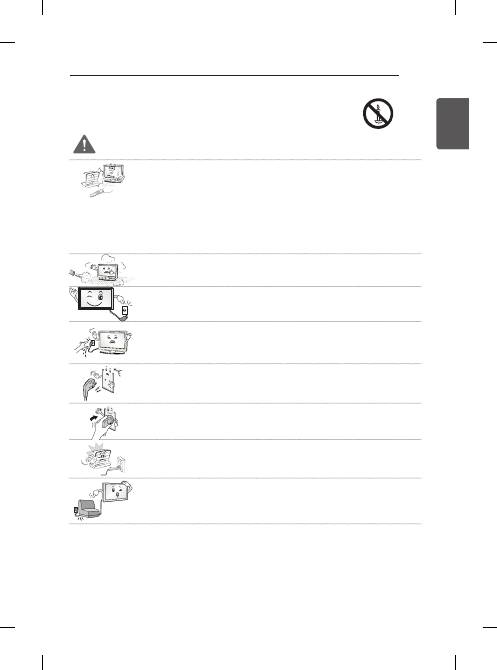
WARNiNg
y
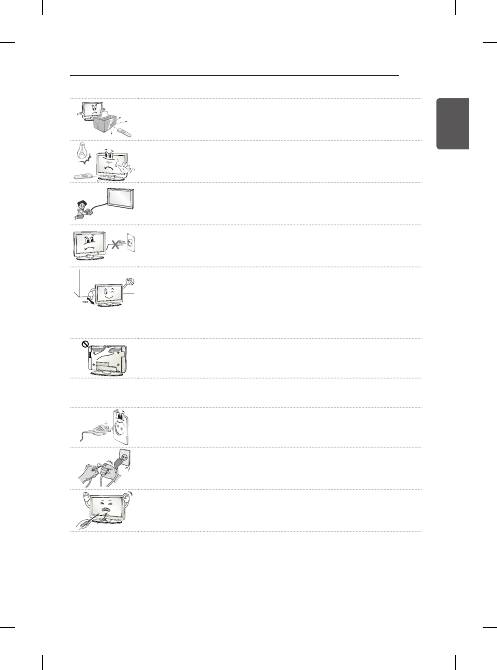
Do not place the TV and/or remote control in the following environments:
- A location exposed to direct sunlight
- An area with high humidity such as a bathroom
- Near any heat source such as stoves and other devices that produce heat
- Near kitchen counters or humidifiers where they can easily be exposed to steam or
oil
- An area exposed to rain or wind
- Near containers of water such as vases
Otherwise, this may result in fire, electric shock, malfunction or product deformation.
y
Do not place the product where it might be exposed to dust.
This may cause a fire hazard.
y
Mains Plug is the TV connecting/disconnecting device to AC mains electric supply. This
plug must remain readily attached and operable when TV is in use.
y
Do not touch the power plug with wet hands. Additionally, if the cord pin is wet or
covered with dust, dry the power plug completely or wipe dust off.
You may be electrocuted due to excess moisture.
y
Make sure to connect Mains cable to compliant AC mains socket with Grounded earth
pin. (Except for devices which are not grounded on earth.) Otherwise possibility you
may be electrocuted or injured.
y
Insert power cable plug completely into wall socket otherwise if not secured completely
into socket, fire ignition may break out.
y
Ensure the power cord does not come into contact with hot objects such as a heater.
This may cause a fire or an electric shock hazard.
y
Do not place a heavy object, or the product itself, on power cables.
Otherwise, this may result in fire or electric shock.
4
ENG
EN
g
LiS
h
SAFETY INSTRUCTIONS
y
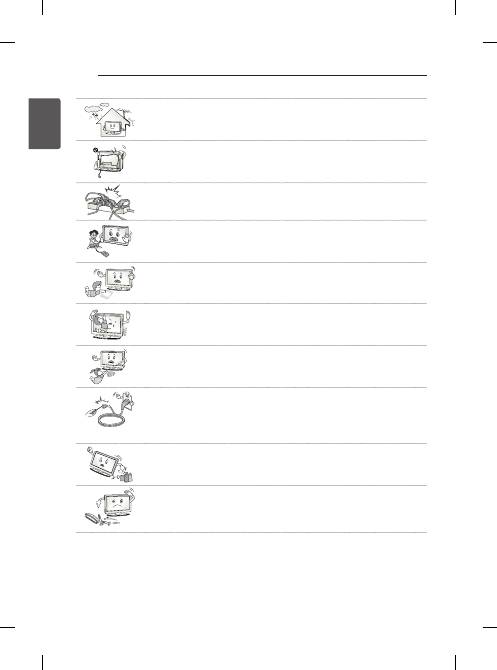
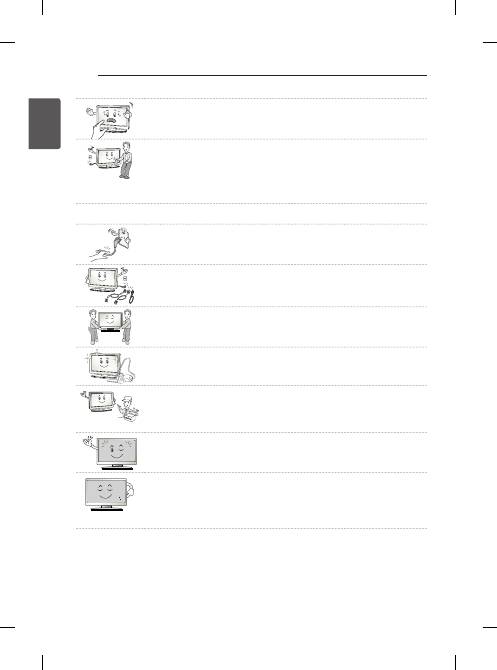
Bend antenna cable between inside and outside building to prevent rain from flowing in.
This may cause water damaged inside the Product and could give an electric shock.
y
When mounting TV onto wall make sure to neatly install and isolate cabling from rear of
TV as to not create possibility of electric shock/fire hazard.
y
Do not plug too many electrical devices into a single multiple electrical outlet.
Otherwise, this may result in fire due to over-heating.
y
Do not drop the product or let it fall over when connecting external devices.
Otherwise, this may result in injury or damage to the product.
Desiccant
y
Keep the anti-moisture packing material or vinyl packing out of the reach of children.
Anti-moisture material is harmful if swallowed. If swallowed by mistake, force the patient
to vomit and visit the nearest hospital. Additionally, vinyl packing can cause suffocation.
Keep it out of the reach of children.
y
Do not let your children climb or cling onto the TV.
Otherwise, the TV may fall over, which may cause serious injury.
y
Dispose of used batteries carefully to ensure that a small child does not consume them.
Please seek Doctor- Medical Attention immediately if child consumes batteries.
y
Do not insert any metal objects/conductors (like a metal chopstick/cutlery/screwdriver)
between power cable plug and input Wall Socket while it is connected to the input
terminal on the wall. Additionally, do not touch the power cable right after plugging into
the wall input terminal.
You may be electrocuted.
(Depending on model)
y
Do not put or store inflammable substances near the product.
There is a danger of combustion/explosion or fire due to careless handling of the
inflammable substances.
y
Do not drop metallic objects such as coins, hair pins, chopsticks or wire into the
product, or inflammable objects such as paper and matches. Children must pay
particular attention.
Electrical shock, fire or injury can occur. If a foreign object is dropped into the product,
unplug the power cord and contact the service centre.
5
ENG
EN
g
LiS
h
SAFETY INSTRUCTIONS
y
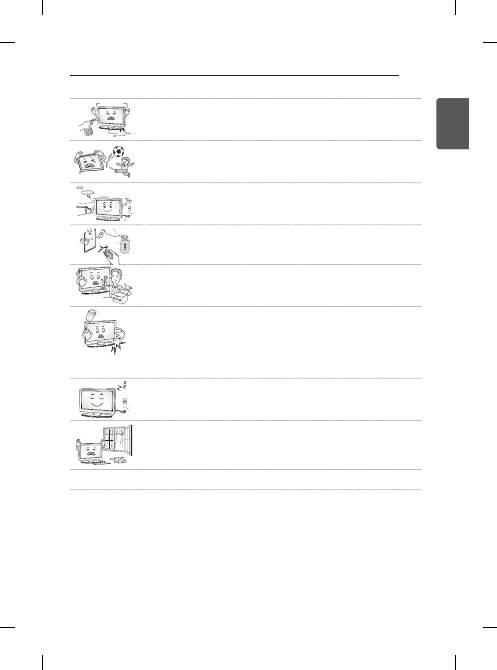
Do not spray water on the product or scrub with an inflammable substance (thinner or
benzene). Fire or electric shock accident can occur.
y
Do not allow any impact, shock or any objects to fall into the unit, and do not drop
anything onto the screen.
You may be injured or the product can be damaged.
y
Never touch this product or antenna during a thunder or lighting storm.
You may be electrocuted.
y
Never touch the wall outlet when there is leakage of gas, open the windows and
ventilate.
It may cause a fire or a burn by a spark.
y
Do not disassemble, repair or modify the product at your own discretion.
Fire or electric shock accident can occur.
Contact the service centre for check, calibration or repair.
y
If any of the following occur, unplug the product immediately and contact your local
service centre.
- The product has been impacted by shock
- The product has been damaged
- Foreign objects have entered the product
- The product produced smoke or a strange smell
This may result in fire or electric shock.
y
Unplug the TV from AC mains wall socket if you do not intend to use the TV for a long
period of time.
Accumulated dust can cause fire hazard and insulation deterioration can cause electric
leakage/shock/fire.
y
Apparatus shall not be exposed to dripping or splashing and no objects filled with
liquids, such as vases, shall be placed on the apparatus.
y
Do not install this product on a wall if it could be exposed to oil or oil mist.
This may damage the product and cause it to fall.
6
ENG
EN
g
LiS
h
SAFETY INSTRUCTIONS
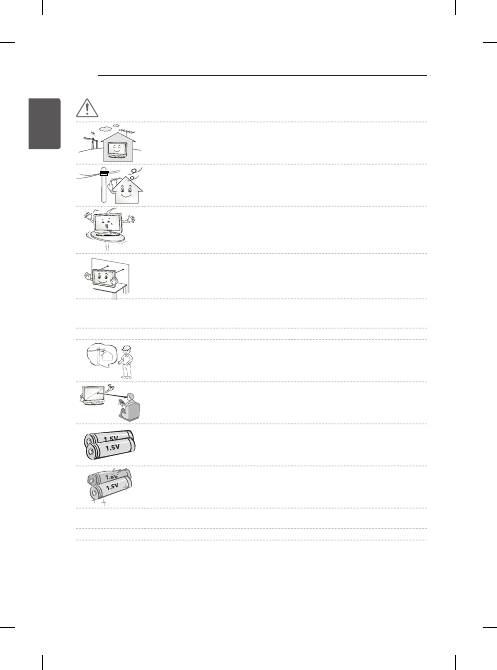
CAuTiON
y
Install the product where no radio wave occurs.
y
There should be enough distance between an outside antenna and power lines to keep
the former from touching the latter even when the antenna falls.
This may cause an electric shock.
y
Do not install the product on places such as unstable shelves or inclined surfaces. Also
avoid places where there is vibration or where the product cannot be fully supported.
Otherwise, the product may fall or flip over, which may cause injury or damage to the
product.
y
If you install the TV on a stand, you need to take actions to prevent the product from
overturning. Otherwise, the product may fall over, which may cause injury.
y
If you intend to mount the product to a wall, attach VESA standard mounting interface (optional parts) to the
back of the product. When you install the set to use the wall mounting bracket (optional parts), fix it carefully
so as not to drop.
y
Only use the attachments / accessories specified by the manufacturer.
y
When installing the antenna, consult with a qualified service technician. If not installed
by a qualified technician, this may create a fire hazard or an electric shock hazard.
y
We recommend that you maintain a distance of at least 2 to 7 times the diagonal screen
size when watching TV.
If you watch TV for a long period of time, this may cause blurred vision.
y
Only use the specified type of battery.
This could cause damage to the remote control.
y
Do not mix new batteries with old batteries.
This may cause the batteries to overheat and leak.
y
Batteries should not be exposed to excessive heat. For example, keep away from direct sunlight, open
fireplace and electric heaters .
y
Do not place non-rechargeable batteries in charging device.
7
ENG
EN
g
LiS
h
SAFETY INSTRUCTIONS
y
Make sure there are no objects between the remote control and its sensor.
y
Signal from Remote Control can be interrupted due to external/internal lighting eg
Sunlight, fluorescent lighting.
If this occurs turn off lighting or darken viewing area.
y
When connecting external devices such as video game consoles, make sure the
connecting cables are long enough.
Otherwise, the product may fall over, which may cause injury or damage the product.
y
Do not turn the product On/Off by plugging-in or unplugging the power plug to the wall
outlet. (Do not use the power plug for switch.)
It may cause mechanical failure or could give an electric shock.
y
Please follow the installation instructions below to prevent the product from overheating.
- The distance between the product and the wall should be more than 10 cm.
- Do not install the product in a place with no ventilation (e.g., on a bookshelf or in a
cupboard).
- Do not install the product on a carpet or cushion.
- Make sure the air vent is not blocked by a tablecloth or curtain.
Otherwise, this may result in fire.
y
Take care not to touch the ventilation openings when watching the TV for long periods
as the ventilation openings may become hot. This does not affect the operation or
performance of the product.
y
Periodically examine the cord of your appliance, and if its appearance indicates damage or deterioration,
unplug it, discontinue use of the appliance, and have the cord replaced with an exact replacement part by an
authorized servicer.
y
Prevent dust collecting on the power plug pins or outlet.
This may cause a fire hazard.
y
Protect the power cord from physical or mechanical abuse, such as being twisted,
kinked, pinched, closed in a door, or walked upon. Pay particular attention to plugs, wall
outlets, and the point where the cord exits the appliance.
y
Do not press strongly upon the panel with a hand or sharp object such as nail, pencil or
pen, or make a scratch on it, as it may cause damage to screen.
8
ENG
EN
g
LiS
h
SAFETY INSTRUCTIONS
y
Avoid touching the screen or holding your finger(s) against it for long periods of time.
Doing so may produce some temporary or permanent distortion/damage to screen.
y
When cleaning the product and its components, unplug the power first and wipe it with
a soft cloth. Applying excessive force may cause scratches or discolouration. Do not
spray with water or wipe with a wet cloth. Never use glass cleaner, car or industrial
shiner, abrasives or wax, benzene, alcohol etc., which can damage the product and its
panel.
Otherwise, this may result in fire, electric shock or product damage (deformation,
corrosion or breakage).
y
As long as this unit is connected to the AC wall outlet, it is not disconnected from the AC power source even if
you turn off this unit by SWITCH.
y
When unplugging the cable, grab the plug and unplug it, by pulling at the plug. Don’t
pull at the cord to unplug the power cord from the power board, as this could be
hazardous.
y
When moving the product, make sure you turn the power off first. Then, unplug the
power cables, antenna cables and all connecting cables.
The TV set or power cord may be damaged, which may create a fire hazard or cause
electric shock.
y
When moving or unpacking the product, work in pairs because the product is heavy.
Otherwise, this may result in injury.
y
Contact the service centre once a year to clean the internal parts of the product.
Accumulated dust can cause mechanical failure.
y
Refer all servicing to qualified service personnel. Servicing is required when the
apparatus has been damaged in any way, such as power supply cord or plug is
damaged, liquid has been spilled or objects have fallen into the apparatus, the
apparatus has been exposed to rain or moisture, does not operate normally, or has
been dropped.
y
If the product feels cold to the touch, there may be a small “flicker” when it is turned on.
This is normal, there is nothing wrong with product.
y
The panel is a high technology display product with resolution of two million to six
million pixels. You may see tiny black dots and/or brightly coloured dots (red, blue or
green) at a size of 1 ppm on the panel. This does not indicate a malfunction and does
not affect the performance and reliability of the product.
This phenomenon also occurs in third-party products and is not subject to exchange or
refund.
9
ENG
EN
g
LiS
h
SAFETY INSTRUCTIONS
y
You may find different brightness and colour of the panel depending on your viewing
position(left/right/top/down).
This phenomenon occurs due to the characteristic of the panel. It is not related with the
product performance, and it is not malfunction.
y
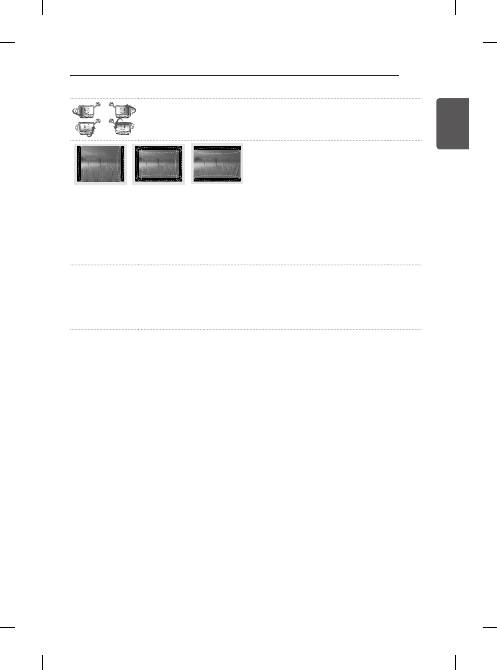
Displaying a still image (e.g., broadcasting channel logo, on-screen menu, scene from a video game) for a
prolonged time may cause damage to the screen, resulting in retention of the image, which is known as image
sticking. The warranty does not cover the product for image sticking.
Avoid displaying a fixed image on your television’s screen for a prolonged period (2 or more hours for LCD, 1
or more hours for Plasma).
Also, if you watch the TV at a ratio of 4:3 for a long time, image sticking may occur on the borders of the
panel.
This phenomenon also occurs in third-party products and is not subject to exchange or refund.
y
generated Sound
“Cracking” noise: A cracking noise that occurs when watching or turning off the TV is generated by plastic
thermal contraction due to tempera-ture and humidity. This noise is common for products where thermal
deformation is required. Electrical circuit humming/panel buzzing: A low level noise is generated from a high-
speed switching circuit, which supplies a large amount of current to operate a product. It varies depending on
the product.
This generated sound does not affect the performance and reliability of the product.
10
ENG
EN
g
LiS
h
SAFETY INSTRUCTIONS
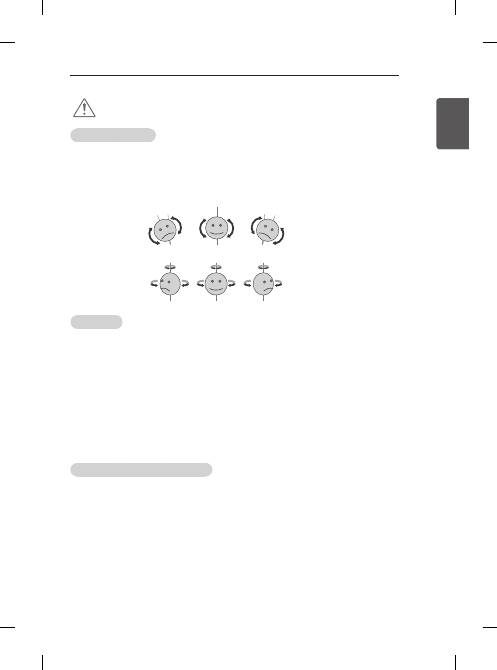
Viewing 3d imaging
(Only 3d models)
WARNiNg
Viewing Environment
y
Viewing Time
- When watching 3D contents, take 5 - 15 minute breaks every hour. Viewing 3D contents for a long period
of time may cause headache, dizziness, fatigue or eye strain.
Those that have a photosensitive seizure or chronic illness
y
Some users may experience a seizure or other abnormal symptoms when they are exposed to a flashing light
or particular pattern from 3D contents.
y
Do not watch 3D videos if you feel nausea, are pregnant and/ or have a chronic illness such as epilepsy, cardiac
disorder, or blood pressure disease, etc.
y
3D Contents are not recommended to those who suffer from stereo blindness or stereo anomaly. Double
images or discomfort in viewing may be experienced.
y
If you have strabismus (cross-eyed), amblyopia (weak eyesight) or astigmatism, you may have trouble sensing
depth and easily feel fatigue due to double images. It is advised to take frequent breaks than the average adult.
y
If your eyesight varies between your right and left eye, revise your eyesight prior to watching 3D contents.
Symptoms which require discontinuation or refraining from watching 3d contents
y
Do not watch 3D contents when you feel fatigue from lack of sleep, overwork or drinking.
y
When these symptoms are experienced, stop using/watching 3D contents and get enough rest until the
symptom subsides.
- Consult your doctor when the symptoms persist. Symptoms may include headache, eyeball pain, dizziness,
nausea, palpitation, blurriness, discomfort, double image, visual inconvenience or fatigue.
11
ENG
EN
g
LiS
h
SAFETY INSTRUCTIONS
CAuTiON
Viewing Environment
y
Viewing Distance
- Maintain a distance of at least twice the screen diagonal length when watching 3D contents. If you feel
discomfort in viewing 3D contents, move further away from the TV.
y
Viewing Position
- Face the center of the screen at eye level with the head looking straight ahead. Otherwise, you may not be
able to view 3D contents properly.
Viewing Age
y
Infants/Children
- Usage/ Viewing 3D contents for children under the age of 6 are prohibited.
- Children under the age of 10 may overreact and become overly excited because their vision is in
development (for example: trying to touch the screen or trying to jump into it. Special monitoring and extra
attention is required for children watching 3D contents.
- Children have greater binocular disparity of 3D presentations than adults because the distance between
the eyes is shorter than one of adults. Therefore they will perceive more stereoscopic depth compared to
adults for the same 3D image.
y
Teenagers
- Teenagers under the age of 19 may react with sensitivity due to stimulation from light in 3D contents.
Advise them to refrain from watching 3D contens for a long time when they are tired.
y
Elderly
- The elderly may perceive less 3D effect compared to the youth. Do not sit closer to the TV than the
recommended distance.
Cautions when using the 3d glasses
y
Make sure to use LG 3D glasses. Otherwise, you may not be able to view 3D videos properly.
y
Do not use 3D glasses instead of your normal glasses, sunglasses or protective goggles.
y
Using modified 3D glasses may cause eye strain or image distortion.
y
Do not keep your 3D glasses in extremely high or low temperatures. It will cause deformation.
y
The 3D glasses are fragile and are easily scratched. Always use a soft, clean piece of cloth when wiping the
lenses. Do not scratch the lenses of the 3D glasses with sharp objects or clean/wipe them with chemicals.
y
When watching 3D videos under fluorescent lights or with three wave length lamps, you may experience the
screen blinking. When this occurs, turn the light off or turn it down.
y
Other electronic or communication devices should be turned off or put away from the TV because it can cause
interference and prevent the 3D function from working properly.
y
When you watch TV lying down, 3D images may look darker or invisible.
12
ENG
EN
g
LiS
h
ASSEMBLING AND PREPARING
y
Image shown may differ from your TV.
y
Your TV’s OSD (On Screen Display) may differ slightly from that shown in this manual.
y
The available menus and options may differ from the input source or product model that you are using.
y
New features may be added to this TV in the future.
y
The TV can be placed in standby mode in order to reduce the power consumption. And the TV should be
turned off if it will not be watched for some time, as this will reduce energy consumption.
y
The energy consumed during use can be significantly reduced if the level of brightness of the picture is
reduced, and this will reduce the overall running cost.
NOTE
ASSEMBLiNg ANd pREpARiNg
unpacking
Check your product box for the following items. If there are any missing accessories, contact the local dealer where
you purchased your product. The illustrations in this manual may differ from the actual product and item.
y
Do not use any unapproved items to ensure the safety and product life span.
y
Any damages or injuries by using unapproved items are not covered by the warranty.
y
Some models have a thin film attached on to the screen and this must not be removed.
CAuTiON
y
The items supplied with your product may vary depending on the model.
y
Product specifications or contents of this manual may be changed without prior notice due to upgrade of
product functions.
y
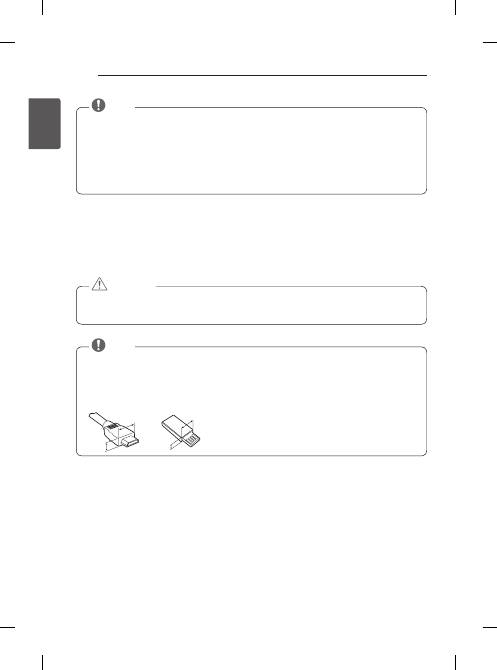
For an optimal connection, HDMI cables and USB devices should have bezels less than 10 mm thick and 18
mm width. Use an extension cable that supports USB 2.0 if the USB cable or USB memory stick does not fit
into your TV’s USB port.
A
B
A
B
*A
<
=
10 mm
*B
<
=
18 mm
NOTE
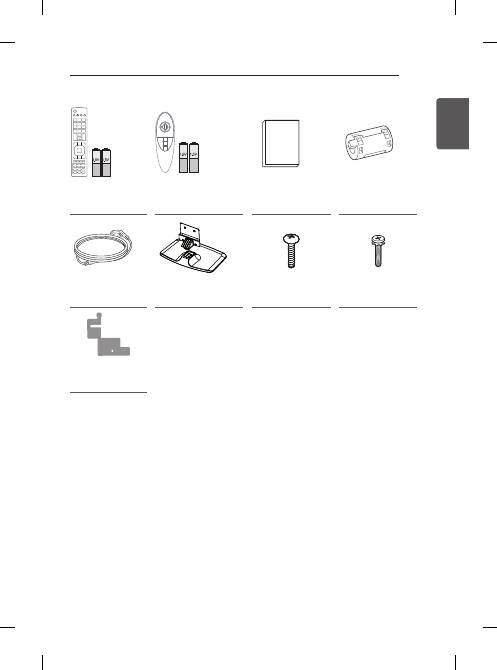
Remote Control,
Batteries (AAA)
(Only PB66**)
Magic remote control,
batteries (AA)
(Only PB69**)
Owner’s manual
Ferrite core
(Depending on model)
power Cord
Stand Body / Stand
Base
Stand Screws
3EA, M5 x L25
Stand Screws
4EA, M4 x L14
Stand Sticker
(Depending on model)
13
ENG
EN
g
LiS
h
ASSEMBLING AND PREPARING
FREEZE
RATIO
L/R SELECT
ENTER
BACK
EXIT
Q.MENU
INFO
MENU
CH
VOL
P
A
G
E
FAV
3D
MUTE
1 2 3
4 5 6
7 8
0
9
MARK
LIST
FLASHBK
ENERGY
SAVING
TV
AV MODE INPUT
Remote Control,
Batteries (AAA)
(Only PB66**)
Magic remote control,
batteries (AA)
(Only PB69**)
Owner’s manual
Ferrite core
(Depending on model)
power Cord
Stand Body / Stand
Base
Stand Screws
3EA, M5 x L25
Stand Screws
4EA, M4 x L14
Stand Sticker
(Depending on model)
