
JVC KD-R402: Using the remote controller — RM-RK50
Using the remote controller — RM-RK50: JVC KD-R402
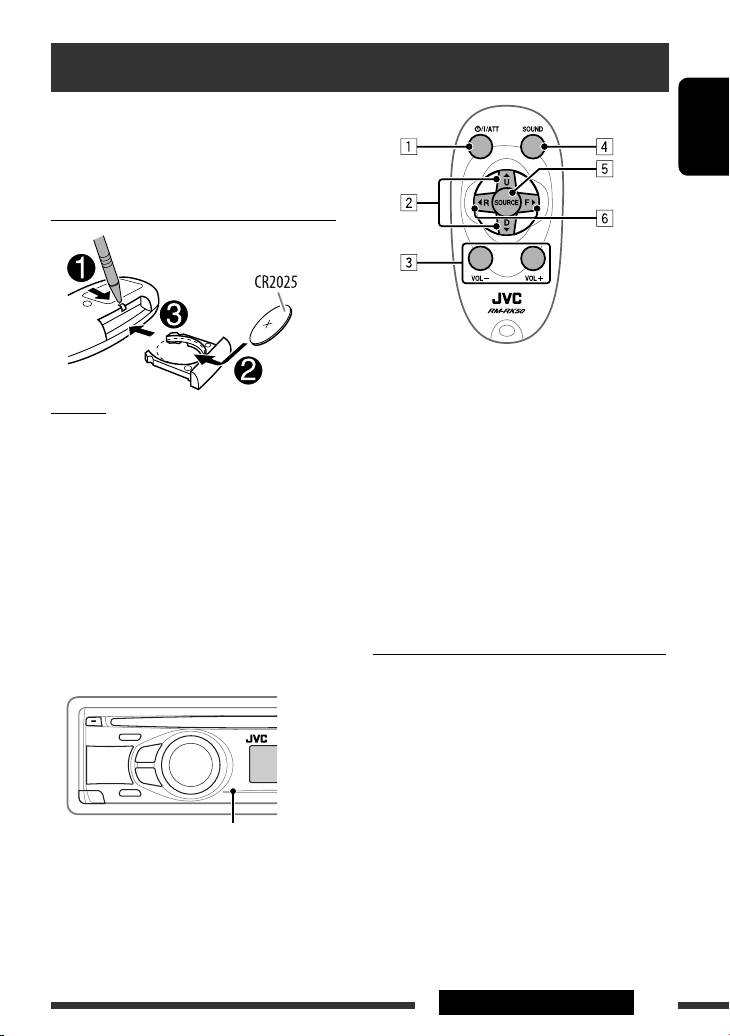
Using the remote controller — RM-RK50
This unit can be remotely controlled as instructed here
(with an optionally purchased remote controller). We
recommend that you use remote controller RM-RK50
ENGLISH
with your unit.
Installing the lithium coin battery (CR2025)
1 • Turns the power on if pressed briefly or
attenuates the sound when the power is on.
Caution:
• Turns the power off if pressed and held.
• Danger of explosion if battery is incorrectly replaced.
2 • Changes the preset stations.
Replace only with the same or equivalent type.
• Changes the folder of the MP3/WMA.
• Battery shall not be exposed to excessive heat such as
3 Adjusts the volume level.
sunshine, fire, or the like.
4 Selects the sound mode.
5 Selects the source.
If the effectiveness of the remote controller
6 • Searches for stations if pressed briefly.
decreases, replace the battery.
• Fast-forwards or reverses the track if pressed and
held.
Before using the remote controller:
• Changes the tracks if pressed briefly.
• Aim the remote controller directly at the remote
sensor on the unit.
• DO NOT expose the remote sensor to bright light
Warning (to prevent accidents and damage):
(direct sunlight or artificial lighting).
• Do not install any battery other than CR2025 or its
equivalent.
• Do not leave the remote controller in a place (such
as dashboards) exposed to direct sunlight for a long
time.
• Store the battery in a place where children cannot
reach.
• Do not recharge, short, disassemble, heat the battery,
Remote sensor
or dispose of it in a fire.
• Do not leave the battery with other metallic
materials.
• Do not poke the battery with tweezers or similar
tools.
• Wrap the battery with tape and insulate when
throwing away or saving it.
EXTERNAL DEVICES
13
EN10-15_KD-R501_003A_f.indd 13EN10-15_KD-R501_003A_f.indd 13 9/10/08 11:11:00 AM9/10/08 11:11:00 AM
Table of contents
- Basic operations
- Preparation
- Listening to the radio
- Disc operations
- Listening to the USB device
- Listening to the other external components
- Using the remote controller — RM-RK50
- Selecting a preset sound mode
- Menu operations
- Color settings (for KD-R501)
- More about this unit
- Troubleshooting
- Maintenance
- Specifications
- Grundlegende Bedienung
- Vorbereitung
- Rundfunkempfang
- Bedienung der Disc
- Hören vom USB-Gerät
- Hören von den anderen externen Komponenten
- Verwendung der Fernbedienung — RM-RK50
- Wählen eines Vorgabe-Klangmodus
- Menü-Bedienungen
- Farbeinstellungen (für KD-R501)
- Weitere Informationen zu Ihrem Receiver
- Störungssuche
- Wartung
- Technische Daten
- Основные операции
- Подготовка
- Прослушивание радио
- Операции с дисками
- Прослушивание устройства USB
- Прослушивание с других внешних устройств
- Использование пульта дистанционного управления—
- Выбор запрограммированного режима звучания
- Операции с меню
- Настройки цвета (для KD-R501)
- Дополнительная информация о приемнике
- Устранение проблем
- Обслуживание
- Технические характеристики
- Βασικές λειτουργίες
- Προετοιμασία
- Ακρόαση ραδιοφωνικών σταθµών
- Λειτουργίες δίσκου
- Ακρόαση συσκευής USB
- Ακρόαση άλλων εξωτερικών συσκευών
- Χρήση του τηλεχειριστηρίου — RM-RK50
- Επιλογή προεπιλεγμένης κατάστασης ήχου
- Λειτουργίες μενού
- Ρυθμίσεις χρώματος (για το KD-R501)
- Περισσότερα σχετικά µε το δέκτη αυτό
- Αντιµετώπιση προβληµάτων
- Συντήρηση
- Προδιαγραφές
