
JVC KD-R402: Listening to the USB device
Listening to the USB device: JVC KD-R402
Selecting the playback modes
REPEAT
You can use only one of the following playback modes
TRACK RPT : Repeats current track
at a time.
FOLDER RPT : MP3/WMA: Repeats current folder
1
RANDOM
ENGLISH
FOLDER RND : MP3/WMA: Randomly plays all
tracks of current folder, then
tracks of next folders
2
ALL RND : Randomly plays all tracks
[Turn] = [Press]
• To cancel repeat play or random play, select
REPEAT Ô RANDOM
“RPT OFF” or “RND OFF.”
• To return to the previous menu, press BACK.
3
[Turn] = [Press]
Listening to the USB device
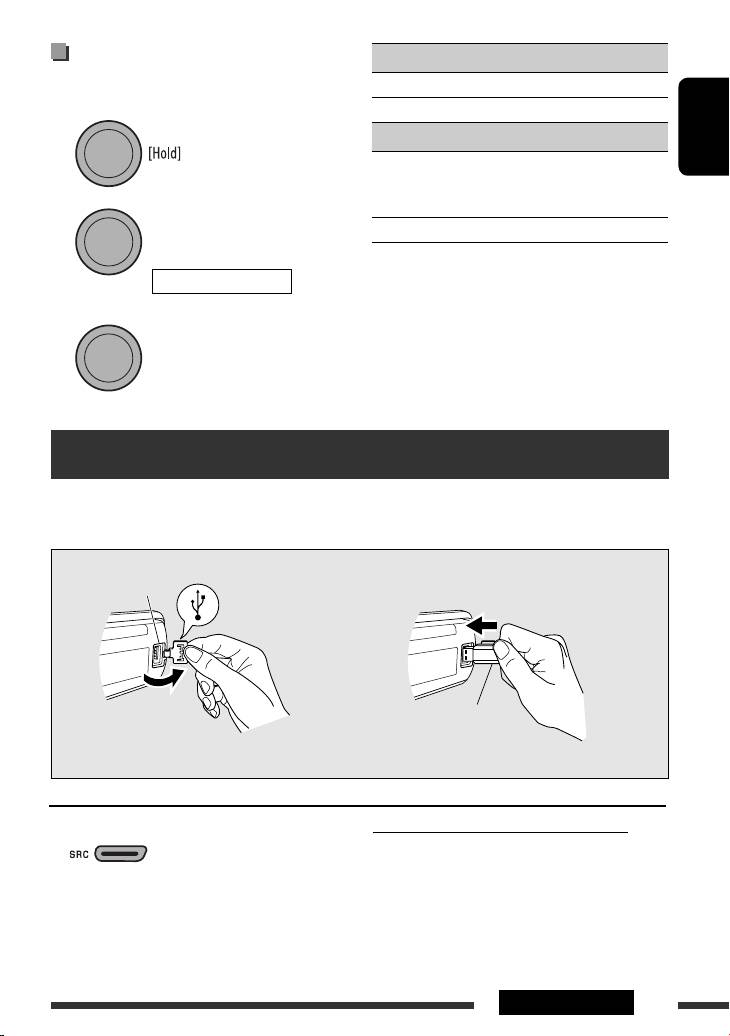
This unit can play MP3/WMA tracks stored in a USB device.
All tracks will be played repeatedly until you change the source or detach the USB device.
USB input jack
USB memory
If a USB device has been attached...
To stop play and detach the USB device
Straightly pull it out from the unit.
• Press SRC to listen to another playback source.
Playback starts from where it has been stopped
previously.
You can operate the USB device in the same way you
• If a different USB device is currently attached,
operate the files on a disc. (See pages 10 and 11.)
playback starts from the beginning.
Continued on the next page
OPERATIONS
11
EN10-15_KD-R501_003A_f.indd 11EN10-15_KD-R501_003A_f.indd 11 9/10/08 2:48:30 PM9/10/08 2:48:30 PM
Table of contents
- Basic operations
- Preparation
- Listening to the radio
- Disc operations
- Listening to the USB device
- Listening to the other external components
- Using the remote controller — RM-RK50
- Selecting a preset sound mode
- Menu operations
- Color settings (for KD-R501)
- More about this unit
- Troubleshooting
- Maintenance
- Specifications
- Grundlegende Bedienung
- Vorbereitung
- Rundfunkempfang
- Bedienung der Disc
- Hören vom USB-Gerät
- Hören von den anderen externen Komponenten
- Verwendung der Fernbedienung — RM-RK50
- Wählen eines Vorgabe-Klangmodus
- Menü-Bedienungen
- Farbeinstellungen (für KD-R501)
- Weitere Informationen zu Ihrem Receiver
- Störungssuche
- Wartung
- Technische Daten
- Основные операции
- Подготовка
- Прослушивание радио
- Операции с дисками
- Прослушивание устройства USB
- Прослушивание с других внешних устройств
- Использование пульта дистанционного управления—
- Выбор запрограммированного режима звучания
- Операции с меню
- Настройки цвета (для KD-R501)
- Дополнительная информация о приемнике
- Устранение проблем
- Обслуживание
- Технические характеристики
- Βασικές λειτουργίες
- Προετοιμασία
- Ακρόαση ραδιοφωνικών σταθµών
- Λειτουργίες δίσκου
- Ακρόαση συσκευής USB
- Ακρόαση άλλων εξωτερικών συσκευών
- Χρήση του τηλεχειριστηρίου — RM-RK50
- Επιλογή προεπιλεγμένης κατάστασης ήχου
- Λειτουργίες μενού
- Ρυθμίσεις χρώματος (για το KD-R501)
- Περισσότερα σχετικά µε το δέκτη αυτό
- Αντιµετώπιση προβληµάτων
- Συντήρηση
- Προδιαγραφές
