
Canon CanoScan 9000F MarkII: Preparing the Scanner
Preparing the Scanner: Canon CanoScan 9000F MarkII
Table of contents
Preparing the Scanner
ENGLISH
Preparing the Scanner
1 Peel the shipping tapes off the scanner.
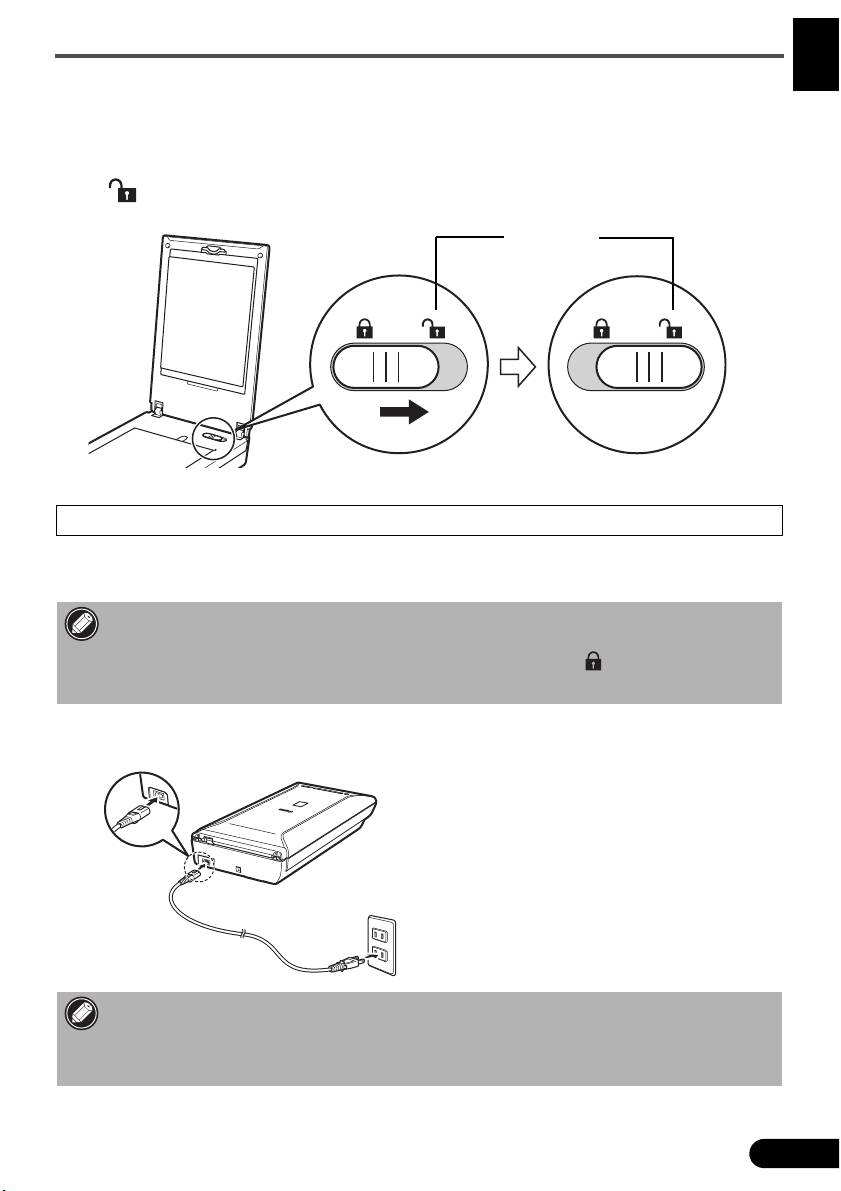
2 Open the document cover and slide the scanner lock switch toward the unlock mark
().
• The document cover is locked temporarily at an angle of about 50 degrees.
3 Close the document cover.
• Handle the scanner with both hands. Be careful not to drop the scanner.
• When you carry or transport the scanner, press the ON button to turn the power off, and then
make sure to slide the scanner lock switch toward the lock mark ( ) to fasten the scanning
unit.
4 Connect the supplied power cord to the scanner.
5 Plug the power cord into the electrical outlet.
• Only use the power cord provided with the scanner. Use of other cables may lead to a
malfunction.
• Always attach the power cord to the scanner before plugging into the electrical outlet.
Reversing this order may lead to malfunctions.
5
Unlock Mark
