
Canon CanoScan 9000F MarkII: Installing the Software
Installing the Software: Canon CanoScan 9000F MarkII
Table of contents
Installing the Software
ENGLISH
Installing the Software
• Quit all applications before installation.
• Log on using an administrator account.
• Internet connection may be required during the installation. Connection fees apply.
• Internet connection is required during software installation. Connection fees apply.
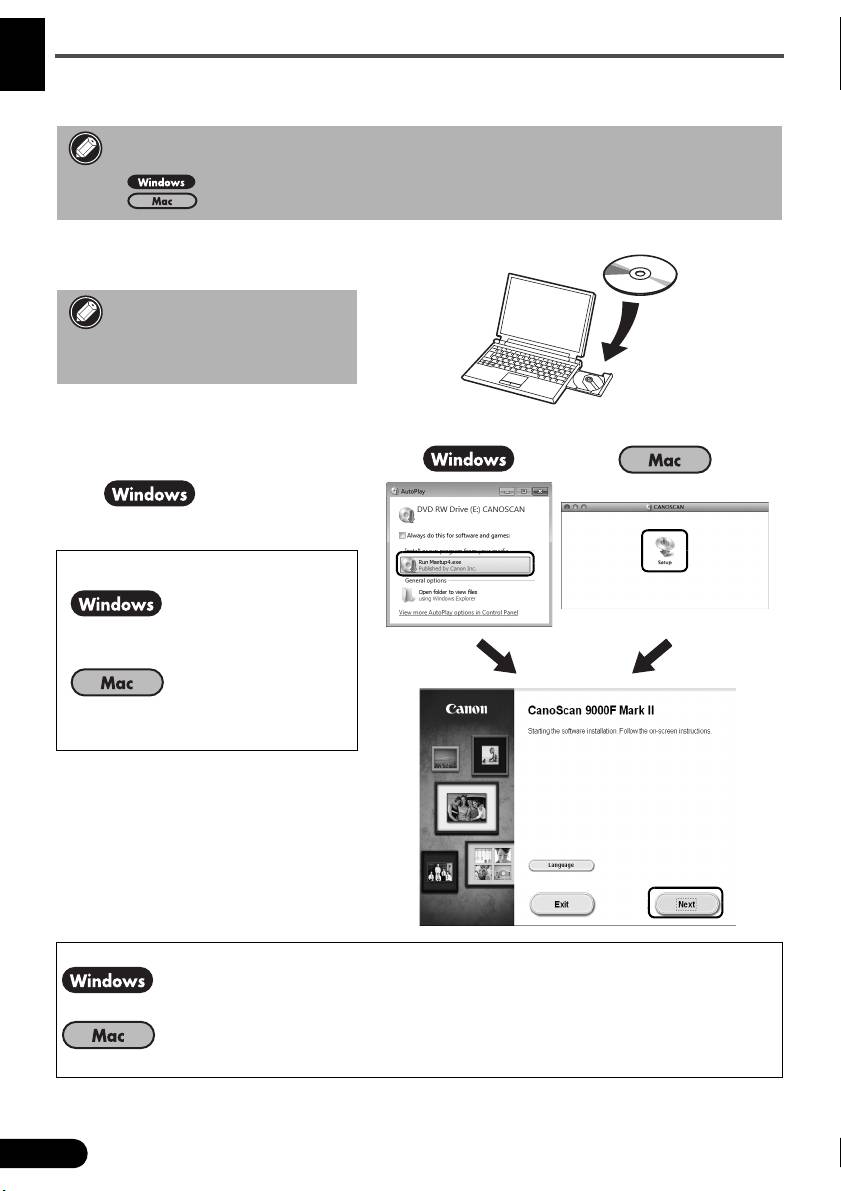
1 Insert the CD-ROM into the
computer.
If the USB cable is already
connected, unplug it. If a
message appears on the
computer, click Cancel.
2 Follow the on-screen
instructions to proceed.
To select a language, click
Language.
If the CD-ROM does not autorun:
Double-click (My) Computer > CD-
ROM icon > MSETUP4.EXE.
Double-click the CD-ROM icon on
the desktop.
To complete the installation, follow the on-screen instructions on the computer.
During installation, you will be prompted to connect the USB cable and turn the power on.
After installation is completed, connect the USB cable and turn the power on.
6
