
Yamaha NS-9900: CONNECTING TO YOUR AMPLIFIER
CONNECTING TO YOUR AMPLIFIER: Yamaha NS-9900
Table of contents
CONNECTING TO YOUR AMPLIFIER
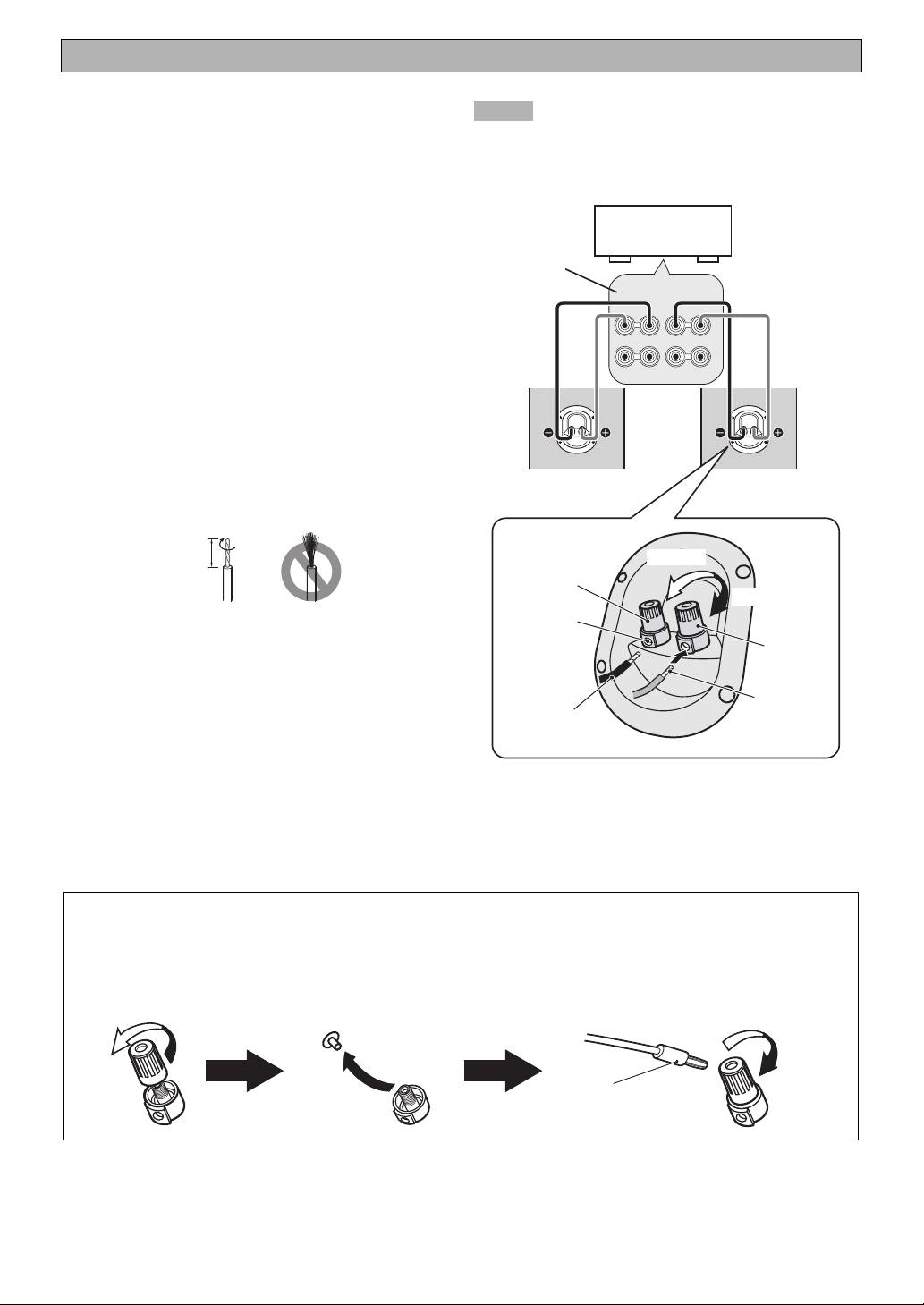
■ Connections
Notes
Before making connection, make sure that the
• Do not let the bare speaker wires touch each other as
this could damage the speaker and/or the amplifier.
amplifier is switched off.
• Do not insert the insulation coating into the hole.
• Connect the screw-type terminals at the rear of the
The sound may not be produced.
speakers to the speaker terminals on the amplifier with
a supplied speaker cable.
• Connect the + terminals on the amplifier and on the
Speaker
Amplifier
terminals of
speakers using one side of the cable. Connect the –
the amplifier
terminals on both components using the other side of
the cable.
SPEAKERS
• Connect one speaker to the left (L) terminals of your
R
L
A
amplifier, and another speaker to the right (R) terminals,
+
–
–
+
making sure not to reverse the polarity (+, –). If one
B
speaker is connected with reversed polarity, the sound
will be unnatural and lack bass.
How to connect
1 Loosen the knob.
2 Twist the exposed wires of the cable together.
NS-9900 (R) NS-9900 (L)
Good
No Good
10 mm
Loosen
Black (–)
Tighten
Terminal hole
3 Insert the bare wire into the hole.
4 Tighten the knob and secure the cable.
Red (+)
Test the firmness of the connection by pulling the
cable lightly at the terminal.
Bare wire
Insulation coating
When using a banana plug (China model only)
1 Unscrew the terminal knob.
3 Tighten the terminal knob.
2 Remove the cap by pulling it toward you.
4 Simply insert the banana plug into the terminal.
Terminal
3
1
2
4
Banana plug
4 En
