
Yamaha CDX-497: TRACK PROGRAMMING FOR RECORDING TO TAPE Automatic tape-programming (for Audio CD)
TRACK PROGRAMMING FOR RECORDING TO TAPE Automatic tape-programming (for Audio CD): Yamaha CDX-497
Table of contents
- CAUTION: Read this before operating your unit.
- CONTENTS
- SUPPORTED DISC TYPES FEATURES
- UNPACKING NOTES ABOUT THE REMOTE CONTROL
- CONNECTIONS
- IDENTIFICATION OF COMPONENTS Front panel Display
- Remote control
- BASIC OPERATION
- To pause playback To turn off the power To play back the desired track To stop playback To search an folder/file on an MP3 or WMA disc (CDX-497 only)
- To advance or reverse playback rapidly (Manual search) To skip to the beginning of the desired track (Skip search)
- Changing display
- Adjusting the output level (CDX-497 only) Changing brightness of the display Automatic spacing
- RANDOM-SEQUENCE PLAY REPEAT PLAY Repeat a selected item
- Repeat A-B
- PROGRAM PLAY
- INDEX SEARCH
- TRACK PROGRAMMING FOR RECORDING TO TAPE Automatic tape-programming (for Audio CD)
- Notes
- Manual tape-programming (for Audio CD)
- Random sequential tape-programming (for Audio CD)
- Automatic searching for the peak level on a disc (for Audio CD)
- CD SYNCHRONIZED RECORDING
- Notes about handling compact discs Discs playable with this unit NOTES ABOUT DISCS
- TROUBLESHOOTING
- SPECIFICATIONS
16
En
1
Press
to stop the playback.
*
The peak level search function of this unit is useful for
adjusting recording level on the tape deck. (For details,
refer to page 20.)
2
If desired, you can automatically insert additional
time space between tracks. (For details, refer to
page 11.)
3
Press
TAPE
to show the total possible recording
time of the tape on the display.
You can select any of the four tape lengths by
pressing
TAPE
.
SPACE
46
60
90
54
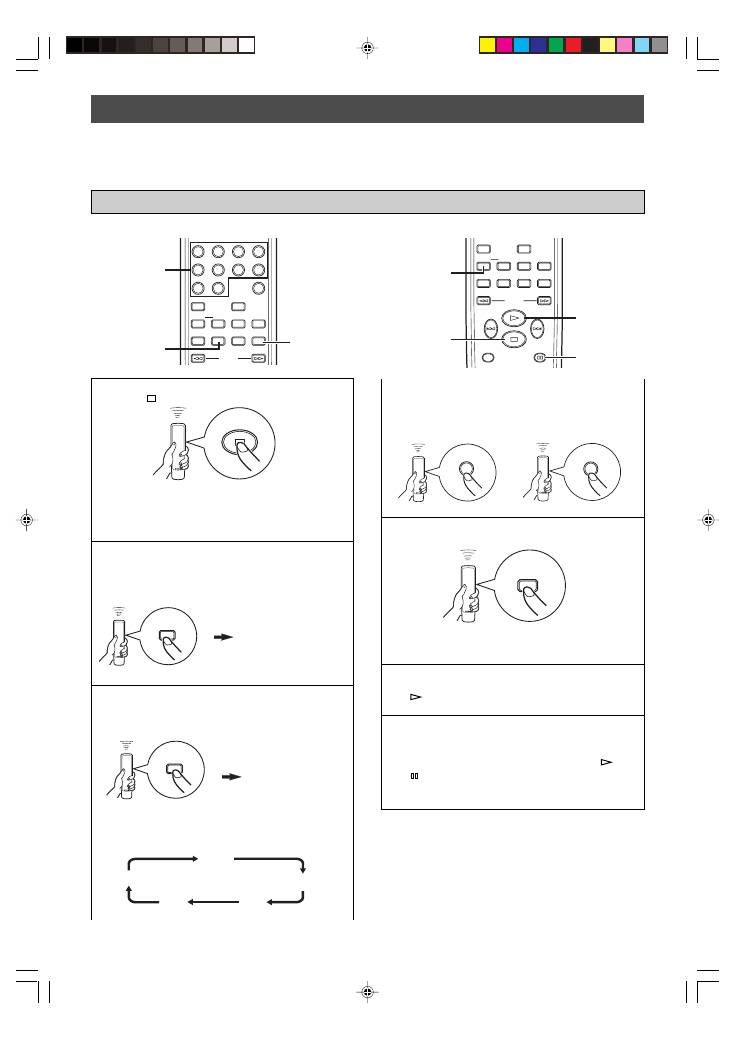
The unit can program tracks on a disc for recording onto tape. By considering the total possible recording time of the tape, the
unit automatically programs tracks or help you program tracks so they fits onto the tape with the least amount of unrecorded
space at each end of the tape.
TRACK PROGRAMMING FOR RECORDING TO TAPE
If desired, you can also enter the total possible
recording time of the tape manually.
Example: For a C-64 tape (32 minutes on each side),
press “6” and “4”.
+
4
Press
REPEAT
.
The unit automatically programs tracks for both side
A and side B considering the total time of the tape.
5
Start recording on the tape deck, and then press
on the remote control of this unit.
6
This unit automatically pauses at the end of the side
A. Turn the tape over to the side B, resume
recording on the tape deck, and then press
or
on the remote control of this unit to start
playback.
(off)
SEARCH
SYNCHRO
TAPE
PEAK
SPACE
REPEAT
DIMMER
RANDOM
INDEX
0
9
6
5
8
7
2
1
4
3
A–B
PROGRAM
CLEAR
3
3
2
SEARCH
TIME/INFO
FOLDER
SYNCHRO
TAPE
PEAK
SPACE
REPEAT
DIMMER
RANDOM
A–B
PROGRAM
CLEAR
4
1
6
5, 6
TAPE
6
4
REPEAT
The unit automatically programs tracks on a disc with their original order.
Automatic tape-programming (for Audio CD)
AUTO SPC ON
“
TAPE 46
” appears.
01_En_02_BOD_CDX-397_497_G.pm
4/27/06, 3:06 PM
16
