
Yamaha CDX-497: Notes about handling compact discs Discs playable with this unit NOTES ABOUT DISCS
Notes about handling compact discs Discs playable with this unit NOTES ABOUT DISCS: Yamaha CDX-497
Table of contents
- CAUTION: Read this before operating your unit.
- CONTENTS
- SUPPORTED DISC TYPES FEATURES
- UNPACKING NOTES ABOUT THE REMOTE CONTROL
- CONNECTIONS
- IDENTIFICATION OF COMPONENTS Front panel Display
- Remote control
- BASIC OPERATION
- To pause playback To turn off the power To play back the desired track To stop playback To search an folder/file on an MP3 or WMA disc (CDX-497 only)
- To advance or reverse playback rapidly (Manual search) To skip to the beginning of the desired track (Skip search)
- Changing display
- Adjusting the output level (CDX-497 only) Changing brightness of the display Automatic spacing
- RANDOM-SEQUENCE PLAY REPEAT PLAY Repeat a selected item
- Repeat A-B
- PROGRAM PLAY
- INDEX SEARCH
- TRACK PROGRAMMING FOR RECORDING TO TAPE Automatic tape-programming (for Audio CD)
- Notes
- Manual tape-programming (for Audio CD)
- Random sequential tape-programming (for Audio CD)
- Automatic searching for the peak level on a disc (for Audio CD)
- CD SYNCHRONIZED RECORDING
- Notes about handling compact discs Discs playable with this unit NOTES ABOUT DISCS
- TROUBLESHOOTING
- SPECIFICATIONS
22
En
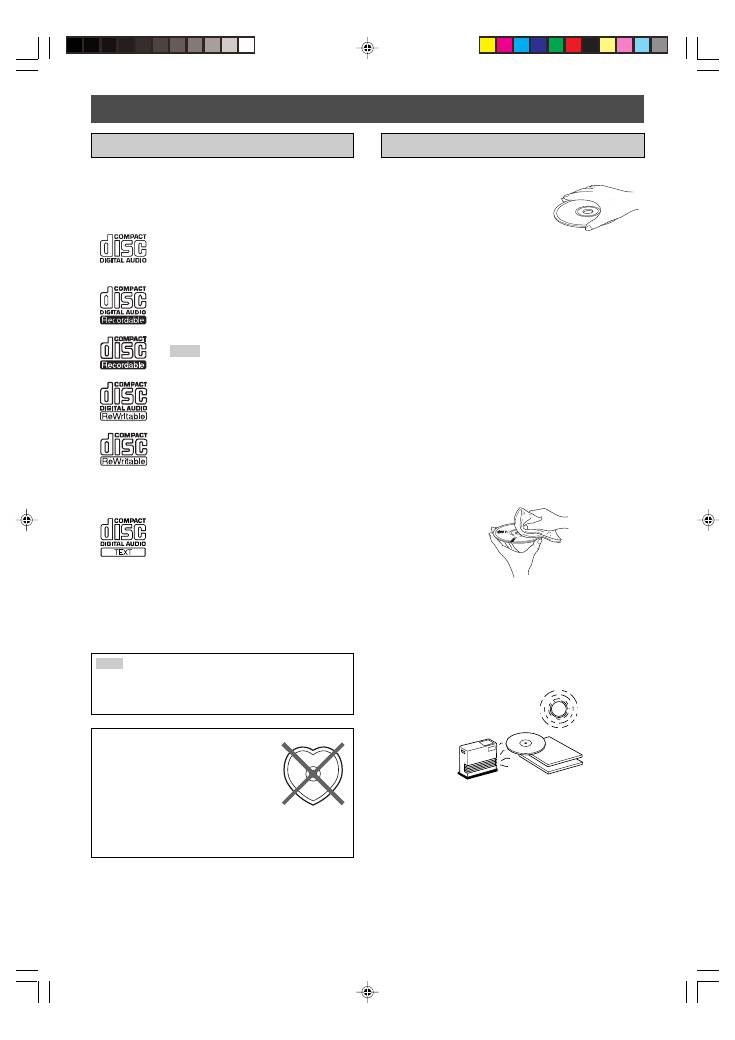
Notes about handling compact discs
●
Always handle the disc with care so that
its surface is not scratched.
●
Compact discs are not subjected to wear during
playback, but damage to the disc surface when the disc
is being handled can adversely affect the disc playback.
●
Be sure to use a felt-tip pen or similar writing tool when
writing on the label side of the disc. Do not use a ball-
point pen, pencil, or other hard-tipped writing tool, as
these may damage the disc and may adversely affect the
disc playback.
●
Do not warp discs.
●
When a disc is not currently being used, remove it from
the unit and store in an appropriate case.
●
When removing or storing a disc, be careful not to
scratch the playing surface.
●
Compact discs are not affected by small particles of dust
or fingerprints on their playing surface, but even so they
should be kept clean. Wipe by using a clean, dry cloth.
Do not wipe with a circular motion; wipe straight outward
from the center.
●
Do not try to clean the disc’s surface by using any type of
disc cleaner, record spray, anti-static spray or liquid, or
any other chemical-based liquid because such
substances might irreparably damage the disc’s surface.
●
Do not expose discs to direct sunlight, high temperature
or high humidity for a long period of time because these
might warp or otherwise damage the disc.
No!
To play back an 8-cm CD
Place it in the inner recessed area of the disc tray. Do not
put a normal (12-cm) CD on top of an 8-cm CD.
Discs playable with this unit
This compact disc player is designed only for playing back
compact discs bearing the marks shown below. Never
attempt to load any other type of disc into the unit. The unit
can also play back 8-cm (3-inch) compact discs.
....
Compact discs (digital audio)
The most popular discs for commercially
available audio CDs.
....
CD-R,CD-RW digital audio discs
Music CDs made by copying onto a CD-
R or CD-RW (including MP3 or WMA
format files).
Notes
●
Be sure to use a CD-R or CD-RW disc
made by a reliable manufacture.
●
Be sure to use a CD-R or CD-RW disc
which has at least one of the following
phrases on the disc or disc case.
FOR CONSUMER
FOR CONSUMER USE
FOR MUSIC USE ONLY
●
Be sure to use a finalized CD-R or CD-
RW disc.
....
CD-TEXT discs
The discs recorded with text data such as
album titles, track titles and artist names.
These discs can be played back with
ordinary CD players, however, the text
data can be displayed only with CD
players which have the ability to display
such data.
Note
This compact disc player may not be able to play back
some CD-RW discs or discs on which recording was not
made correctly.
To prevent a malfunction of this unit:
●
Do not use any nonstandard shaped
disc (heart etc.) available on the
market because it might damage the
unit.
●
Do not use a disc with tape, seals, or paste on it. If
you use such a disc, a disc may get stuck in the unit,
or damage to the unit may result.
NOTES ABOUT DISCS
01_En_02_BOD_CDX-397_497_G.pm
4/27/06, 3:06 PM
22
