
Yamaha AX-397: AX-497 Recording a source to a tape or an MD
AX-497 Recording a source to a tape or an MD: Yamaha AX-397
Table of contents
- CAUTION: READ THIS BEFORE OPERATING YOUR UNIT.
- FEATURES SUPPLIED ACCESSORIES
- CONTROLS AND FUNCTIONS
- CONTROLS AND FUNCTIONS Remote control sensor Opening and closing the front panel door
- Remote control
- Installing batteries in the remote control Using the remote control
- Rear panel
- Connecting speakers and other components
- Remove approximately 10 mm (3/8 in) of insulation from the end of each speaker cable and twist the exposed wires of the cable together to prevent short circuits. Connecting the banana plug (With the exception of Asia, Korea, U.K. and Europe models)
- Connecting the power supply cord
- Play the source. Playing a source
- Adjust the tonal quality by using the BASS, TREBLE, BALANCE and LOUDNESS controls or the CD/DVD DIRECT AMP switch on the front panel.
- Adjusting the BALANCE control Using the CD/DVD DIRECT AMP switch Using the PURE DIRECT switch Adjusting the BASS and TREBLE controls Adjusting the LOUDNESS control Adjusting the tonal quality
- AX-497 Recording a source to a tape or an MD
- AX-397
- General TROUBLESHOOTING Problem
- Remote control Problem
- SPECIFICATIONS
14
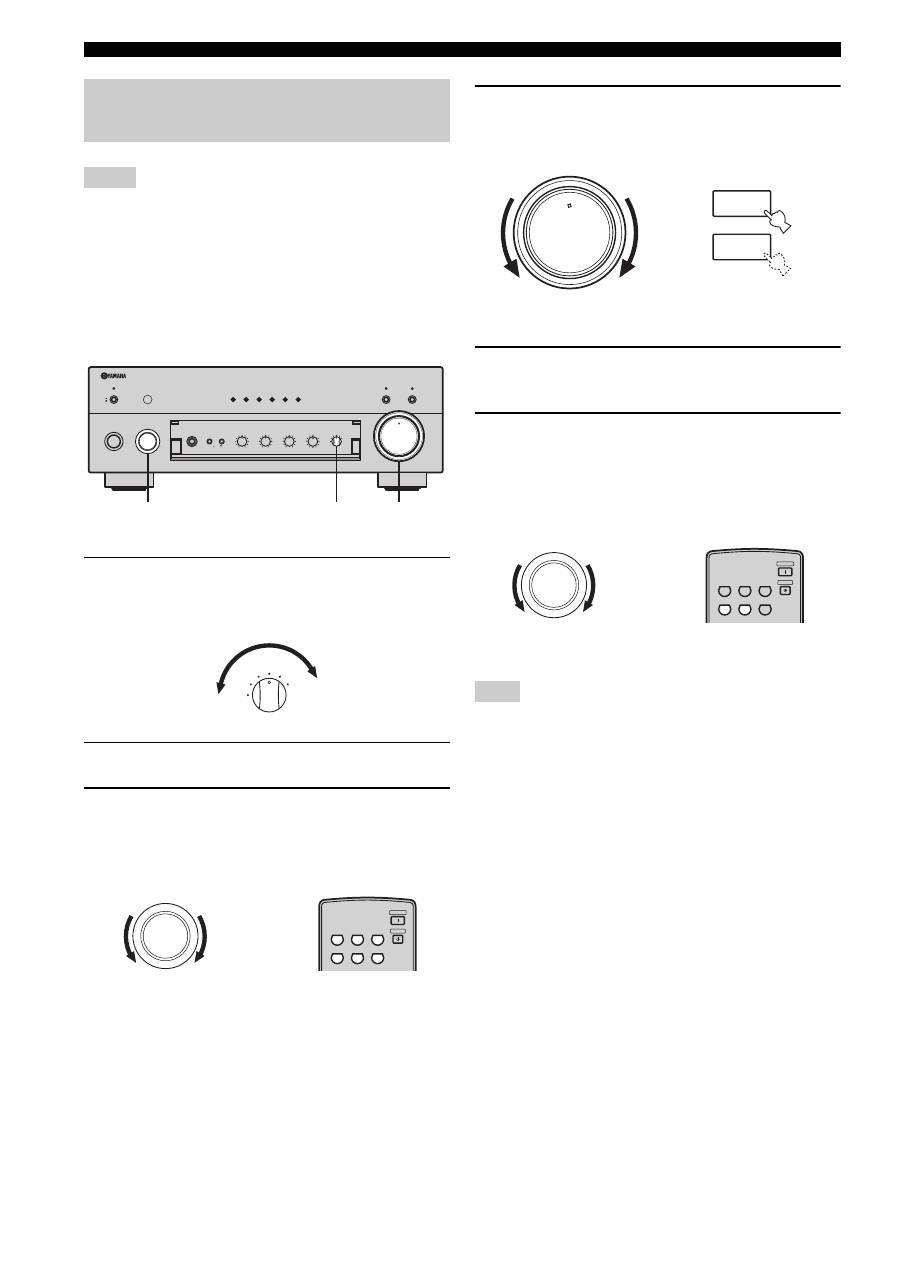
PLAYING AND RECORDING
• The VOLUME, BASS, TREBLE, BALANCE and
LOUDNESS controls and the CD/DVD DIRECT AMP switch
(and the PURE DIRECT switch for AX-497 only) have no
effect on the source being recorded.
• Check the copyright laws in your country to record from
records, CDs, radio, etc. Recording copyright-protected
material may infringe on copyright laws.
■
AX-497
1
Rotate the REC OUT selector on the front
panel to select the source you want to
record.
2
Play the source.
3
Rotate the INPUT selector on the front panel
(or press one of the input selector buttons on
the remote control) to select the input source
you want to listen to.
4
Rotate VOLUME on the front panel (or press
VOLUME +/– on the remote control) to adjust
the sound output level.
5
Begin recording on the tape deck or the MD
recorder.
6
Rotate the INPUT selector on the front panel
(or press TAPE or MD on the remote control)
to select TAPE or MD and then monitor the
sound being recorded on the tape deck or
the MD recorder.
Selecting another source with the INPUT selector on the front
panel (or the corresponding input selector button on the remote
control) while recording is in progress will not affect the
recording.
Recording a source to a tape or an MD
Notes
0
12
12
2
8
4
∞
20
20
60
60
26
26
40
40
16
16
-dB
-dB
STANDBY
/ON
STANDBY
INPUT
PHONES
SPEAKERS
BASS
5
1
4
2
3
5
1
4
2
3
A
POWER
ON
OFF
ON
OFF
AUX
MD
TAPE
CD/DVD
TUNER
PHONO
PURE DIRECT
CD/DVD DIRECT AMP
B
+
–
TREBLE
5
1
4
2
3
5
1
4
2
3
+
–
BALANCE
5
1
4
2
3
5
1
4
2
3
TUNER
PHONO
TAPE
MD
AUX
R
L
LOUDNESS
REC OUT
VOLUME
7
–30dB
FLAT
CD/DVD
10
9
5
6
1
4
2
3
8
3,6
4
1
TUNER
PHONO
TAPE
MD
AUX
REC OUT
CD/DVD
INPUT
CD/DVD
PHONO
TUNER
POWER
STANDBY
MD
TAPE
AUX
Remote control
Front panel
or
Note
0
12
12
2
8
4
∞
20
20
60
60
26
26
40
40
16
16
-dB
-dB
VOLUME
+
–
VOLUME
Remote control
Front panel
or
CD/DVD
PHONO
TUNER
POWER
STANDBY
MD
TAPE
AUX
Remote control
Front panel
or
INPUT
