
Nikon Altri-dispositivi-di-comando-a-distanza: Manual Release
Manual Release: Nikon Altri-dispositivi-di-comando-a-distanza
Table of contents
- For Your Safety (1/2)
- For Your Safety (2/2) Notices (1/2)
- Body
- When the MC-36 Is Not in Use
- Parts of the MC-36 (3/3) Connecting the MC-36
- Using the MC-36 Timed Photography (1/7)
- Timed Photography (2/7)
- Timed Photography (3/7)
- Timed Photography (4/7)
- Timed Photography (5/7) 2.3 After adjusting all settings as desired, press 3. Start the Timer
- 4. End Shooting
- Timed Photography (7/7)
- Manual Release
- Precautions for Use Caring for the MC-36
- Speci cations
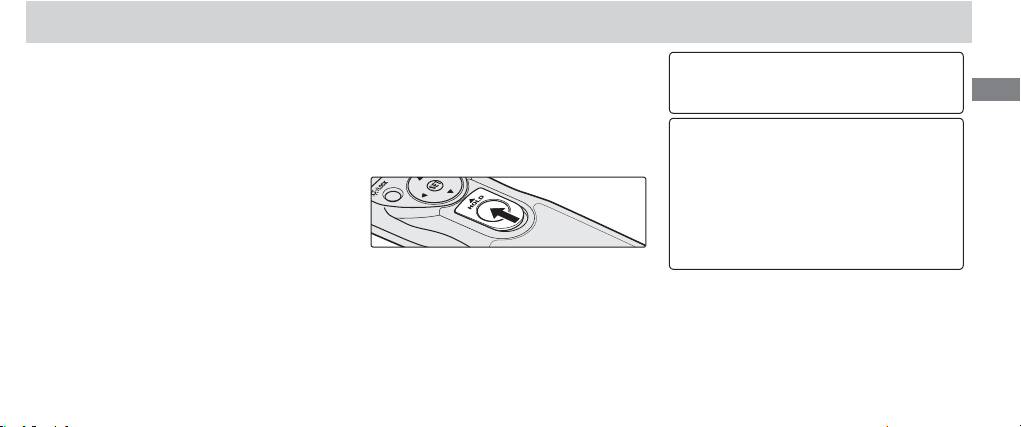
Manual Release
The MC-36 shutter-release button () func-
the control panel will show the time re-
The MC-36 shutter-release button can be used
tions in much the same way as the camera
maining until the shutter closes.
when no batteries are inserted. The control pan-
En
shutter-release button.
To keep the shutter-release button ful-
el will remain off and no beep will sound.
ly pressed for bulb photography, slide the
1. Adjust Camera Settings
The shutter-release button can be used to re-
button to the HOLD position. Slide it in the
Connect the MC-36 (pg. 7) and turn the
lease the shutter manually while the timer is ac-
opposite direction to release the lock.
camera on. Choose exposure mode, shut-
tive. Timer count-down (including the control-
ter speed, focus mode, and shooting mode
panel display, release lamp, and beep) contin-
as desired.
ues during manual release. If a manual release
overlaps with an automatic release, the shutter
2. Take Pictures
will remain open until both exposure times have
2.1 Press the MC-36 shutter-release button ()
expired.
2.2 Release the button to end shooting.
halfway and check focus and exposure,
then press it the rest of the way down to
take a picture. While the shutter is open,
a beep will sound at one-second intervals,
the “RELEASE“ indicator () will fl ash, and
15
